Products
Discover HeroesFind top LinkedIn creators in your niche.Post CreatorAI-powered composer with your tone and style.Trending PostsSee what's going viral on LinkedIn right now.
Use Cases
Repurpose ContentTurn YouTube, blogs, and articles into LinkedIn posts.Carousel GeneratorCreate swipeable LinkedIn carousels with AI.30-Day Auto CalendarPlan and auto-publish a month of posts.LinkedIn MCP ServerPost to LinkedIn from Claude, Codex and OpenClaw.For AgenciesRun your clients' LinkedIn content in one place.
Tools
Text FormatterBold, italic, and Unicode styles for posts.Hashtag GeneratorFind the best hashtags for your content.Engagement CalculatorMeasure your post performance instantly.Hook GeneratorAI hooks that stop the scroll.Post PreviewSee exactly how your post will look.Content CalendarPlan and schedule your LinkedIn content.Browse all 80+ free tools
Resources
Free Tools80+ LinkedIn tools, no signup required.Templates100 ready-to-use LinkedIn post templates.GuidesStep-by-step LinkedIn growth playbooks.CollectionsCurated tool sets by role and goal.CompareViralBrain vs. other LinkedIn tools.BlogLinkedIn growth tips and strategies.
Pricing
LoginStart 7 Days Trial
Back to Discover Heroes
Anisha Jain

Anisha Jain

LinkedIn Content Strategy & Writing Style

How to write (better) with AI.

United Kingdom
85 Viral ScoreView on LinkedIn

1 person tracking this creator on ViralBrain

Warm Analysis

Anisha Jain positions herself as the definitive technical architect of AI-driven productivity, moving far beyond basic prompting to focus on the structural setup of a "digital twin." Her content strategy centers on the systemization of Claude, specifically through her "Cowork" methodology, where she emphasizes file structures, token efficiency, and automated workflows over simple chat interactions. She distinguishes herself by treating AI as a sophisticated operating system rather than a search engine, providing high-density, "no-fluff" technical guides that prioritize cost-saving token management and desktop-level integration. Her work sits at a unique intersection of software mastery and creative output, where she combines granular tutorials on .md file optimization with high-level advice on maintaining a human "taste" in AI-generated writing.

Performance Overview

Followers

167.0K

Connections

8.5K

Avg. Engagement

1.2K

Engagement Rate

Posts/Week

5.0

Viral Score

85

Posts Analyzed

1

Top Posts by Engagement

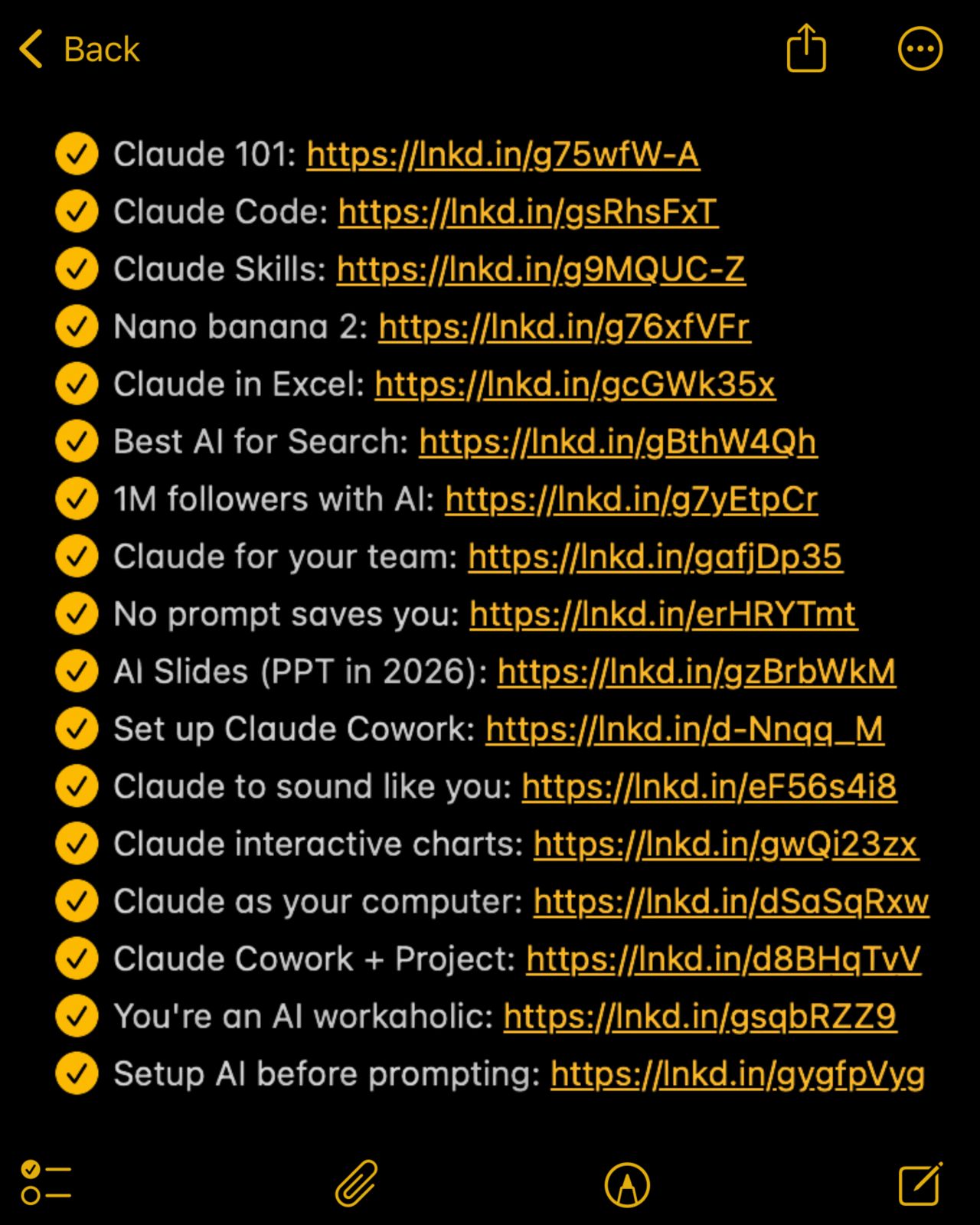
You don't need to pay $$$ for AI courses in 2026. Instead save these 17 (free) guides for later: Claude 101: https://lnkd.in/g75wfW-A Claude Code: https://lnkd.in/gsRhsFxT Claude Skills: https://l…

LinkedIn post image: You don't need to pay $$$ for AI courses in 2026.
2.0K14727529 viral
AI Learning Resources6 months ago
View on LinkedIn

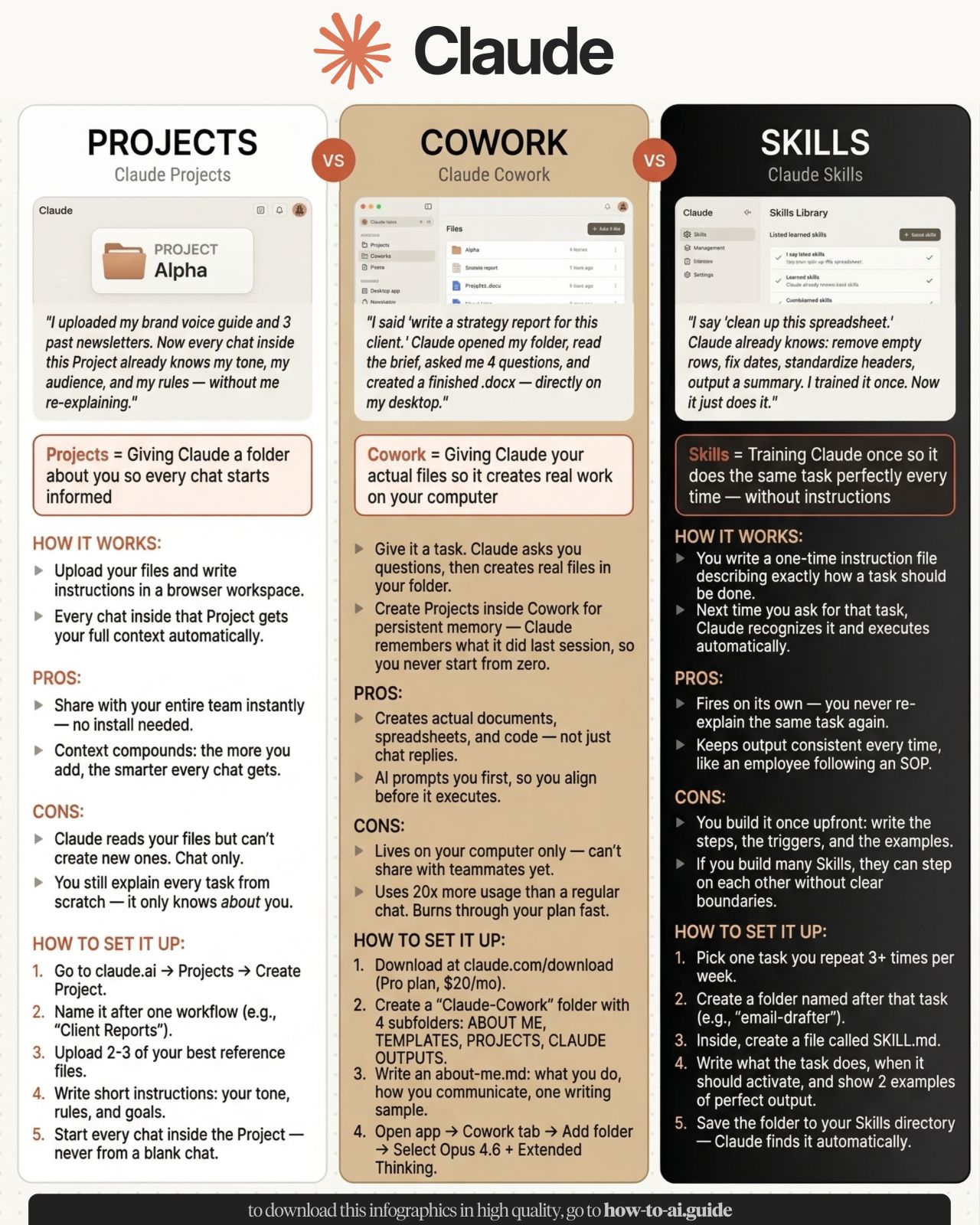
Claude Projects vs. Cowork vs. Skills Most people pick wrong. Here's a cheatsheet: Step 1. Know what each tool does ✦ Projects: a folder about you, so every chat starts informed. ✦ Cowork: giving…

LinkedIn post image: Claude Projects vs. Cowork vs. Skills
1.9K16618124 viral
AI Tools6 months ago
View on LinkedIn

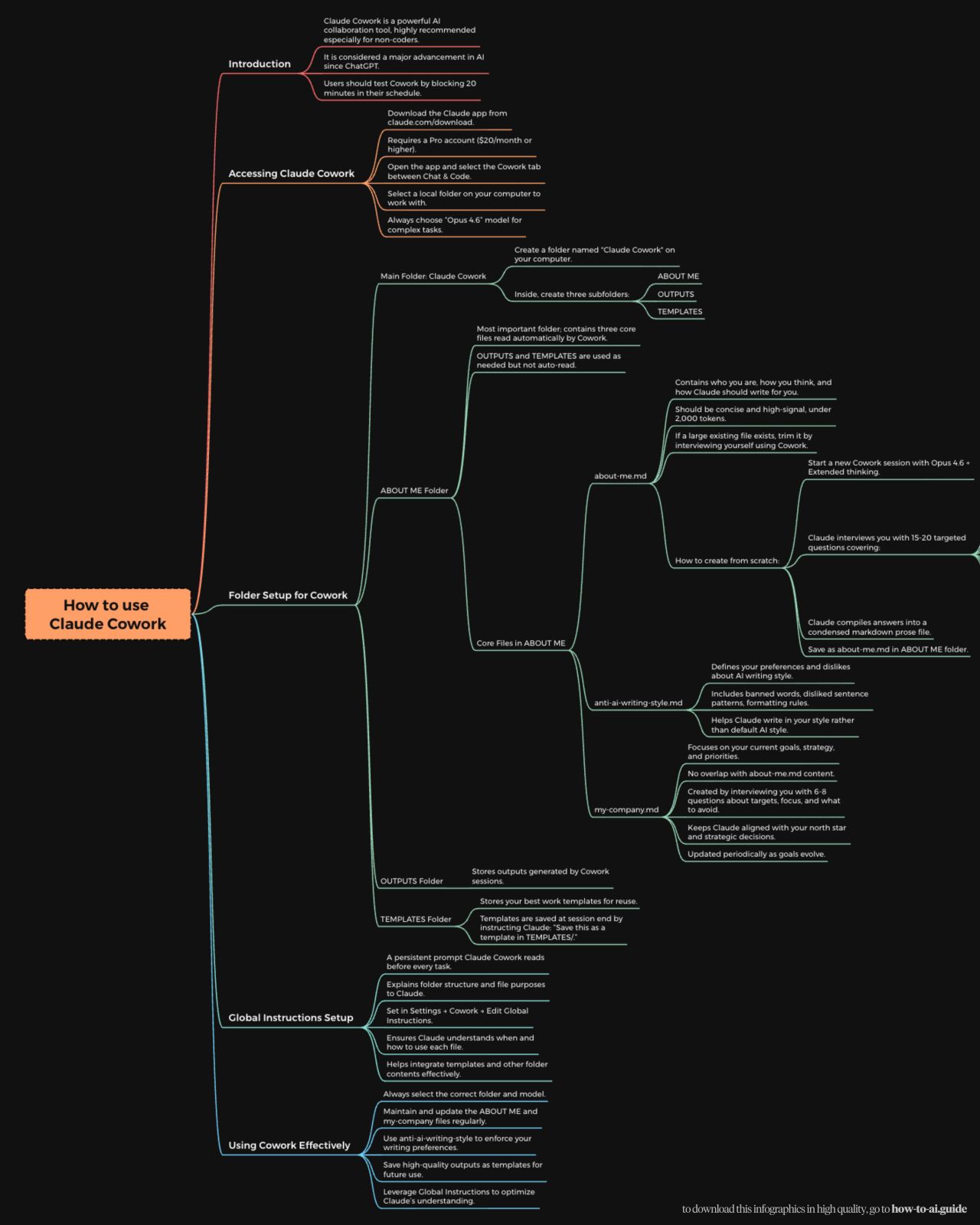
How to set up Claude Cowork completely in 1 day: (Save this. Never explain yourself to Claude again) Step 1: The folder. Create a folder on the computer: "Claude Cowork." 3 subfolders: ABOUT ME. OU…

LinkedIn post image: How to set up Claude Cowork completely in 1 day:
1.2K1478815 viral
AI Prompting & Workflow5 months ago
View on LinkedIn

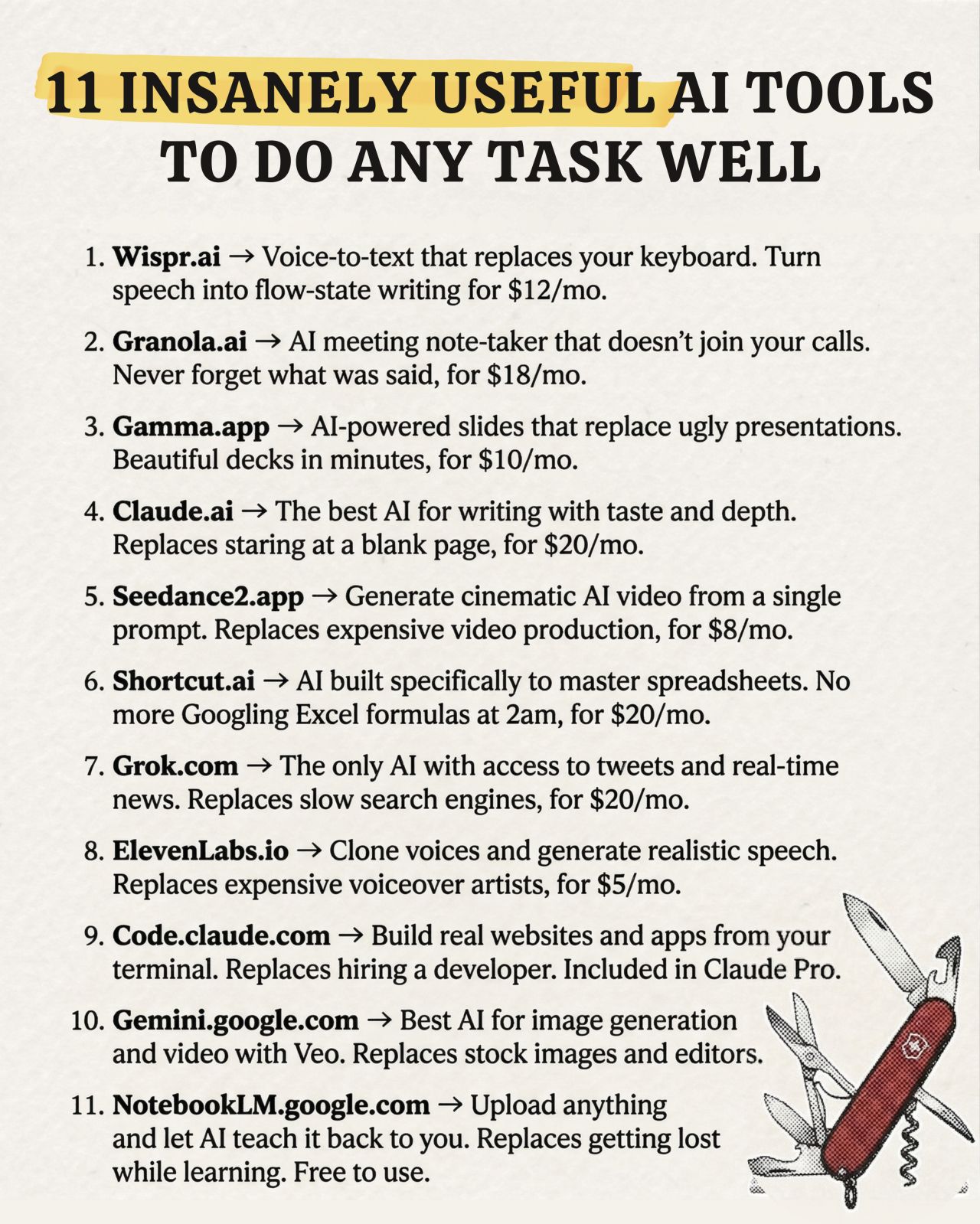
11 (insanely) useful tools to do any task stupidly well 1/ Claude.ai ☑ Replaces: staring at a blank page. ☑ The best AI to write with taste and depth. ☑ Free plan available (worth $20/month plan). 2…

LinkedIn post image: 11 (insanely) useful tools to do any task stupidly well
8561617413 viral
AI Productivity Tools6 months ago
View on LinkedIn

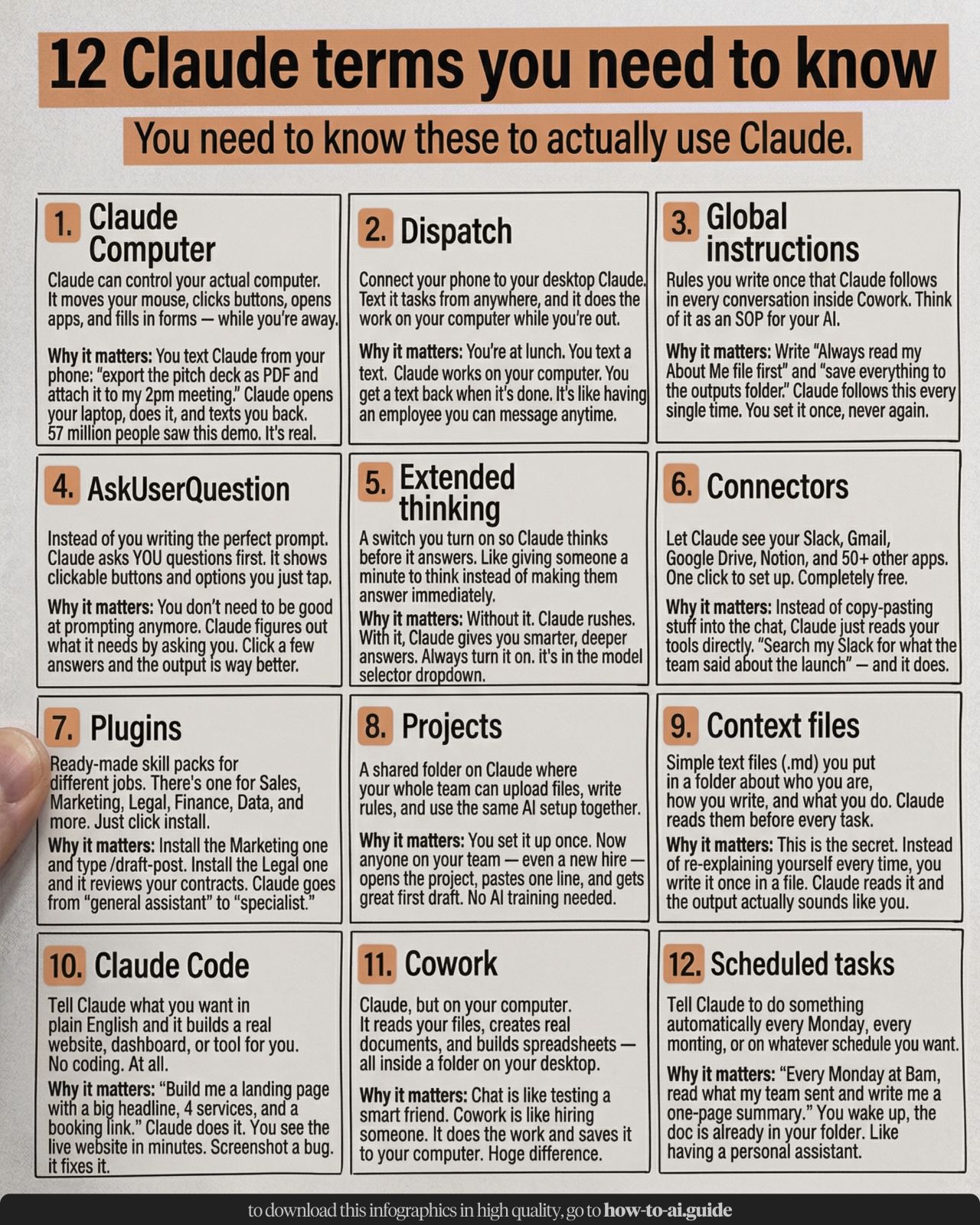
Stop ignoring 90% of Claude. Here's every Claude feature explained in 3 minutes: 1. Go to Claude (desktop app). 2. Pay for the monthly $20 plan. 3. Bookmark this. You'll need it later. 4. To downloa…

LinkedIn post image: Stop ignoring 90% of Claude.
7961449113 viral
AI Tools & Automation6 months ago
View on LinkedIn

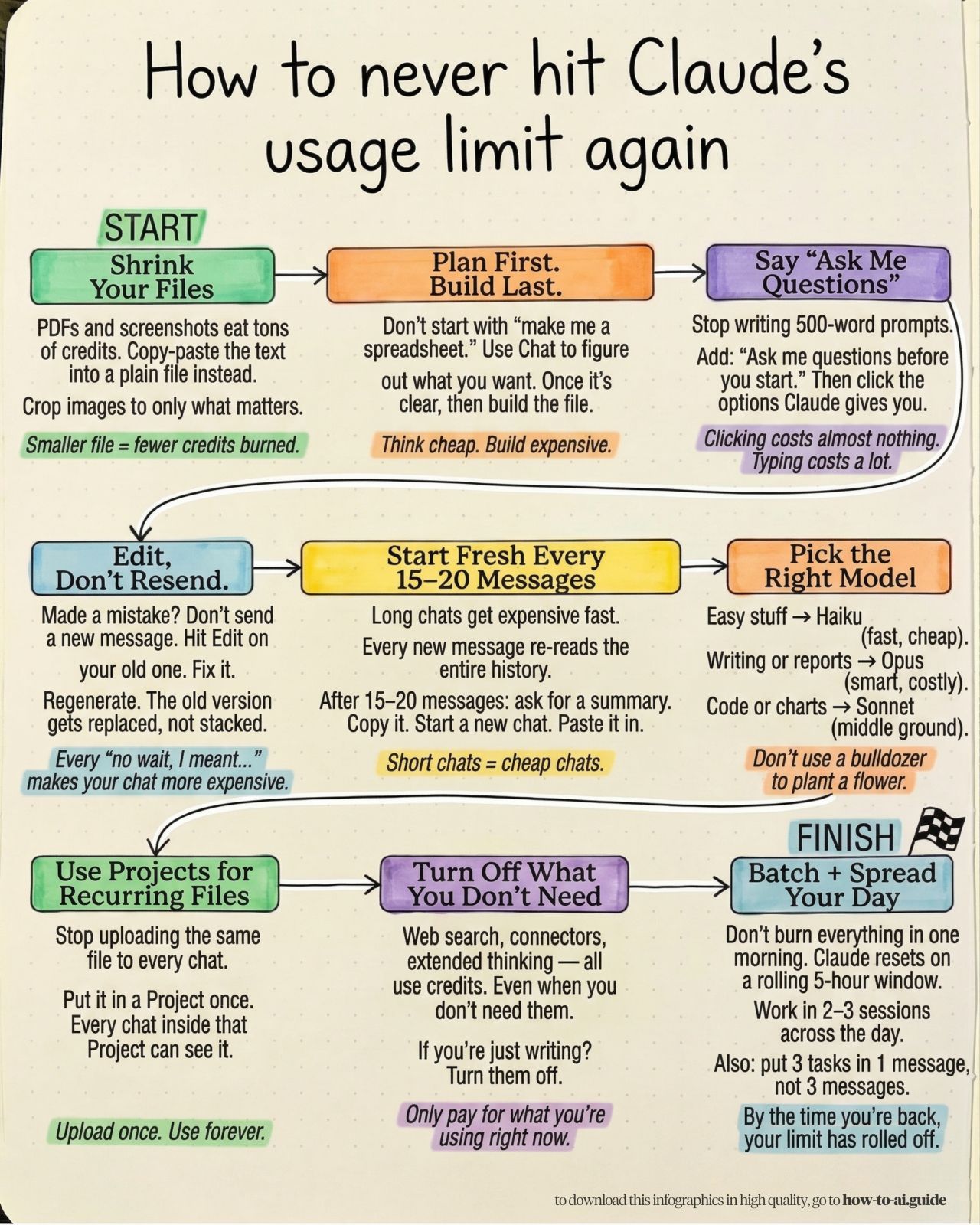
You don't need the $100 Claude plan. Instead, you just need these 9 (free) fixes: 1. Shrink Your Files. Open a Google Doc. Paste the text from your PDF. Download as .md file format & upload that…

LinkedIn post image: You don't need the $100 Claude plan.
5101213413 viral
AI Cost Optimization5 months ago
View on LinkedIn

Posting Patterns & Frequency

5.0 posts/week

Posts / Week

1.6 days

Days Between Posts

1

Total Posts Analyzed

HIGH

Posting Frequency

Timezone: Europe/London

Best Performing Days

FridaySaturday

Best Performing Times To Post

08:00–08:05

Topics & Content Focus

Primary Topics

Claude power-user operations (Cowork setup, Projects, global instructions, scheduled tasks)Token/credit cost optimization for LLM workflows (compression, model choice, batching, context resets)Template-driven personal AI systems (about-me file, taste/anti-style file, strategy file)

Secondary Themes

LinkedIn growth mechanics engineered with AI (hook writing systems, pattern interrupts)Anti-course / free-resource positioning (curated guide libraries as lead magnets)Prompt design that reduces effort (AskUserQuestion / interactive prompting)

Industry Focus

AI productivity for knowledge workers and creators using Claude (desktop + Cowork)B2B creator marketing on LinkedIn (systems for repeatable posting output)Lightweight ops enablement for small teams adopting AI workflows

Content Categories

Step-by-step playbooks / SOPsTool-specific tutorials (Claude Cowork)Cost-saving hacks / optimizationPrompt libraries + templatesResource roundups (bookmarkable lists)

Performance Insights

1231.4%

Avg Engagement Rate

DECREASING

Performance Trend

Best Performing Topics

Free guide roundups (high shareability + bookmarking behavior)Claude Cowork full setup systems (folder + files + global instructions)Operational shortcuts that save money/time (token compression + model switching)

Virality Signals

High-share formats: curated lists, cheat sheets, downloadable templatesStrong ‘anti-spend’ stance (don’t pay, free in email) increases forwardingBuilt-in distribution prompts (save / send to team / repost)Specific numbers and constraints (tokens, message counts, 3–5x savings) increase perceived credibilitySingle-tool dominance (Claude/Cowork) creates repeat-viewing and series behavior

Structure & Quality

350

Avg Length (Words)

HIGH

Depth Level

ADVANCED

Expertise Level

0.78/10

Uniqueness Score

Common Hooks

Contrarian cost/value opener ("You don't need X")Ultra-specific promise + timeframe ("set up in 1 day")Authority-by-result paired with immediate utility ("I have X followers because...")Command to save/bookmark before delivering steps ("Save this")

Common Endings

Link to the full guide / prompt repositoryDirect sharing instruction ("Send it to..." / repost cue)Newsletter subscription push framed as free access

Value Delivery Methods

Operationalized workflows (folders, files, global rules) instead of generic prompting adviceConcrete efficiency levers (file formats, summarization resets, batching, model selection)Copy/paste-ready prompts and templates that reduce reader effort to implementRealistic caveats (limits, review-before-sending) that signal practitioner experience

Formatting Style

Numbered lists with scannable micro-stepsShort punchy lines; frequent line breaks for mobile readabilityUI-path instructions (Settings → Cowork → ...)Specific constraints (token caps, message limits, model choices) to feel operationalOccasional checkbox sections for pros/cons and caveats

Audience & Tone

NO

Question Usage

Detected Tone

Pragmatic operatorNo-fluff systems builderContrarian value advocate (anti-course, anti-overpay)Tactical teacher with strong opinionsCreator-growth engineer (attention mechanics as a system)semi-formalsecond-person

Interaction Style

Primarily broadcast-teaching with action prompts (save/share/download)Audience treated as implementers (do this now) more than discussion partnersCommunity formation via repeated resources + hub links (newsletter/list building)

Community Building Signals

Repeated free-resource gating through a consistent hub (newsletter as the community container)Team-forwarding prompts ("send to your team") to seed multi-user adoptionSeries continuity (multiple Cowork posts) encourages following for the next module

Writing Style Patterns

Content Strategy

Hook: Contrarian cost/value opener ("You don't need X")Tone: semi-formalCTA: Save/bookmark CTA (framed as future usefulness)

Writing style breakdown

<start of post>

You are using Claude wrong.

(Save this. Your credits will thank you later.)

Most people treat Claude like a search engine.

They send 50 messages to get one result.

Each message re-loads the entire history.

That's how you hit the limit in 20 minutes.

Instead, follow this 4-step "Power User" setup

Step 1: The Context File

Create a file called about-me .md.

Write 3 paragraphs: Who you are, what you build, and how you speak.

Upload this to a Project.

Now Claude knows you forever. You never have to explain your "tone" again.

Step 2: The "AskUser" Rule

Stop writing 500-word prompts.

Write this instead: "I want to [TASK]. Use AskUserQuestion to interview me first."

Claude will give you a list of options.

Clicking an option costs 0 tokens. Writing a new prompt costs 500.

Step 3: Edit, Don't Resend

If Claude makes a mistake, don't reply "No, I meant..."

Click the "Edit" icon on your previous message.

Fix your instruction. Hit Save.

This replaces the old thread and saves 50% of your usage limit.

Step 4: Use Cowork for Files

Don't copy-paste text into the chat.

Use Claude Cowork to read your actual desktop folders.

It creates .docx and .xlsx files directly.

No more "formatting" hell.

---

I built a full system to automate this.

Access the free guides here

✦ 17-fixes breakdown: how-to-ai.guide

✦ The Cowork setup: claude-co.work

Don't pay for an AI consultant. Just build the folder.

♻️ Repost this to save your team 10 hours a week.

<end of post>

1. OVERALL WRITING STYLE & VOICE
1. Hook: A bold claim or a 'you are doing it wrong' statement (e.g., 'You don't need the $100 Claude plan').
1. Link to a specific deep: dive guide.

Sign in to unlock the full writing analysis

Apply Anisha Jain's patterns to your posts

Free tools to help you write, score, and benchmark in the same style.

LinkedIn Hook Generator

Generate scroll-stopping hooks in the same style top creators use.

Open tool

LinkedIn Post Scorer

Score your draft against viral post patterns before you publish.

Open tool

LinkedIn Engagement Calculator

Benchmark your engagement rate against creators in your niche.

Open tool

More LinkedIn creators to learn from

Discover all

Other creators worth studying alongside Anisha Jain.

Conor Grennan

Conor Grennan

Chief AI Architect, NYU Stern | NY Times and #1 Int’l bestselling author | CEO, AI Mindset (Consulting/Training) | Board Member, SHRM Foundation | AI Instructor, MasterClass

12 Viral Score

John Thompson

John Thompson

AI Strategy | AI Product Leadership | AI Solution Development | AI Governance & Ethics | AI Compliance | Artificial General Intelligence - AGI | Agentic Thought Leadership | Best selling author | AI Innovator

5 Viral Score

David Green 🇺🇦

David Green 🇺🇦

Co-Author of Excellence in People Analytics | People Analytics leader | Director, Insight222 & myHRfuture.com | Conference speaker | Host, Digital HR Leaders Podcast

9 Viral Score

Brent Dykes

Brent Dykes

Author of Effective Data Storytelling | Founder + Chief Data Storyteller at AnalyticsHero, LLC | Forbes Contributor

40 Viral Score

Michael Saifoudine

Michael Saifoudine

Founder @ KLIMB (hiring!) — Branding & Digital Studio | Podcast Host (Notion, Revolut, Lovable, Netflix, Zapier, Qonto, Typeform…)

171 Viral Score

Emily D.

Emily D.

Business Partner & Personal Brand Strategist | Scaled brands to $45M+ | Authority is an energy. I help you own it - and monetise it.

226 Viral Score

€1 trial · 7 days

Automate your LinkedIn for 30 days

ViralBrain plans, writes, and schedules your LinkedIn content, using official LinkedIn APIs so your account stays safe.

  • Official LinkedIn APIs, no risk of ban
  • You approve every post before it goes live
  • Cancel anytime
Start €1 trial€39 Pro or €69 Premium · cancel anytime

30-day plan

On track
1
2
3
4
5
6
7
8
9
10
11
12
13
14
15
16
17
18
19
20
21
22
23
24
25
26
27
28
13 posts queued · auto-publishing
€1 · 7-day trial

Write like Anisha Jain and auto-post for 30 days.

ViralBrain learns their voice and publishes for you.

Try it free

Write like Anisha Jain.

Try it free

Discover more LinkedIn creators · ViralBrain

Other LinkedIn creators

  • Laura Kremer
  • Christ Coolen
  • Nick Broekhuysen
  • Jason Lovell
  • Tobias Zwingmann
  • Jean Bonnenfant
  • Ross Dawson
  • Sandra Đajic
  • Kieran Flanagan
  • Nate Herkelman
  • Aemal Sayer
  • Jan Meinecke
  • Steven Bartlett
  • Annie Duke