

LinkedIn Showcase Pages: Setup and Limits
A LinkedIn Showcase Page starts at zero followers and cannot post jobs. The real limits, the super admin steps, and when to skip it entirely.
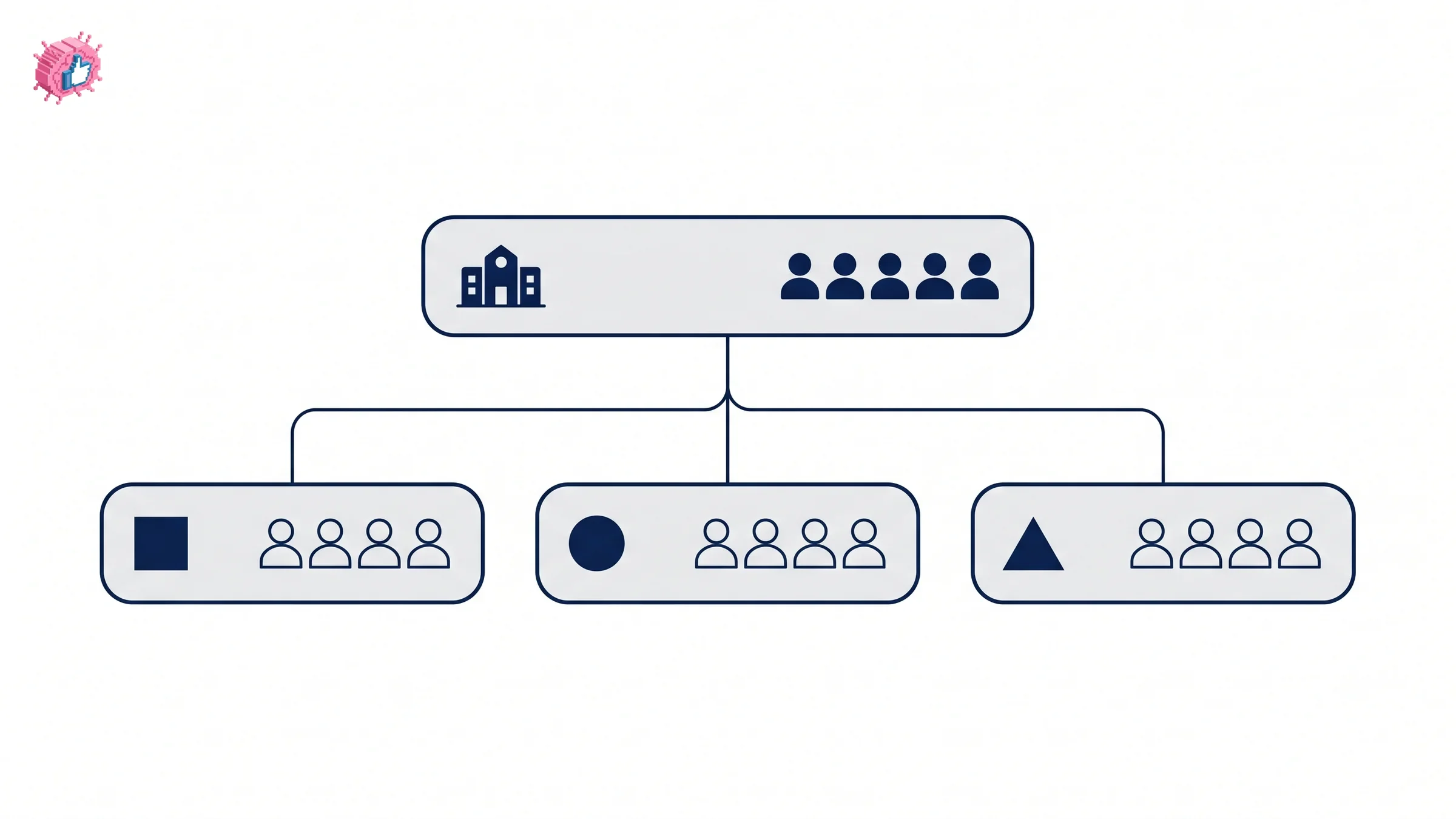
A LinkedIn Showcase Page is a second Page hanging off your main one, built for a product line, a business unit, or an initiative that deserves its own audience.
The part that decides whether you should make one: it starts at zero followers, and LinkedIn will not move any of your existing followers across. Your main Page might have 12,000 followers. The Showcase Page you create this afternoon has none, and everything you publish there reaches nobody until you build that audience again from scratch.
This guide covers what a Showcase Page can and cannot do, the super admin steps to create one, the limits nobody reads until they hit them, and the cases where a Showcase Page is the wrong answer.
Automate your LinkedIn for 30 days
What is a LinkedIn Showcase Page?
LinkedIn describes a Showcase Page as something "used by a Page admin to represent a brand, business unit, or organization initiative," with the purpose of developing "a long-term relationship with a specific audience."
The structural rule is simple: "A Showcase Page can only be associated to one LinkedIn Page (known as the parent Page)." One parent, many children, no sharing between parents.
In practice these work as separate publishing surfaces for audiences that only care about one slice of what you do. A company selling to both hospitals and pharmacies has two audiences with almost no overlap in what they want to read, and a Showcase Page lets each one follow only their half.
How a Showcase Page differs from your main Page
The separation is more complete than most people expect.
| Parent Page | Showcase Page | |
|---|---|---|
| Followers | Yours | Start at zero, never transferred |
| Analytics | Its own | Separate |
| Notifications | Its own | Separate |
| Job postings | Yes | No |
| Career pages | Yes | No |
| Employee profile association | Yes | No |
| Parent association | n/a | Exactly one |
| How many | One | Up to 25 per parent |
LinkedIn is direct that "analytics, notifications, followers, and follower counts remain separate and don't transfer between the two." A Showcase Page is a neighbor of your main Page rather than a section inside it.
You start at zero, and that is the whole decision
Everything else on this page is detail. This is the part that determines whether creating one is a good idea.
LinkedIn states that "followers from the parent Page also can't be migrated or carried over to a Showcase Page." There is no import, no invitation flow that moves them across in bulk, and no setting that mirrors your existing audience.
So creating a Showcase Page means committing to build a second audience. That is the same job as growing the first one, with the same costs: consistent posting, a reason for someone to follow, and months of patience. If you are not prepared to run a real publishing schedule on the new Page, it will sit at 40 followers and quietly make your brand look abandoned to anyone who finds it.
Ask one question before you create anything: who is going to post here every week, and what do they have to say that does not belong on the main Page? If the honest answer is nobody and nothing, a content calendar for your existing Page is the better use of the same effort, and growing the followers you already have compounds instead of restarting.
What a Showcase Page cannot do
Three absences matter commercially, and none of them is obvious from the product page.
No job postings and no career pages. Recruiting stays on the parent Page. If you were planning a Showcase Page for a division so it could hire under its own brand, that does not work.
No employee profile association. People cannot list a Showcase Page as their employer, so it never accumulates the staff connections that make a main Page feel populated. Every employee stays attached to the parent, which also means your employee advocacy efforts keep pointing at the main Page rather than the new one.
Separate analytics with no combined view. Performance is reported per Page. Measuring the parent and its children as one brand means exporting each and joining them yourself, which is worth knowing before you promise a single dashboard to anyone. Third-party analytics tools are the usual workaround.
How to create a LinkedIn Showcase Page
You need to be a super admin of the parent Page. Page admins below that level cannot do this.
LinkedIn's steps:
- Access your Page super admin view of the parent Page
- Click Create in the upper-left corner of the Page
- Select Create a Showcase Page from the dropdown
- Enter the desired parent Page in the Associated organization page box
- Enter the required information as indicated by an asterisk
- Click Create page
From your admin view you can then edit or finish setting up the new Page. Two practical notes: creation is rate limited to stop spam, so you cannot spin up several in one sitting, and the new Page gets its own unique URL that you can customize from the admin view.
Admin control follows the same pattern. Super admins gain access automatically when the Page is created, and only super admins can edit the Page, post content, or add and remove other admins.
Automate your LinkedIn for 30 days
You can have 25, and that is a trap
LinkedIn's FAQ confirms: "You can create up to 25 Showcase Pages for each parent Page."
Twenty-five is a ceiling rather than a suggestion. Each one is a separate audience to build, a separate posting schedule to fill, and a separate set of numbers to report. Two well-fed Showcase Pages beat eight that publish once a quarter, because an inactive Page is a live URL that tells visitors your company lost interest.
The realistic number for most organizations is one or two, and only where the audiences genuinely do not overlap. If the same person would happily follow both, they belong on one Page with a consistent brand voice rather than split across two.
Removing one is harder than creating one
This asymmetry is worth knowing before you experiment.
A Showcase Page "can only be removed by a super admin or the LinkedIn customer support team." Converting one into a full LinkedIn Page is possible, but it requires a super admin to contact LinkedIn support rather than a setting you can flip yourself.
So a Showcase Page created on a whim is not trivially undone. Deactivation is available through admin controls, which leaves you with a dormant Page rather than a clean removal. Decide properly at the start.
Who should create a Showcase Page
The fit is narrow and specific:
- Genuinely separate audiences. Two customer groups who want different content and would be annoyed by each other's. This is the case the feature was built for.
- A product line with its own publishing capacity. Someone owns it and will post regularly, not occasionally.
- A long-term initiative rather than a campaign. LinkedIn's own framing is a "long-term relationship," and the zero-follower start makes anything short-term a poor trade.
Skip it if:
- You want it for recruiting. No jobs, no career pages, no employee association. The parent Page is where hiring lives.
- You have nobody to run it. The audience restart makes an unstaffed Showcase Page worse than no Page, because it is publicly visible and visibly neglected.
- Your audiences overlap. Splitting one audience across two Pages halves the engagement signal on both, and the algorithm responds to activity on the Page where it happens.
- You are trying to rank a keyword. A Showcase Page is a brand surface rather than an SEO play, and a thin Page with a handful of posts does nothing for search.
- Your real problem is reach on the main Page. A second Page does not fix a first Page nobody engages with. When you post and what you publish move that number; more Pages do not.
The honest summary
Showcase Pages solve one problem well: audiences that want genuinely different things from the same company. For that case the separation is the point, and the zero-follower start is a cost worth paying.
For every other case the maths is unkind. You are trading an existing audience for an empty one, giving up job postings and employee association, and adding a publishing commitment to a team that probably has not filled the first calendar. Most companies asking about Showcase Pages would get more from a single Page posting consistently, and from putting real budget behind the posts that work rather than building somewhere new to publish.
If the audiences are truly distinct and someone is genuinely accountable for the new Page, create one. Otherwise the parent Page is the answer, and it already has your followers.
FAQ
What is a LinkedIn Showcase Page?
A secondary Page attached to a parent LinkedIn Page, used to represent a brand, business unit, or organization initiative with its own audience. It has separate followers, analytics and notifications, and can be associated with exactly one parent Page.
Do followers transfer to a Showcase Page?
No. LinkedIn states that "followers from the parent Page also can't be migrated or carried over to a Showcase Page." Every Showcase Page starts at zero followers and the audience has to be built from scratch.
How many Showcase Pages can I create?
Up to 25 per parent Page. Creation is also rate limited to prevent multiple Pages being made within a 24-hour period, and each Showcase Page can be associated with only one parent.
Who can create a LinkedIn Showcase Page?
Only a super admin of the parent Page. Lower admin roles cannot create one, and once it exists only super admins can edit the Page, post content, or manage its admins.
Can a Showcase Page post jobs?
No. Showcase Pages cannot have associated job postings, career pages, or employee profile associations. Those features belong to the parent LinkedIn Page.
How do I delete a LinkedIn Showcase Page?
A Showcase Page "can only be removed by a super admin or the LinkedIn customer support team." Deactivation is available through admin controls, which leaves the Page dormant rather than removed.
Can a Showcase Page be converted into a full LinkedIn Page?
Yes, but not from a setting. A super admin has to contact LinkedIn support to request the conversion.
Does a Showcase Page have its own URL?
Yes. Each Showcase Page has a unique URL that can be customized from the admin view, which changes the web address members see when they visit it.
Automate your LinkedIn for 30 days
ViralBrain plans, writes, and schedules your LinkedIn content, using official LinkedIn APIs so your account stays safe.
- Official LinkedIn APIs, no risk of ban
- You approve every post before it goes live
- Cancel anytime
Keep reading
LinkedIn Career Break: How to Add One and Who Sees It
Add a career break on LinkedIn desktop or the app. Your network is not notified, the type is optional, and signed-in members see it. From LinkedIn Help.
How to Add a Certification to LinkedIn Without Posting
Add a certification on LinkedIn desktop or the app, put credentials after your name, and see what LinkedIn documents about notifying your network.
How to Remove a Connection on LinkedIn: What It Erases
Remove a LinkedIn connection on desktop or the app. They are not notified, but recommendations and endorsements go for good. Steps from LinkedIn Help.