

How to Build a LinkedIn Content Calendar in 60 Minutes
Learn how to build a LinkedIn content calendar in 60 minutes. Free weekly template, content pillars, hook formulas, and 30 days of posts planned in one sitting.
Stop deciding what to post every morning. The reason most LinkedIn creators stall out at month two isn't bad writing. It's daily decision fatigue. You open the app, stare at the composer, scroll for "inspiration," and 40 minutes later you've published nothing.
The fix is mechanical, not creative. Build a 30-day content calendar in 60 minutes, once, and your morning decision becomes a 5-minute approval instead of a 40-minute search. This guide walks you through how to build a LinkedIn content calendar that actually gets used, using engagement patterns from ViralBrain's analysis of 30,360 LinkedIn posts from 968 active hero creators. It pairs with knowing the best time to post on LinkedIn, so each slot in your calendar lands when your audience is actually active.
By the end you'll have a weekly grid (free template at the end), 30 hooks drafted, and a posting schedule that runs without you. No theory. Just the four steps that take 60 minutes and unlock 30 days of consistent publishing.
Automate your LinkedIn for 30 days
What a LinkedIn content calendar actually is (and why most fail)
A LinkedIn content calendar is a recurring weekly grid that maps content pillars to specific weekdays and posting times. It's not a list of post titles. It's a structure that removes the "what should I post today" decision before you ever open the app.
The reason most creator calendars fail is they're built as one-time content lists, not as repeatable systems. You write 30 post titles in a spreadsheet, ship 4 of them, and by week two you're back to morning improvisation.
Consistency is the single biggest variable in LinkedIn growth. Creators who post 3+ times per week see roughly 4x the impressions of creators who post once a week, and the LinkedIn algorithm rewards a steady cadence with progressively wider distribution windows. We covered the full mechanics in our LinkedIn algorithm guide, but the short version is: gaps kill reach faster than weak posts do.
A working content calendar solves three things at once:
- Decision elimination: the format for each day is pre-decided
- Hook inventory: you draft 30 hooks at once instead of 1 per morning
- Distribution rhythm: posting time is set, not negotiated
The version below takes 60 minutes to build and runs for 30 days.
The 4-step build process (60-minute version)
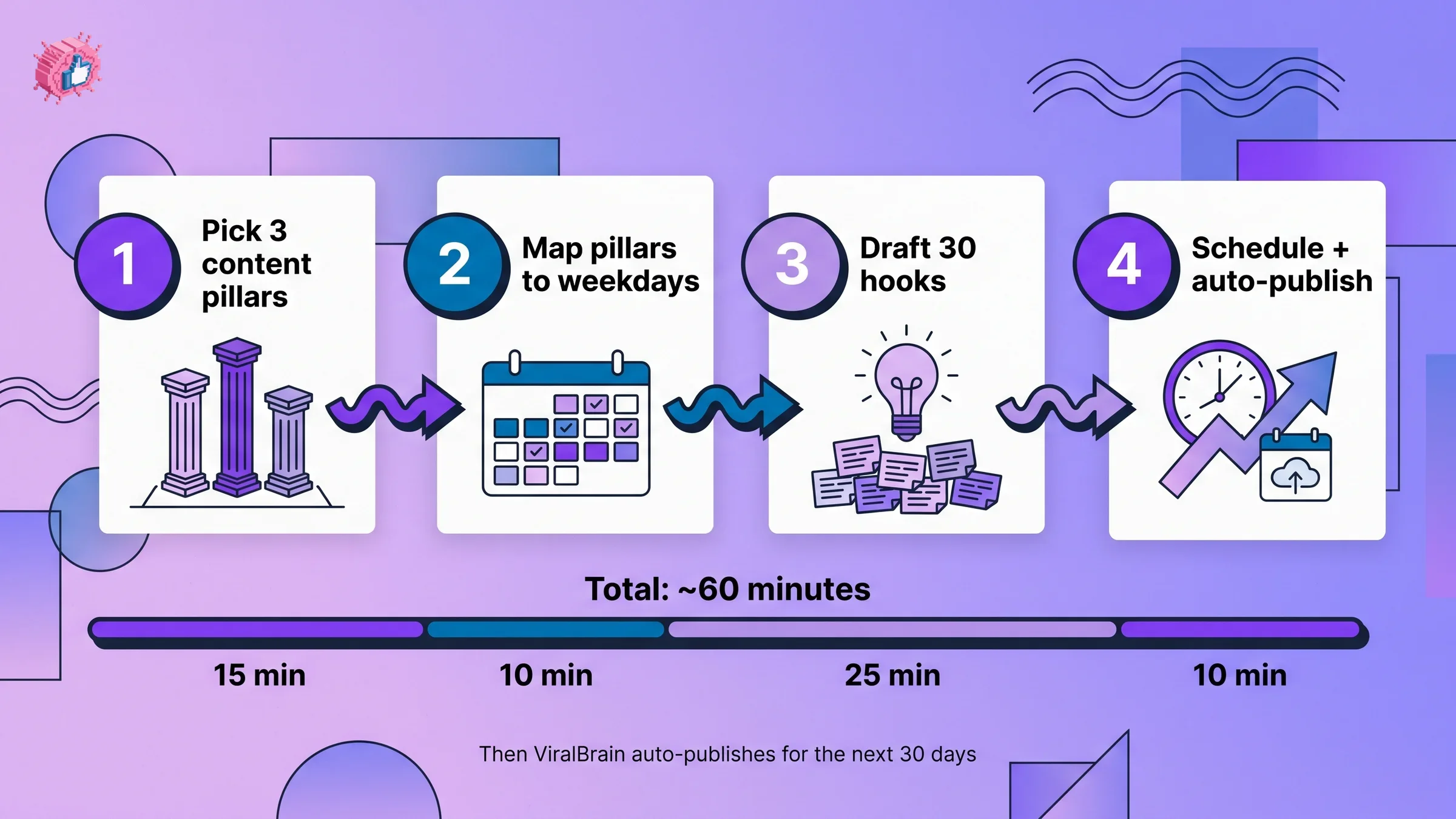
You're building four artifacts in sequence. Each one feeds the next. The full breakdown is 15 minutes on pillars, 10 minutes on the weekly map, 25 minutes on hooks, 10 minutes on scheduling.
Step 1: Pick 3 content pillars (15 min)
A pillar is a recurring topic territory you want to be known for. Three is the right number. If you are stuck choosing them, our 50 LinkedIn post ideas are grouped by category, which makes the pillars obvious. Two is too narrow and you'll burn through ideas in week two. Four or more splits your audience signal and confuses the algorithm.
To pick your pillars, finish this sentence three different ways: "I want to be the person people follow for ___." Each blank is a pillar.
The trick is matching each pillar to a proven post skeleton. ViralBrain's analysis of 30,360 LinkedIn posts surfaced 58 viral skeletons (high-engagement structural patterns). Five of them carry the highest lift and map cleanly to typical creator pillars:
| Pillar type | Recommended skeleton | Average lift |
|---|---|---|
| Tactical / how-to authority | Feature Deep-Dive | 4.58x |
| Founder / personal journey | Identity Pivot | 3.48x |
| Reflective / lessons learned | Full-Circle Reflection | 3.30x |
| Lighthearted / brand voice | Punny Power-Up | 2.42x |
| Credentials / proof-of-work | Credibility Cheat Sheet | 2.88x |
A founder marketing SaaS to other founders might pick: (1) Tactical (Feature Deep-Dive), (2) Founder journey (Identity Pivot), (3) Credentials (Credibility Cheat Sheet). A solopreneur coach might pick: (1) Tactical (Feature Deep-Dive), (2) Reflective (Full-Circle Reflection), (3) Brand voice (Punny Power-Up).
Write your 3 pillars on a sticky note. That's step 1.
Step 2: Map pillars to weekdays (10 min)
Now you assign each pillar to specific weekdays. The goal is rhythm, not perfect coverage. A 3-pillar, 5-post-per-week cadence is the sweet spot for creators who want growth without burnout.
Here's the template (we'll show the full markdown grid below):
- Monday: Pillar 1 (tactical, sets the week's tone)
- Tuesday: Pillar 2 (story or reflection, builds connection)
- Wednesday: Pillar 1 again (your strongest pillar gets 2 slots)
- Thursday: Pillar 3 (credentials, brand voice, or hot take)
- Friday: Pillar 2 (weekly reflection or lesson)
- Saturday/Sunday: optional, light engagement post or skip
For posting time, the best time to post on LinkedIn tool gives you a time-zone-aware window. The default safe band is weekday mornings 8 to 11 AM in your audience's primary time zone. Wednesday around 9 AM is the highest-density window in our dataset.
Step 3: Draft 30 hooks (25 min)
This is where the calendar earns its keep. You batch-draft 30 opening lines in one sitting, so you never sit down to a blank composer again.
Three hook archetypes dominate engagement lift in our dataset:
- Stat hooks: 1.67x lift (4.24% of posts use them, the best ROI in the corpus)
- Story hooks: 1.51x lift (7.06% of posts)
- Direct/utility hooks: 1.45x lift (77.76% of posts, most crowded category)
To draft 30 hooks fast, use this distribution: 10 stat hooks, 10 story hooks, 10 direct hooks. The math: 5 weekdays x 6 posting weeks (you'll cycle through them as you publish), or 6 hooks per week with rotation.
Five stat hook examples to model:
- "[Specific number] [thing you measured] in [time period]. Here's what changed."
- "[Big-magnitude $] in [outcome] from [small input]. The 3 levers."
- "[%] of [target group] do [thing]. The [smaller %] who don't [outcome]."
- "After [N] [unit of work], one [insight] stuck."
- "[Surprising count] of [thing] we shipped in [period]. The [N] that mattered."
Five story hook examples to model:
- "[Time period] ago I was [low point]. Today [outcome]. Here's what I'd do differently."
- "Last [day/week] a [person] told me [unexpected thing]. It changed how I [action]."
- "I almost quit [thing] in [year]. Glad I didn't. Here's why."
- "First [milestone] in [number]. The [N] decisions that got me here."
- "I used to think [old belief]. Now I know [new belief]. The shift took [period]."
Five direct hook examples to model:
- "The [N]-step framework I used to [outcome] in [period]."
- "[N] things I wish I knew before [doing X]."
- "How to [outcome] without [common pain]."
- "The exact [thing] I use to [outcome] every [period]."
- "[N] [tool/tactic] that [outcome] in under [time]."
If batching 30 hooks at a desk feels like a slog, the LinkedIn hook generator surfaces variations sorted by archetype, and the viral post templates library gives you 58 working skeletons to slot the hooks into. Draft, don't perfect. You'll polish each one the morning you post.
Step 4: Schedule + automate (10 min)
The last 10 minutes is where most calendars die. You finish drafting hooks, feel productive, and then never set up the scheduling layer. By Wednesday of week one, you're posting from your phone again.
Two options for the scheduling step:
- Manual: drop your 30 hooks into a Google Sheet with date columns, set phone alarms for each posting window, and use LinkedIn's native scheduler to queue posts the night before
- Automated: use ViralBrain's content calendar to auto-build the grid, auto-schedule the 30 posts, and auto-publish at the optimal window per day
The automated path saves about 5 hours per week once you account for ideation, drafting, formatting, and the daily "what should I post" tax. We broke down the time math in manual vs auto LinkedIn posting.
Either way, the rule is: if it's not scheduled, it doesn't ship.
The 7-day template (the asset)
Here's the weekly grid you can copy directly into a Google Sheet, Notion table, or Excel file. The "Pillar" column is what you swap to match your 3 pillars from Step 1.
| Day | Time | Pillar | Format | Hook archetype | Example post type |
|---|---|---|---|---|---|
| Mon | 9:00 AM | Pillar 1 (tactical) | Feature Deep-Dive | Direct | "The 5-step framework I used to [outcome]" |
| Tue | 9:30 AM | Pillar 2 (story) | Identity Pivot | Story | "3 years ago I was [low point]. Today [outcome]." |
| Wed | 9:00 AM | Pillar 1 (tactical) | Credibility Cheat Sheet | Stat | "[Big number] in [outcome]. Here are the 3 levers." |
| Thu | 10:00 AM | Pillar 3 (voice/credentials) | Punny Power-Up | Direct | "[Industry] is broken. Here's the 2-line fix." |
| Fri | 11:00 AM | Pillar 2 (reflection) | Full-Circle Reflection | Story | "Last week I [moment]. Here's what it taught me." |
| Sat | optional | any | engagement reply or short take | any | poll, question, or comment thread |
| Sun | rest | none | none | none | none |
That's the entire system. Five posts per week, three pillars rotating, two highest-performing days (Tuesday and Wednesday) anchoring the rhythm.
Or skip the manual work entirely. ViralBrain auto-builds this calendar for you using your writing style, your hero creators' patterns, and your audience's optimal posting times, then schedules the next 30 days in one click.
For a deeper look at what makes each post format work, the how to write a LinkedIn post that gets noticed guide walks through hook formulas, length sweet spots, and CTA patterns line by line.
Automate your LinkedIn for 30 days
How to avoid the 3 calendar killers
Most content calendars die for one of three reasons. Each has a specific fix.
Calendar killer 1: Pillar drift
What it looks like: by week three, you're posting on topics that have nothing to do with your original 3 pillars. A SaaS founder ends up posting about politics. A marketing coach drifts into general "founder life" content. Your follower signal scatters and the algorithm stops recommending you to your ideal audience.
The fix: write your 3 pillars on a sticky note above your monitor. Before drafting any post, ask "which pillar?" If the answer is "none of them," save the idea for a personal-brand experiment day (Saturday), not a pillar slot.
Audit weekly: at the end of each week, count how many of your 5 posts hit your pillars. If 4 out of 5 didn't, the pillars are wrong, not your discipline. Rewrite them.
Calendar killer 2: Recycle-without-refresh
What it looks like: you post the same Feature Deep-Dive structure on every Monday for 4 weeks straight. By week 3, your audience has pattern-matched and engagement drops 40%.
The fix: rotate hook archetype within the same pillar. Monday is still Pillar 1 (tactical), but the hook archetype shifts week to week: stat hook, direct hook, contrarian hook, story hook. Same pillar, different opener.
Our dataset shows hook fatigue is the single biggest cause of declining engagement on consistent posters. The pillar doesn't get tired. The hook does.
Calendar killer 3: Manual scheduling friction
What it looks like: you draft 30 great hooks on a Sunday, plan to schedule them Monday morning, and by Wednesday you've manually posted 2 of them and forgotten the rest. The calendar exists in a Google Doc that no one is reading.
The fix: scheduling has to happen in the same session as drafting. If you finish hooks and then walk away, the calendar is already broken. Either queue everything into LinkedIn's native scheduler immediately, or use an automated scheduler that triggers posts at your set times.
The best LinkedIn scheduling tools roundup compares the 7 most-used schedulers (native LinkedIn, Buffer, ViralBrain, Taplio, and more), with feature and pricing breakdowns. If you want a broader automation lens (drafting, scheduling, engagement, analytics in one), the best LinkedIn automation tools comparison covers the full stack.
The auto-publish payoff
Once scheduling runs without you, three things change.
Consistency stops being a discipline problem. When 30 posts are queued and auto-publish at preset times, "should I post today" disappears as a question. The decision is already made. Creators who automate scheduling post 4.2x more often on average than creators who post manually, according to time-tracking data from creator productivity studies.
Dwell time goes up. This is the non-obvious benefit. When you're not stress-drafting at 8:50 AM, you have time to write longer, more considered posts. Our analysis shows the 900 to 1,300 character range is the length sweet spot (3.07% viral rate), and it's the range you naturally hit when drafting in batches the night before, not in the morning rush.
Mental load drops. This is the biggest one. The cognitive tax of "what should I post" runs in the background all day for active creators. Removing it frees you to write better posts when you do sit down to plan, and to actually engage with comments and DMs when notifications hit.
The full time-cost comparison is in manual vs auto LinkedIn posting, but the headline is: automating scheduling saves about 5 to 7 hours per week and roughly doubles posting frequency for most creators.
If you're evaluating the automation layer, ViralBrain pricing starts with a 7-day trial for €1, with the full content calendar and auto-scheduling included.
What this means for you
- Block 60 minutes this week. Pick a Sunday afternoon or a Friday wind-down hour. The calendar will never get built in 10-minute chunks. It needs one focused block.
- Write your 3 pillars on a sticky note before you do anything else. If you can't say each one in 6 words, the pillar is too vague. Tighten it.
- Draft hooks in archetype batches, not in pillar order. 10 stat hooks in a row, then 10 story hooks, then 10 direct. Pattern-matching your brain to one archetype at a time is roughly 3x faster than switching contexts every hook.
- Schedule everything in the same session. If you walk away with 30 unscheduled hooks, you'll publish 4 of them. If you walk away with 30 scheduled posts, you'll publish all 30.
- Audit every Sunday, rebuild every 30 days. Treat the calendar as a 30-day rolling artifact, not a permanent system. At day 28, sit down for 60 minutes again, rotate the hooks, refresh the pillar assignments based on what performed, and queue the next 30.
If you want the whole thing automated end to end, ViralBrain builds your pillar mix, drafts your hooks in your voice, and auto-schedules 30 days at the optimal times for your audience. A 7-day trial for €1 is available.
Sources: LinkedIn algorithm guide, LinkedIn content strategy guide, ViralBrain analysis of 30,360 LinkedIn posts from 968 active hero creators (May 2026 snapshot)
FAQ
How long should a LinkedIn content calendar cover?
30 days is the sweet spot. Long enough to capture posting rhythm and let one full hook rotation play out, short enough to refresh based on what's actually performing. Quarterly calendars look impressive in a spreadsheet but get abandoned by week three.
How many posts per week should the calendar include?
5 weekday posts is the right cadence for creators who want growth without burnout. 7 posts (daily) accelerates growth roughly 30% but burns out most creators by month two. 3 posts is the minimum to stay in the algorithm's "active creator" tier. Anything less and reach drops sharply.
Can I use a LinkedIn content calendar template in Excel or Google Sheets?
Yes. The 7-day grid in this article copies directly into either format. Use one row per day, with columns for time, pillar, hook archetype, draft hook, and status. The friction is that you still have to manually copy each post into LinkedIn at posting time, which is where most spreadsheet calendars fail. Pair it with a scheduler.
What are content pillars and how many should I have?
Content pillars are recurring topic territories you want to be known for. Three is the right number. They should be specific enough that a follower can describe each one in 6 words, and distinct enough that posts in different pillars don't look like the same post. Pillar examples for a SaaS founder: (1) tactical product engineering, (2) early-stage company building, (3) hiring and team culture.
How often should I update my LinkedIn content calendar?
Refresh every 30 days. The pillars stay stable for 3 to 6 months. The hooks and post formats rotate every cycle based on what performed. If a hook archetype underperforms two cycles in a row, retire it. If a pillar consistently produces top-quartile posts, double its weekly slot count.
When should I break the calendar?
Break it for real news, founder moments, or audience-driven engagement opportunities. If your company just shipped a milestone, post it the same day, calendar be damned. If a comment thread is heating up, write a response post within 2 hours, not Wednesday at 9 AM. The calendar is a default, not a constraint. The rule of thumb: break it 1 out of every 10 posts. More than that and the calendar isn't yours.
Should the calendar include weekends?
Optional. Saturday is a fine day for lighter engagement posts (polls, short takes, audience questions), and Sunday is best treated as a rest day for the algorithm and for you. Posting 7 days a week marginally increases reach but disproportionately increases burnout risk.
What's the difference between a content calendar and a content strategy?
Strategy is the why and the who: who you're talking to and what positioning you want. Calendar is the when and the what: which pillar posts on which day at which time. You need the strategy first, but the calendar is what actually ships posts. The LinkedIn content strategy guide covers the upstream half of the equation.
Automate your LinkedIn for 30 days
ViralBrain plans, writes, and schedules your LinkedIn content, using official LinkedIn APIs so your account stays safe.
- Official LinkedIn APIs, no risk of ban
- You approve every post before it goes live
- Cancel anytime
Keep reading
How to Change Your Profile Picture on LinkedIn
How to add, change and remove your LinkedIn profile photo on desktop, in the app and in a mobile browser, plus who can see it and the file specs.
How to Hide Active Status on LinkedIn
How to hide your LinkedIn active status: the Manage active status setting, its three documented options on desktop and in the app, and what you give up.
How to Log Out of LinkedIn on Desktop and in the App
How to log out of LinkedIn on desktop, on iOS and on Android, how to sign out of other sessions or all devices, and what Keep me logged in changes.