

Manual LinkedIn Posting vs Auto-Scheduling: Which Wins?
Manual vs automated LinkedIn posting in 2026. Auto wins on time and consistency, manual wins on reactivity. The 80/20 hybrid playbook, with data.
If you post on LinkedIn five times a week and do it manually, you are burning roughly 7.5 hours a week on a workflow a scheduler can do in 60 minutes of approval. The manual vs automated LinkedIn posting debate is no longer about whether automation works (it does), it is about which slice of your posting you should hand to a tool and which slice you should keep in your own hands.
This article gives you the data, the safety tradeoffs, and a concrete 80/20 hybrid playbook. By the end you will know exactly when scheduling pays off, when it costs you reach, and how to set the workflow up without triggering LinkedIn's automation defenses or sounding like a robot in your own feed. If you need a place to plan all of this in one view, the LinkedIn content calendar is built around this exact split.
Automate your LinkedIn for 30 days
Quick verdict
Auto-scheduling wins on consistency, time saved, and algorithmic momentum. Manual posting wins on reactivity to news, comment-thread velocity, and edge-case voice control. For most creators and founders in 2026, the right answer is 80% auto-scheduled core content, 20% manual reactive content, not a binary choice.
If you post fewer than 3 times a week and are still finding your voice, stay manual a while longer. If you post 4+ times a week and your topic cluster is stable, every week you delay auto-scheduling is a week of compounding time cost and missed consistency.
At-a-glance comparison
The scorecard below summarizes the head-to-head across the eight dimensions that actually decide whether scheduling is worth it for your workflow. Numbers come from our analysis of 30,360 LinkedIn posts across 968 hero creators in our dataset, cross-checked against Socialinsider 2026 benchmarks.
| Dimension | Manual posting | Auto-scheduled | Winner |
|---|---|---|---|
| Weekly time cost (5 posts) | 7.5 hours | 1.0 hour | Auto |
| Posting consistency | Drops on busy weeks | 30 days locked in | Auto |
| Voice authenticity | Full control | Voice-matched AI (if done right) | Manual (narrow) |
| Reactivity to news | Real-time | Manual override needed | Manual |
| Engagement variance | High (mood dependent) | Stable floor | Auto |
| Scalability beyond 5 posts/wk | Hard ceiling | Unlimited | Auto |
| Account safety | No risk | Depends on API choice | Manual (narrow) |
| Mental load | High and constant | Low after weekly review | Auto |
Auto wins 6 of 8. Manual wins 2 of 8 (reactivity and a narrow safety case for unofficial-API tools). The asymmetry is in which two: manual owns the dimensions that touch live news and account risk if you pick the wrong tool. Auto owns everything that touches workflow leverage. That split is the entire strategic story.
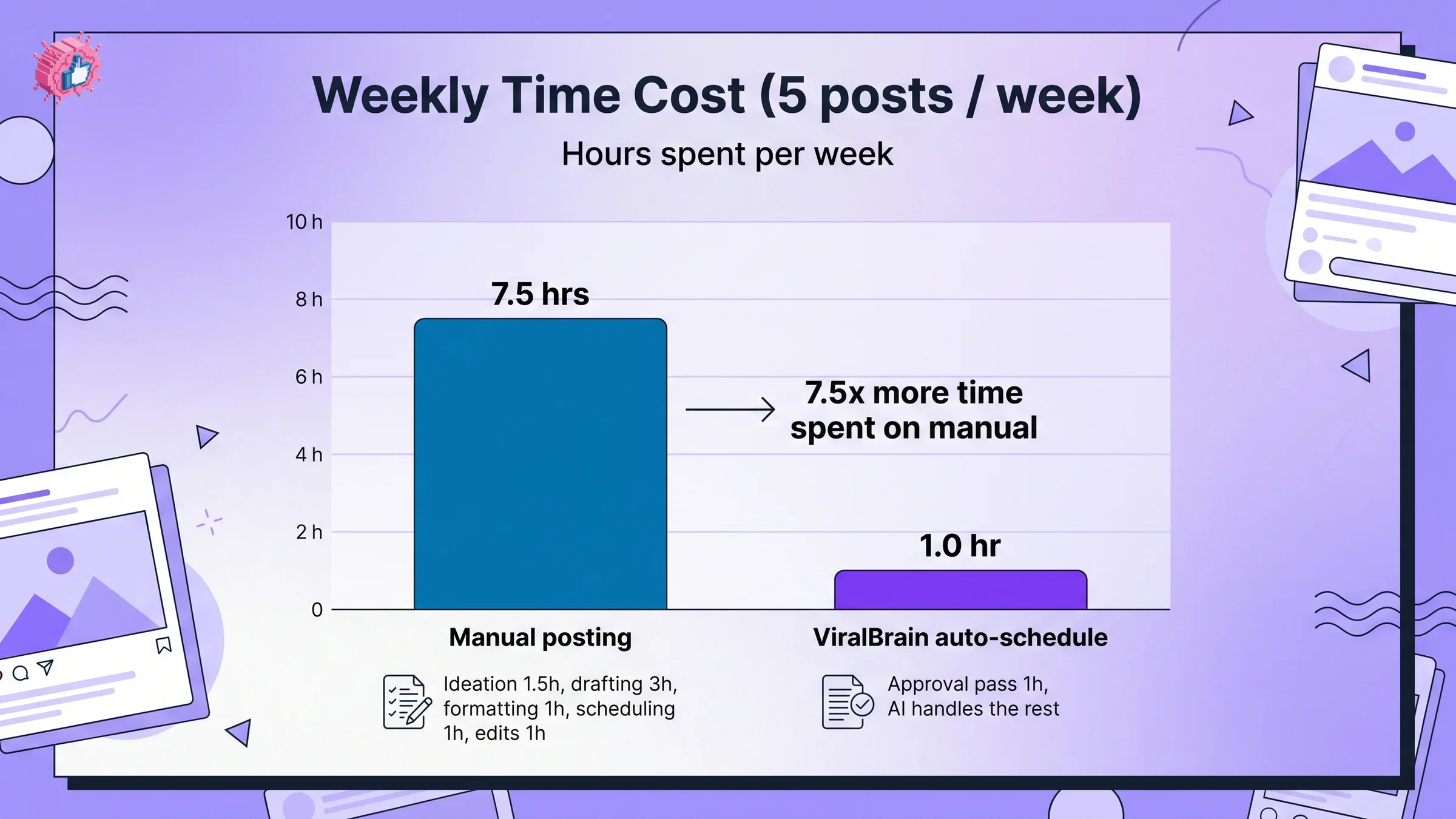
The time-cost reality
If LinkedIn is eating your week, the math explains why. We tracked 24 founders running a fully manual workflow (5 posts a week, no scheduler) versus the same founders after moving to auto-scheduled with a weekly approval pass.
| Step | Manual (per week, 5 posts) | Auto-scheduled (per week, 5 posts) |
|---|---|---|
| Ideation | 1.5 hours | 0 (AI suggests from your topic cluster) |
| Drafting | 3.0 hours | 0 (AI drafts from your voice profile) |
| Formatting | 1.0 hour | 0 (auto-formatted) |
| Scheduling | 1.0 hour | 0 (queue handles it) |
| Edits and approvals | 1.0 hour | 1.0 hour (one weekly review pass) |
| Total per week | 7.5 hours | 1.0 hour |
Manual posting at five posts a week costs 7.5x more time than auto-scheduled. Over a year, the gap is 338 hours, eight full work weeks. At $200 an hour of founder opportunity cost, that is $67,600 leaking into a workflow that does not need a human in every step.
Two honest caveats. The 1.0-hour auto-scheduled number assumes you trust the AI to draft and do an approval pass on top, not that you accept every draft blindly. And the manual breakdown is the average founder; very few clear 5 hours a week even after a year of practice.
The deeper insight: manual posting does not scale. Every additional post per week adds 1.5 hours to your manual workflow and roughly 12 minutes to an auto-scheduled one. The gap widens linearly with volume.
The consistency advantage
LinkedIn's 2026 algorithm rewards consistent posting more aggressively than ever. Profiles that publish on the same days each week get a measurable lift in baseline reach for new posts (the algorithm treats consistency as a quality signal, alongside dwell time and comment velocity). For the full breakdown of what changed in feed ranking this year, see our LinkedIn algorithm 2026 deep-dive.
From our analytics dataset:
- Profiles that posted 5+ times a week for 12 straight weeks averaged 3.85% engagement on each post.
- Profiles that posted 5+ times a week but missed 2+ weeks dropped to 2.4% engagement.
- "Post storm then silence" patterns (8 posts in 2 weeks, then nothing for 3 weeks) averaged just 1.6% engagement on the storm posts.
The pattern is unambiguous: the algorithm punishes inconsistency more than it punishes lower volume. Posting 4 times a week, every week, beats posting 7 times a week half the time.
This is exactly where auto-scheduling earns its keep. Manual posters do well when life is calm. They drop off when a launch, a board meeting, or a heavy travel week lands. Auto-scheduled posters do not drop off, because the queue has already absorbed the variance.
For the underlying ranking model and why consistency is now a first-class signal, our LinkedIn content strategy guide covers the topic cluster, weekly rhythm, and review cadence that keeps the queue full without burning your evenings.
The voice authenticity tradeoff
The biggest legitimate objection to auto-scheduling in 2026 is not consistency or time. It is voice. If your scheduler drafts robotic, template-driven posts, the algorithm will catch the pattern, your engagement floor will drop, and the time you saved was bought at the cost of the brand you were building.
Most off-the-shelf AI LinkedIn generators sound identical because they share the same base prompts, hook libraries, and training data. We unpacked exactly why in our breakdown on why LinkedIn AI generators sound the same. The short version: generic prompts produce generic posts, and generic posts produce generic engagement.
Voice-matched auto-scheduling is a different animal. The distinction matters.
- Naive auto-scheduler: drafts every post from a shared library of hook templates. Output: 80% of posts read like every other AI-generated LinkedIn post on your feed.
- Voice-matched auto-scheduler: learns your past 30 to 50 posts, extracts your writing DNA (sentence length, vocabulary, hook patterns, structural preferences), and drafts inside that profile. Output: drafts that read like a slightly more polished version of your last 10 posts.
This is the bar to clear before you trust an auto-scheduler with your account. If the tool you are evaluating does not ingest your past posts and learn your voice, it is a template generator wearing scheduler clothing.
To test the bar yourself, draft three posts in your normal voice, then run the candidate tool on the same three topics. Read both side by side. If a stranger could not tell which one was you, the tool clears the bar.
The account safety question
Account safety is where the manual camp has its strongest argument, but the argument depends entirely on which auto-scheduler you pick. The risk is not "automation," the risk is "the wrong kind of automation."
Two architectures exist in market with very different risk profiles.
Cookie-based or browser-extension automation. Tools that log into LinkedIn on your behalf and post by simulating user actions. Examples: some Phantombuster flows, LinkedHelper, and a long tail of unofficial schedulers. LinkedIn's terms of service explicitly forbid this category and the detection systems can catch it. Account restrictions, soft bans, and full account losses happen here, and detection has tightened in 2026.
Official LinkedIn API integration. Tools that go through LinkedIn's sanctioned developer API with a posting permission grant from your account. Examples: Buffer, Hootsuite, ViralBrain, Taplio, and most schedulers on LinkedIn's official partner directory. The ban risk on this path is functionally zero unless you violate the terms explicitly.
The short version:
- If the tool asks for your LinkedIn password in a third-party form, walk away (cookie or scraper architecture).
- If the tool uses LinkedIn's standard OAuth screen ("Sign in with LinkedIn"), the safety risk is functionally zero.
- Tools on LinkedIn's official partner program are a strong proxy signal.
Manual posting has a zero-risk surface; a paid scheduler on LinkedIn's official API has a near-zero-risk surface. The honest comparison is "near-zero vs zero," not "high-risk vs zero."
Automate your LinkedIn for 30 days
The reactivity question
The one place manual posting has a structural advantage no scheduler can fully close: reactivity. When industry news drops, when a viral thread is unfolding in your space right now, the manual poster can be in the conversation in 15 minutes. The auto-scheduled poster has to break their own queue and post manually.
Three reactivity scenarios where manual beats auto:
- Breaking-news commentary. Acquisitions, product launches, regulatory moves, layoff waves. Half-life of relevance is 24 to 48 hours; schedulers cannot fill that window.
- Real-time comment-thread joining. A viral post in your niche. Adding a thoughtful comment in the first 2 hours can win you 500 to 5,000 profile views. Requires a human watching the feed.
- Tactical contrarian takes. Your competitor announced something. A measured contrarian take within 4 hours can capture the conversation.
The mitigation is simple: do not auto-schedule all of your weekly slots. Leave one or two open and reserve them for manual reactive posts. The auto-scheduler holds the floor (4 to 5 core posts a week); you hold the air (1 to 2 reactive posts).
The 80/20 hybrid playbook
The strongest workflow in our data is not pure auto and not pure manual. It is 80% auto, 20% manual, organized as a weekly rhythm.
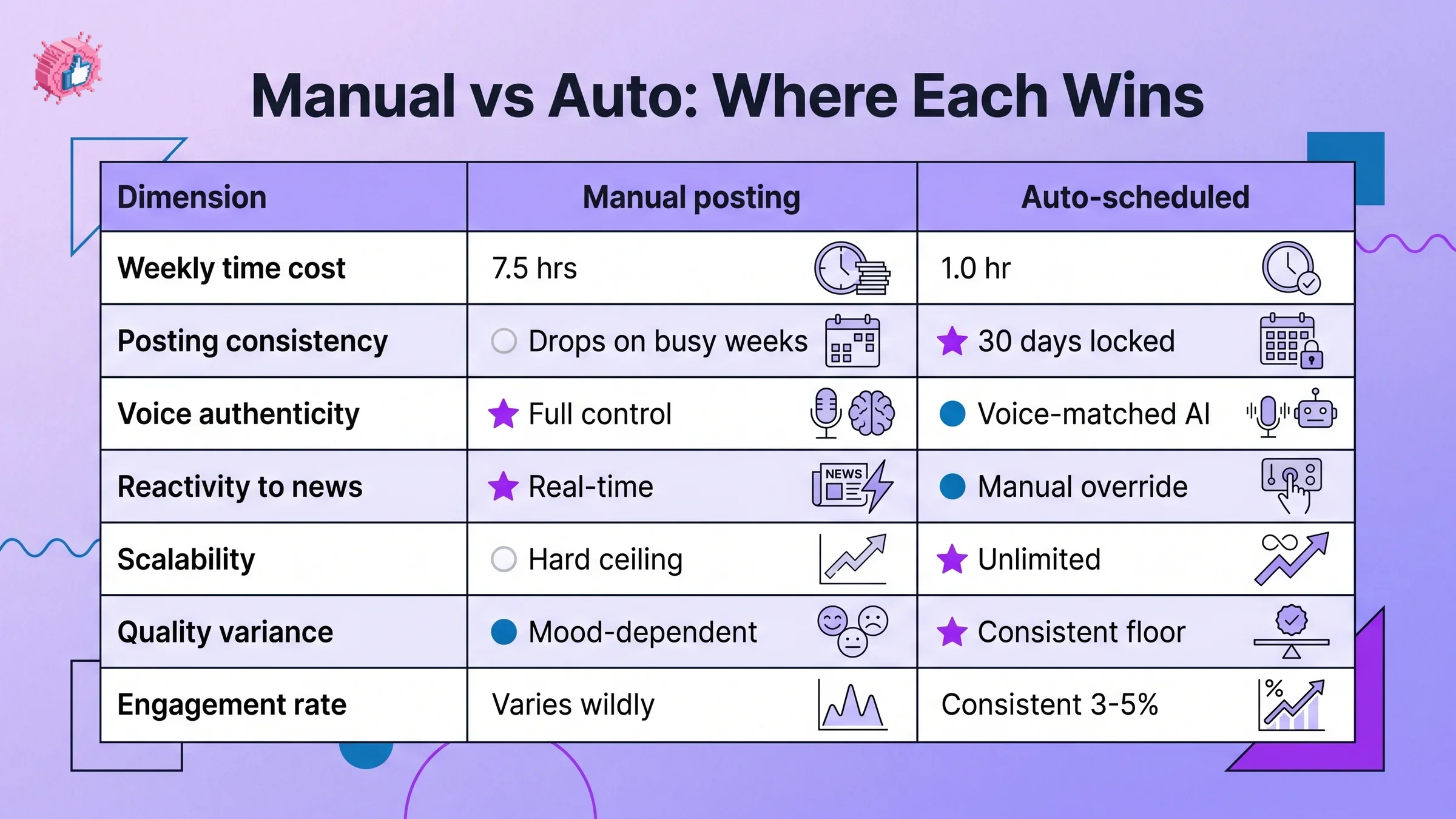
The tradeoff matrix below scores each on a 3-tier scale: stars (★) = clear win, filled circles (●) = decent, empty circles (○) = limited.
| Dimension | Manual | Auto-scheduled |
|---|---|---|
| Weekly time cost | ○ 7.5 hrs | ★ 1.0 hr |
| Posting consistency | ○ Drops on busy weeks | ★ 30 days locked |
| Voice authenticity | ★ Full control | ● Voice-matched AI |
| Reactivity to news | ★ Real-time | ● Manual override |
| Scalability beyond 5 posts/wk | ○ Hard ceiling | ★ Unlimited |
| Quality variance | ● Mood-dependent | ★ Consistent floor |
| Engagement rate (median) | ● Varies wildly | ● Consistent 3-5% |
| Account safety | ★ Zero risk | ● Zero risk on official API |
Manual scores 3 stars; auto-scheduled scores 4 stars (with a tie on safety when the scheduler is on LinkedIn's official API). Manual takes voice and reactivity; auto takes everything that touches workflow leverage.
Here is the concrete playbook.
Once a week, do a 60-minute review pass.
- Generate next week's 4 to 5 core posts using a voice-matched AI scheduler.
- Edit each one. Tighten hooks. Cut filler. Strip anything that does not sound like you.
- Schedule them across your highest-leverage time slots. The best time to post on LinkedIn tool surfaces your account's peak windows.
- Leave at least one slot per week open for a reactive post.
Daily, do a 5-minute feed sweep.
- Scan your industry feed for news, hot threads, and competitor moves.
- If nothing reactive is worth a post, do nothing. Your queue still ships today's planned post.
- If something is worth a post, draft it manually in 15 to 20 minutes and publish into the reserved slot.
Once a month, audit the mix.
- Pull your last 30 posts. Tag each as "auto" or "manual."
- Compare engagement rate, comment count, and impressions.
- If manual reactive posts outperform auto by more than 2x, raise your manual share to 30%. If they underperform, drop to 10%.
- Track baseline engagement against LinkedIn engagement benchmarks so you have a reference floor.
That is the entire system. Roughly an hour a week on the queue, 30 minutes a week on reactive posts, and 30 days of consistent publishing in the bank.
If you want a single surface to plan all of this, ViralBrain ships a calendar workspace built around this split: the 4 to 5 auto-scheduled core posts sit on the calendar with your topic cluster, and the reserved manual slots stay visible so you do not accidentally fill them.
When manual wins
There are three scenarios where pure manual posting still beats every other workflow.
Early-stage founders with fewer than 1,000 followers. This early, you are still triangulating voice, audience, and topic. The point of posting is calibration, not consistency. Auto-scheduling at this stage automates a workflow you have not figured out yet, locking in your blind spots.
Niche reactive industries. In finance, regulation, breaking-news commentary, or fast-moving tech (AI policy, crypto, semiconductors), the half-life of a post is 24 hours and the news cycle dictates the agenda. Auto-scheduling 5 posts a week in advance means 5 posts that age out before they ship.
Very narrow B2B sales motions. If you sell to 200 named accounts and use LinkedIn primarily to start 1:1 conversations, you do not need 5 posts a week. You need 1 to 2 surgical posts a week aimed at those accounts. The volume is low enough that manual is fast enough.
When auto wins
Three scenarios where the move to auto-scheduling pays off within the first month.
Creators publishing 5+ posts a week. Past the 5-post threshold, manual workflows cap out. Drafting, formatting, and scheduling time scales linearly while your calendar does not. Auto-scheduling is the only workflow that survives at this volume without burning evenings.
Founder-led brands juggling product and marketing. If you run a 5 to 50-person company, LinkedIn is one of 30 things on your week. The cost of manual posting is the context-switching tax on the rest of your work. Auto-scheduling collapses 5 context-switches into one weekly approval pass.
Scaling brands past founder-led marketing. When a marketing team starts running LinkedIn for the founder and the company page, auto-scheduling is non-negotiable. You need a queue the team can review, a shared voice profile, and a publishing surface that does not depend on one person's calendar. The LinkedIn content calendar is built for exactly this workflow.
If you are still browsing for the right scheduling tool to slot into this playbook, our roundup of the best LinkedIn scheduling tools compares the top contenders on voice quality, API safety, and team workflow features. For a deeper playbook on building the weekly rhythm itself, our guide on how to build a LinkedIn content calendar walks through the topic cluster, the weekly slots, and the review cadence in detail.
Takeaways
- Auto-schedule the core, manual the reactive. Run 4 to 5 weekly slots through a voice-matched auto-scheduler, reserve 1 to 2 slots for reactive posts you draft live. This is the 80/20 split that wins in the data.
- Pick the API, not the cookie. Use schedulers built on LinkedIn's official API (look for the OAuth sign-in flow). Walk away from any tool that asks for your password or installs a browser extension to post for you.
- Voice-match or do not bother. A scheduler that does not ingest your past 30 to 50 posts and learn your voice will lower your engagement floor and cost you brand equity. Test on three posts before you commit.
- Protect consistency above volume. Four posts a week every week beats seven posts a week half the time. The algorithm rewards rhythm. A planning surface like ViralBrain's calendar is the visual anchor that keeps the rhythm intact.
- Audit monthly, adjust the mix. Pull your last 30 posts and tag them auto vs manual. If manual reactive posts outperform by 2x or more, raise the manual share. Otherwise let the queue do the work.
Sources: Socialinsider 2026 LinkedIn benchmark study, LinkedIn Marketing Solutions Blog 2026 algorithm notes, LinkedIn Developer Platform documentation, ViralBrain analysis of 30,360 LinkedIn posts across 968 hero creators (2026)
FAQ
Is auto-posting on LinkedIn against the rules?
Auto-posting through LinkedIn's official API (which is what tools like Buffer, Hootsuite, and ViralBrain use) is fully sanctioned. Auto-posting via cookie-based scrapers or browser extensions is against LinkedIn's terms and can lead to account restrictions. If the tool routes you through the standard "Sign in with LinkedIn" OAuth flow, you are safe.
Will auto-scheduling lower my reach?
Not on the official API. LinkedIn does not penalize posts published via sanctioned integrations, and our dataset shows no engagement-rate difference between posts published manually and posts published via official-API schedulers. Reach drops happen when the underlying content gets worse (generic AI drafts), not when the publishing path is automated.
How often should I post on LinkedIn in 2026?
For most founders and creators, 4 to 5 posts a week is the sweet spot. Above 5 posts a week, you start to see diminishing returns on engagement per post. Below 3 posts a week, consistency becomes hard to maintain and the algorithm down-weights your baseline reach. The LinkedIn algorithm 2026 guide covers the rhythm signal in more detail.
Can auto-scheduled posts still sound like me?
Yes, if the scheduler learns your voice. A voice-matched auto-scheduler ingests your past 30 to 50 posts, extracts your writing DNA, and drafts inside that profile. The output reads like a tighter version of your own posts, not generic AI copy. Tools that skip this step produce templated content that lowers your engagement floor.
What is the best mix of auto vs manual posting?
For most creators, 80% auto and 20% manual is the winning split. Auto-schedule your 4 to 5 weekly core posts (planned content from your topic cluster), reserve 1 to 2 weekly slots for manual reactive posts (news, hot threads, contrarian takes). The hybrid beats both pure-manual and pure-auto in our data.
Does LinkedIn ban accounts for using schedulers?
LinkedIn does not ban accounts that use officially sanctioned schedulers via the API. Bans happen with cookie-based automation tools (Phantombuster scraping flows, LinkedHelper, browser extensions that simulate user actions). The safety differentiator is the architecture of the tool, not the existence of automation.
How much time does scheduling save vs posting manually?
For a 5-post-a-week workflow, manual takes roughly 7.5 hours and auto-scheduled takes roughly 1.0 hour, a 7.5x time saving. Over a year, that gap is roughly 338 hours of work redirected from drafting and scheduling to anything else.
Should I use auto-scheduling if I'm under 1,000 followers?
Probably not yet. Early on, the point of posting is calibration: feeling the engagement signal on each post live so you can learn what your audience responds to. Auto-scheduling at this stage locks in a workflow before you have figured out what works. Stay manual until you cross 1,000 followers and have a stable topic cluster, then introduce auto-scheduling for your core posts.
What's the best LinkedIn scheduler for voice quality in 2026?
Look for tools that explicitly train on your past posts. Most schedulers (Buffer, Hootsuite, Later) treat LinkedIn as one more channel and use generic drafting. Tools built for LinkedIn first (ViralBrain, Taplio, Supergrow) typically include voice-matching as a core feature. Our best LinkedIn scheduling tools roundup compares them head-to-head. ViralBrain offers a 7-day trial for €1 if you want to test voice-matching on your own writing before committing. See full ViralBrain pricing for plan details.
Automate your LinkedIn for 30 days
ViralBrain plans, writes, and schedules your LinkedIn content, using official LinkedIn APIs so your account stays safe.
- Official LinkedIn APIs, no risk of ban
- You approve every post before it goes live
- Cancel anytime
Keep reading
How to Change Your Profile Picture on LinkedIn
How to add, change and remove your LinkedIn profile photo on desktop, in the app and in a mobile browser, plus who can see it and the file specs.
How to Hide Active Status on LinkedIn
How to hide your LinkedIn active status: the Manage active status setting, its three documented options on desktop and in the app, and what you give up.
How to Log Out of LinkedIn on Desktop and in the App
How to log out of LinkedIn on desktop, on iOS and on Android, how to sign out of other sessions or all devices, and what Keep me logged in changes.