Products
Discover HeroesFind top LinkedIn creators in your niche.Post CreatorAI-powered composer with your tone and style.Trending PostsSee what's going viral on LinkedIn right now.
Use Cases
Repurpose ContentTurn YouTube, blogs, and articles into LinkedIn posts.Carousel GeneratorCreate swipeable LinkedIn carousels with AI.30-Day Auto CalendarPlan and auto-publish a month of posts.LinkedIn MCP ServerPost to LinkedIn from Claude, Codex and OpenClaw.For AgenciesRun your clients' LinkedIn content in one place.
Tools
Text FormatterBold, italic, and Unicode styles for posts.Hashtag GeneratorFind the best hashtags for your content.Engagement CalculatorMeasure your post performance instantly.Hook GeneratorAI hooks that stop the scroll.Post PreviewSee exactly how your post will look.Content CalendarPlan and schedule your LinkedIn content.Browse all 90+ free tools
Resources
Free Tools90+ LinkedIn tools, no signup required.Templates100 ready-to-use LinkedIn post templates.GuidesStep-by-step LinkedIn growth playbooks.CollectionsCurated tool sets by role and goal.CompareViralBrain vs. other LinkedIn tools.BlogLinkedIn growth tips and strategies.
Pricing
LoginStart 7 Days Trial
Back to Discover Heroes
Benjamin Ejzenberg

Benjamin Ejzenberg

LinkedIn Content Strategy & Writing Style

Transformez vos Excel chronophages en dashboards automatisés → Automatisation avec Power BI | Récupérez +20 modules gratuits ICI ⬇

Canada
23 Viral ScoreView on LinkedIn

1 person tracking this creator on ViralBrain

Warm Analysis

Benjamin Ejzenberg positions himself as a high-authority data coach and automation architect who bridges the gap between messy Excel workflows and professional business intelligence. His content strategy centers on "de-risking" the transition to Power BI and Microsoft Fabric by providing actionable DAX snippets, architectural best practices, and ROI-focused project scoping that prioritizes user adoption over technical vanity. He is notable for his "Café Power BI" community-building approach, which humanizes complex infrastructure shifts through transparency and collaborative learning. By intersecting deep technical tutorials with pragmatic consulting advice, Benjamin transforms from a mere tool expert into a strategic partner for finance and data leaders.

Performance Overview

Followers

83.6K

Connections

25.2K

Avg. Engagement

173

Engagement Rate

Posts/Week

4.7

Viral Score

23

Posts Analyzed

4

Top Posts by Engagement

🎯 Live gratuit : on prépare la PL-300 ensemble. Les vrais sujets, les vrais pièges. Ce que j'aurais aimé savoir avant de passer la PL-300. Préparer cette certification, c'est la meilleure façon de…

120263715 viral
Power BI Certification9 months ago

View on LinkedIn

💡 Vos tableaux Power BI sont trop statiques ? Voici comment les rendre vivants. Un simple segment, un peu de code, et vos lignes se surlignent toutes seules en fonction de la sélection ! Le probl…
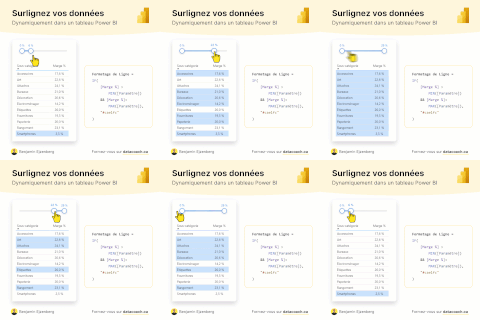
LinkedIn post image: 💡 Vos tableaux Power BI sont trop statiques ?
2312197 viral
Power BI7 months ago
View on LinkedIn

💡 Faites parler vos étiquettes. Ajouter du contexte à vos visuels Power BI n'a jamais été aussi simple.. si vous avez la recette. Soyons honnêtes : ajouter des étiquettes de données, tout le monde…
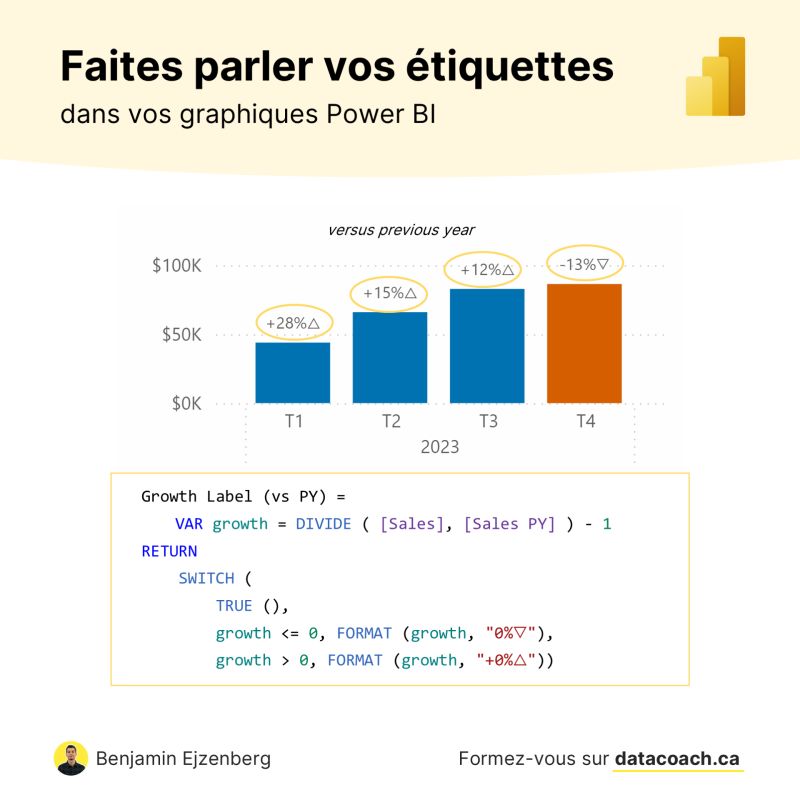
LinkedIn post image: 💡 Faites parler vos étiquettes.
2438165 viral
Business Intelligence8 months ago
View on LinkedIn

💡 Arrêtez de créer des signets dans Power BI. Il existe une solution bien plus élégante ! Le résultat ? Une interface tellement intuitive que vos collègues vont vous demander comment vous avez fait.…
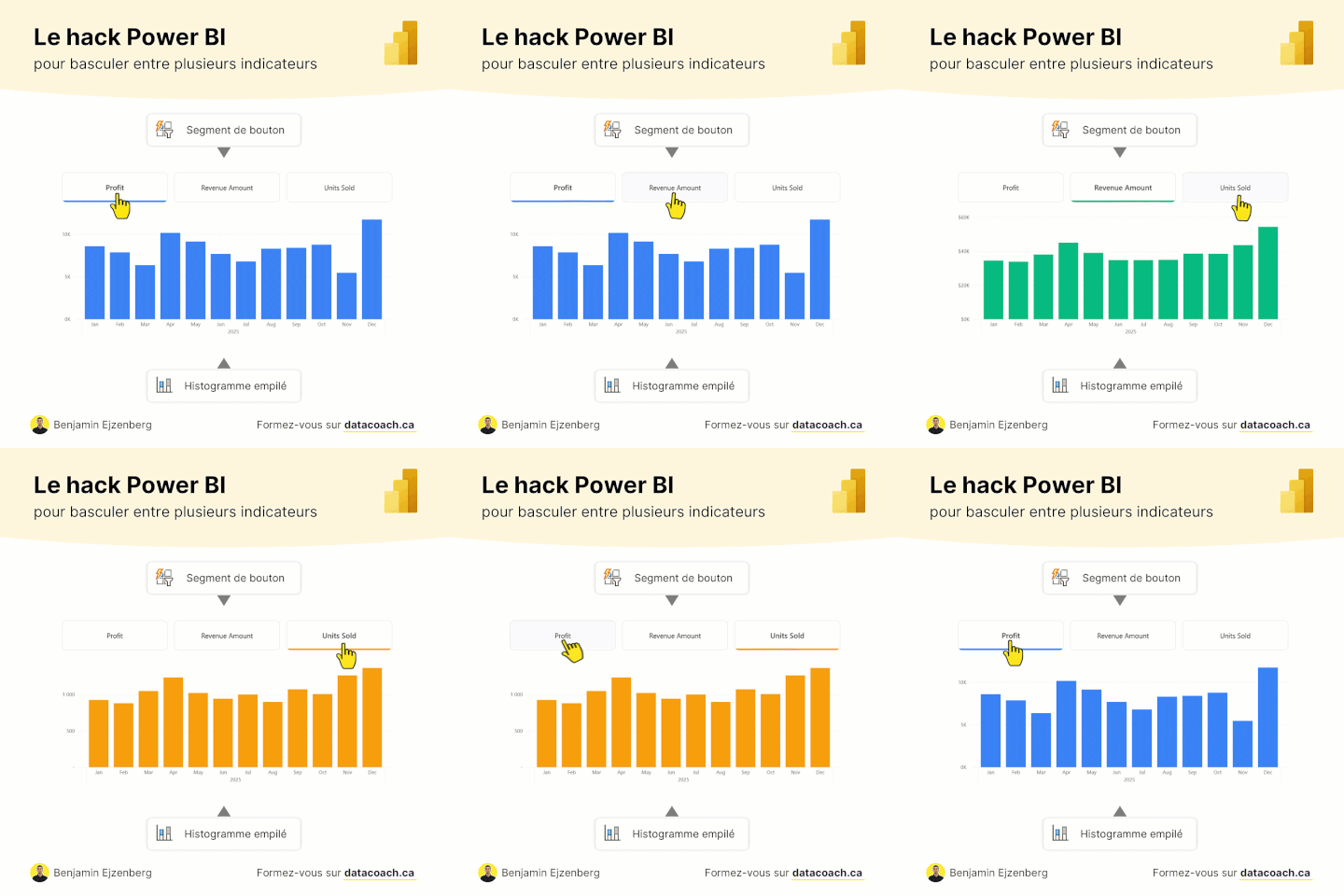
LinkedIn post image: 💡 Arrêtez de créer des signets dans Power BI. Il existe une solution bien plus élégante !
22128135 viral
Power BI9 months ago
View on LinkedIn

💡 La prochaine évolution de Power BI ne se voit pas dans l'interface. Ce n'est pas un nouveau bouton. Ce n'est pas une nouvelle fonctionnalité visuelle. Elle se passe dans le code. Et elle ouvre de…
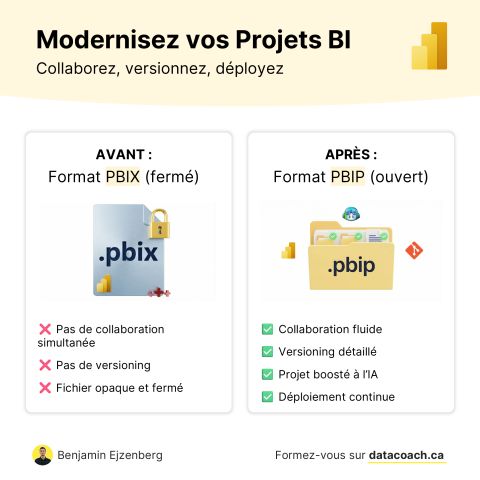
LinkedIn post image: 💡 La prochaine évolution de Power BI ne se voit pas dans l'interface.
21612144 viral
Business Intelligence8 months ago
View on LinkedIn

📊 Ajouter une cible sur vos graphiques Power BI ? Pas si simple… …sauf si vous connaissez cette astuce cachée. Afficher les objectifs à côté des performances réelles, c'est une demande qui revient…
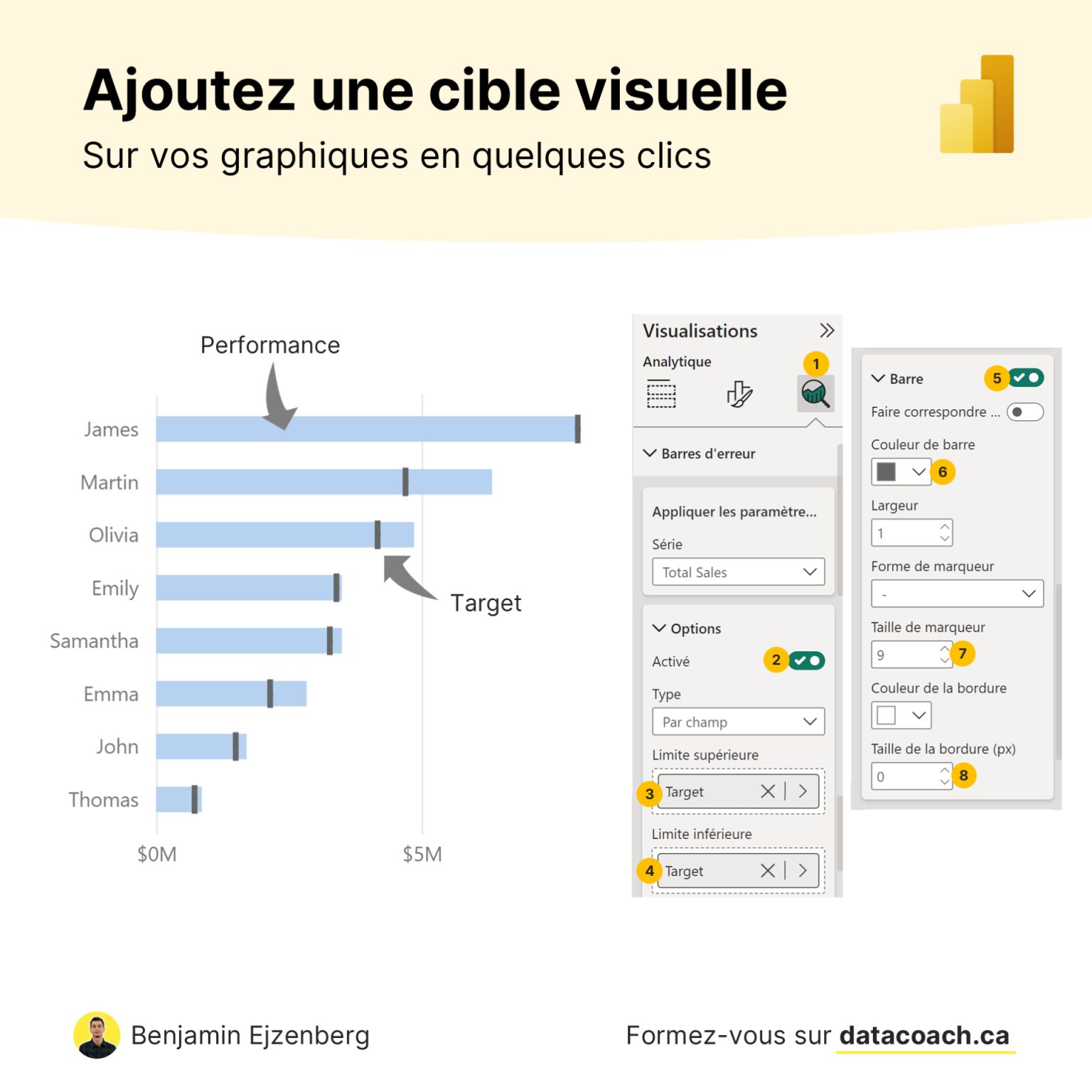
LinkedIn post image: 📊 Ajouter une cible sur vos graphiques Power BI ? Pas si simple…
20111124 viral
Power BI Data Visualization9 months ago
View on LinkedIn

Posting Patterns & Frequency

4.7 posts/week

Posts / Week

1.7 days

Days Between Posts

4

Total Posts Analyzed

HIGH

Posting Frequency

Timezone: America/Cambridge_Bay

Best Performing Days

TuesdayThursday

Best Performing Times To Post

07:00-08:0009:00-10:00

Topics & Content Focus

Primary Topics

Power BI micro-optimisations orientées utilisateur (interactivité, lisibilité, exploration sans friction)Gouvernance du modèle et bonnes pratiques DAX (standardisation, auditabilité, maintenabilité)Transition Power BI → Microsoft Fabric (quand l’infrastructure devient le vrai problème)

Secondary Themes

Distribution et personnalisation de rapports via URL (deep links, audiences, automatisation)Enablement/formation et montée en compétence (coach data, ressources, podcast/épisode expert)

Industry Focus

Business Intelligence Microsoft (Power BI, DAX, Semantic Model, Fabric)Analytics pour fonctions Finance/DAF et managers opérationnels (consommation de rapports filtrés)Data teams en contexte entreprise (scalabilité, orchestration, industrialisation)

Content Categories

Tutoriels actionnables (how-to) avec effet immédiatBest practices & anti-patterns (débat implicite vs explicite)Thought leadership pragmatique sur l’architecture (limites de Power BI, bascule vers Fabric)Contenu communautaire (Café Power BI / épisode avec invité Microsoft)Contenu de conversion soft (profil, notifications, contact coaching)

Performance Insights

173%

Avg Engagement Rate

STABLE

Performance Trend

Best Performing Topics

Hacks Power BI immédiatement réutilisables (UI/UX + DAX/formatage conditionnel)Réglages de qualité de modèle (désactiver mesures implicites) avec angle ‘risque équipe’Tactiques ‘zéro friction’ pour la consommation (liens filtrés, personnalisation d’accès)

Virality Signals

Partages élevés quand la valeur est ‘packagée’ (code, réglage précis, astuce duplicable)Surperformance des posts ‘anti-bricolage’ (qualité, auditabilité) qui créent débat sans polémique agressiveMoins de partages quand le post demande une action externe (écouter un épisode, explorer Fabric) vs appliquer un truc tout de suite

Structure & Quality

190

Avg Length (Words)

HIGH

Depth Level

ADVANCED

Expertise Level

0.78/10

Uniqueness Score

Common Hooks

Hook-problème concret + promesse de solution rapide (friction immédiate dans Power BI)Hook ‘hack’/surprise (remplacer un filtre par une URL, un seul réglage, une ligne de code)Hook ‘pain-to-platform’ (vous sentez les murs → ce n’est plus du DAX, c’est l’infra)Hook communautaire récurrent (rituel type ‘Café Power BI’)

Common Endings

Question ouverte pour déclencher réponses/opinions (débat, ‘vous validez ?’)Call-to-save / valeur packagée (‘sauvegardez le post’, code fourni)Lien en commentaire / redirection vers épisodeCTA profil + notifications + proposition d’accompagnement

Value Delivery Methods

Tactiques concrètes à faible effort et fort impact (1 réglage, 1 ligne, 1 pattern DAX)Traduction ‘business’ des features (zéro friction, audience, audit, réutilisation)Progression pédagogique (vulgariser Fabric pour profils Power BI, donner un ordre de priorité)

Formatting Style

Paragraphes courts, rythme ‘scroll-friendly’Bullets avec flèches (➜) orientées bénéficesOpposition ‘avant/après’ et ‘problème → solution’Emojis de balisage (💡, ☕, 💾) pour signaler le type de post

Audience & Tone

YES

Question Usage

0.3%

Response Rate

Detected Tone

Expert accessible ‘smart-casual’Pragmatique orienté adoptionAnti-blabla marketing (volonté explicite d’aller au-delà du discours)Coach exigeant sur la qualité (anti ‘rapport bricolé’)semi-formalsecond-person

Interaction Style

Conversation pédagogique (coach/mentor)Déclencheur d’opinions (préférences, ‘vous êtes d’accord ?’)Aide à l’appropriation (inciter à sauvegarder, à tester, à appliquer en contexte réel)

Community Building Signals

Brand persona récurrent (‘votre coach data’)Rituel/format série (‘Café Power BI’)Mécaniques de fidélisation (activer notifications, ressources sur le profil)

Writing Style Patterns

Content Strategy

Hook: Hook-problème concret + promesse de solution rapide (frictioTone: semi-formalCTA: Micro-CTA d’engagement (vote/avis, ‘connaissiez-vo

Writing style breakdown

<start of post>

💡 Vos mesures Power BI sont-elles vraiment sécurisées ?

Une erreur de manipulation, un collègue distrait, et votre calcul de CA s'effondre.

Le problème avec Power BI Desktop, c'est qu'il n'y a pas de bouton "annuler" pour une suppression de mesure faite il y a trois jours. Une fois que c'est enregistré, c'est perdu.

On a tous connu cette sueur froide au moment de rouvrir un fichier.

L'astuce pour dormir tranquille, c'est d'adopter le réflexe du versionning, même en solo

➜ Vous créez un historique clair de chaque modification

➜ Vous pouvez revenir en arrière en un clic si un bug apparaît

➜ Vous travaillez sur des branches séparées pour tester vos idées folles

Le résultat : vous ne travaillez plus avec la peur de "tout casser".

C'est la base d'un travail de pro.

Et vous ? Vous avez déjà perdu des heures de travail sur un fichier corrompu ?

Dites-le moi en commentaire, on va se soutenir 😅

_____

Ici Benjamin Ejzenberg 🖐🏼 votre coach data !

Vous voulez monter en compétence sur Power BI ? Visitez mon profil pour découvrir une multitude de ressources. Et pour ne rien rater, assurez-vous d'activer les notifications pour mes publications🔔 sur mon profil.

#DataWithBen

<end of post>

1. OVERALL WRITING STYLE & VOICE
1. The 'Problem: Solution' Hook: Starting with a relatable technical struggle or a 'Did you know?' tip.
1. THE HOOK: A single line, often starting with an emoji (usually 💡), presenting a tip, a warning, or a surprising fact.

Sign in to unlock the full writing analysis

Apply Benjamin Ejzenberg's patterns to your posts

Free tools to help you write, score, and benchmark in the same style.

LinkedIn Hook Generator

Generate scroll-stopping hooks in the same style top creators use.

Open tool

LinkedIn Post Scorer

Score your draft against viral post patterns before you publish.

Open tool

LinkedIn Engagement Calculator

Benchmark your engagement rate against creators in your niche.

Open tool

More LinkedIn creators to learn from

Discover all

Other creators worth studying alongside Benjamin Ejzenberg.

Bob McDowall

Bob McDowall

Owner, McDowall Consulting and Pharmaceuticals Consultant NOT a Recruitment Agency

154 Viral Score

O

Ozan Okutan

Senior Quality Engineer

1,349 Viral Score

Kurt In Albon, MSc

Kurt In Albon, MSc

Global Quality & CSV/C&Q/DI Leader | AI/ML Validation | Inspection Readiness | Data Integrity & Governance | OT Quality | GxP | Inspection Readiness | Pharma | Biotech.

63 Viral Score

Pierre-Yves L.

Pierre-Yves L.

Executive Recruiter & Talent Advisor | Beauty, Cosmetics, Ingredients, CDMO | C-level & Strategic Roles | Industrial & Business Transformation

9 Viral Score

Tobias Zwingmann

Tobias Zwingmann

Author: The Profitable AI Advantage. Created profits with AI from enterprise giants to 20-person teams.

10 Viral Score

Roger Martin

Roger Martin

Founder & President at Roger L. Martin, Inc. and author of A New Way to Think

51 Viral Score

€1 trial · 7 days

Automate your LinkedIn for 30 days

ViralBrain plans, writes, and schedules your LinkedIn content, using official LinkedIn APIs so your account stays safe.

  • Official LinkedIn APIs, no risk of ban
  • You approve every post before it goes live
  • Cancel anytime
Start €1 trial€39 Pro or €69 Premium · cancel anytime

30-day plan

On track
1
2
3
4
5
6
7
8
9
10
11
12
13
14
15
16
17
18
19
20
21
22
23
24
25
26
27
28
13 posts queued · auto-publishing
€1 · 7-day trial

Write like Benjamin Ejzenberg and auto-post for 30 days.

ViralBrain learns their voice and publishes for you.

Try it free

Write like Benjamin Ejzenberg.

Try it free

Discover more LinkedIn creators · ViralBrain

Other LinkedIn creators

  • Matt Pocock
  • Andrew Petcash
  • David Green 🇺🇦
  • Dr. Marc Sniukas
  • Morgan J Ingram
  • Scott Brinker
  • Tom Madders
  • Jack Roberts
  • Andrea Giuliodori
  • Nathalia Garcia
  • Anthony Pierri
  • Ryan Kaufman
  • Tycho Luijten