

LinkedIn Service Page: setup, pricing and the one-way choice
LinkedIn Service Pages are free for freelancers and consultants, but choosing profile or Company Page is locked once set. Setup steps and Premium limits.
A LinkedIn Service Page is free, takes about ten minutes to set up, and contains one decision you cannot walk back. When you create it you choose whether your services sit on your personal profile or on your Company Page, and LinkedIn's own documentation says you cannot change that afterwards.
For a freelancer or consultant, that single choice matters more than anything else on the setup screen. Everything else can be edited later.
This guide covers what the feature actually is, who can use it, the steps on desktop and mobile, what the free version gives you against what sits behind Premium, and the part of it LinkedIn is currently retiring. All of it comes from LinkedIn's own help documentation rather than from third-hand advice.
Automate your LinkedIn for 30 days
What is a LinkedIn Service Page?
A Service Page is a free landing page attached to your profile that lists the services you sell and lets anyone message you about them. LinkedIn describes Service Pages as "free dedicated landing pages that showcase your services and businesses."
They run on what LinkedIn calls a request and proposal model: a potential client sends you a project request, you reply with a proposal, and the two of you settle the details elsewhere.
The reach detail worth knowing is that the page removes the usual messaging barrier. LinkedIn states that "potential clients can contact providers for free, regardless of connection degree," so a stranger with a budget does not need an InMail or a connection request to reach you.
Who can create one?
Freelancers and small business owners who sell a service. LinkedIn puts it plainly: "Freelancers and small business owners who offer a service can create a Service Page."
There is one geographic exclusion. LinkedIn says Service Pages "are available globally, except in China."
Beyond that there is no follower threshold, no application, and no approval step. If you sell a service and you are outside China, you can turn one on today.
The choice you cannot undo
Before you touch the setup flow, decide whether the services belong to you or to your company, because LinkedIn locks it. Its wording is "after you set up your services, you can't currently change whether your services are offered on your Company Page or on your profile."
Read the hedge in that sentence. LinkedIn says "can't currently change," which leaves room for the restriction to be lifted later, but nothing in the documentation promises it. Treat it as permanent and you will not be caught out.
A rough guide for the two cases:
- Choose your personal profile if clients buy you. Consultants, freelancers, coaches and ghostwriters mostly fall here, because the relationship and the reputation belong to a person. This is also the route with the fuller documentation and the Premium features described below.
- Choose your Company Page if clients buy the firm, if more than one person delivers the work, or if you expect to sell or hand over the business.
If you are genuinely undecided, our comparison of a personal brand versus a company page works through the wider trade-off, and it applies here with more force than usual because this particular decision does not come with an undo.
How do you set up a Service Page on your profile?
Add it as a profile section. The flow differs slightly between desktop and mobile.
| Step | Desktop | Mobile |
|---|---|---|
| 1 | Click the Me icon on your homepage | Tap the icon on your homepage, then tap your name |
| 2 | Click View Profile | Tap Add section below your profile picture |
| 3 | Click Add profile section below your profile picture | Tap Add services |
| 4 | Click Add services | Review How it works, tap Continue |
| 5 | Review How it works, click Continue | Complete the setup information |
| 6 | Complete the setup information | Tap Publish |
| 7 | Click Save to make the page viewable |
The How it works screen only appears the first time you create a Service Page.
What do you fill in?
LinkedIn marks three of these inputs optional. It does not mark the services list or your work location, so treat both of those as required.
- The services you provide. Required.
- An About description, optional, explaining your services and experience.
- Your work location, also required, plus a checkbox for whether you are open to remote work.
- A starting hourly rate, optional. LinkedIn is careful about what this means: "starting price is intended to show buyers the minimum amount you charge for your services, and is not a guarantee of the final price." You can select Contact for pricing instead.
- Media such as documents, photos, videos and websites. This one is Premium-only, covered below.
There is also a checkbox to let buyers message you regardless of your degree of connection. For anyone using the page to find new clients rather than serve existing ones, leaving that on is the point of the exercise.
If you are writing the description and the services list from scratch, our LinkedIn bio tool for freelancers and our consultant positioning tool cover the wording side.
Automate your LinkedIn for 30 days
What is free and what needs Premium?
The page itself is free. The parts that make it convert are not.
LinkedIn states that "any member can create a Service Page, market their brand, and build an audience on LinkedIn for free," and that certain additional features require a Premium Business, Sales Navigator or Recruiter Lite subscription.
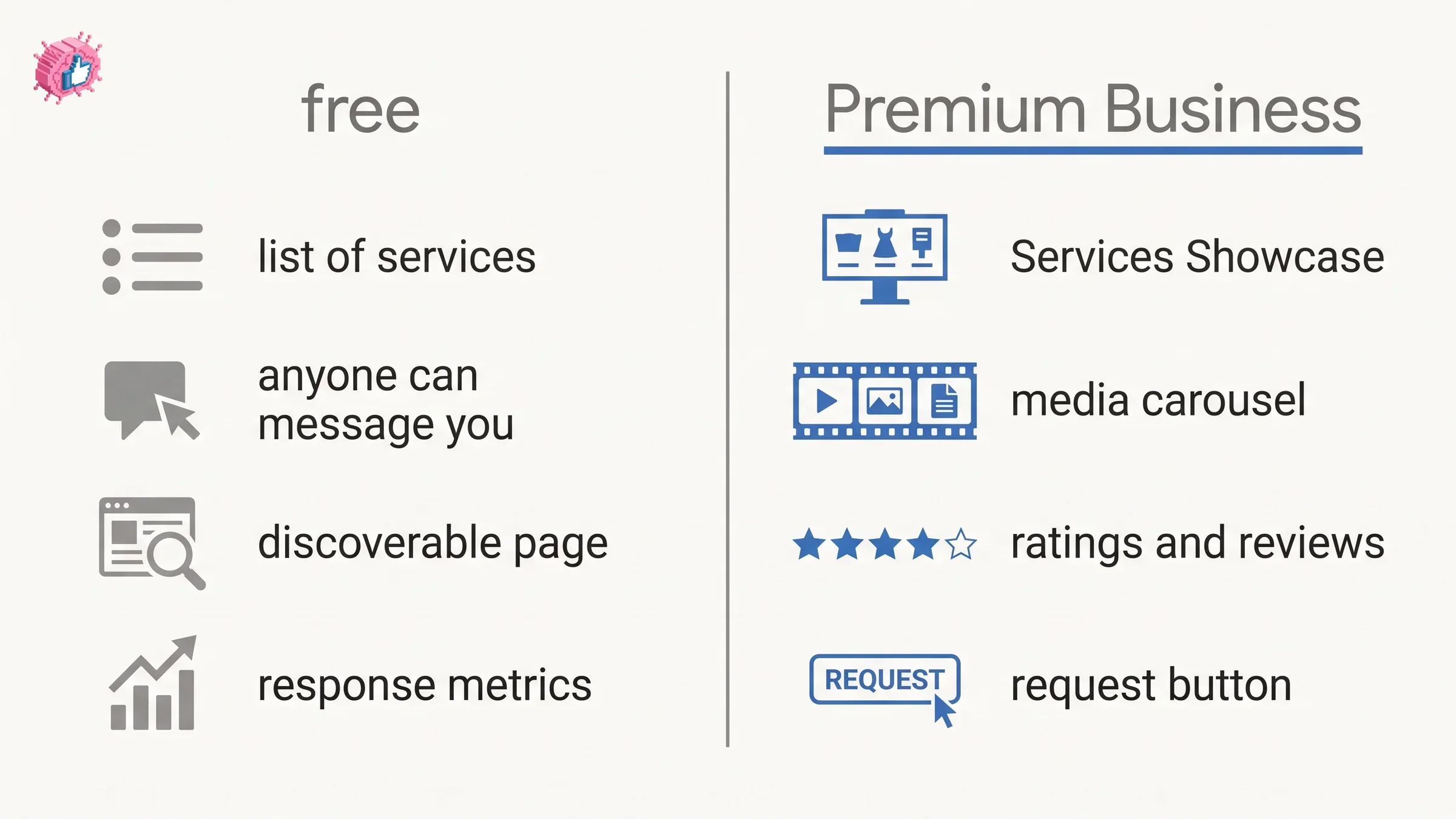
| Free | Premium Business, Sales Navigator or Recruiter Lite | |
|---|---|---|
| Services section on profile | LinkedIn's own pages disagree, see below | Services Showcase, a richer display |
| Media | Not available | Documents, photos, videos and websites, shown in a carousel |
| Ratings and reviews on profile | Not shown | Preview of your description, your ratings, and your most recent four or five star review |
| Call-to-action button | Not available | A request button on your profile, feed posts, messages and search results |
| Inbound project requests | Standard | "Eligible to receive additional project requests from potential clients" |
Two places where LinkedIn's own pages disagree, both worth knowing before you rely on either.
The first is that top row, and it matters most to anyone who will never subscribe. The Service Pages FAQ says the free Services section "shows a list of services you offer." The profile setup article says it "only shows a preview of your services description." A list of services and a preview of one description are different things. LinkedIn publishes both statements and does not say which is current, so expect one of the two and check your own profile once the page is live.
The second is the name of the Premium call-to-action. The profile setup article calls it a Request services button, the Service Pages FAQ calls it a Request proposal button. Only the profile setup article says where it appears, listing the top of your profile, your feed posts, messages and search results. Expect the label you see in the product to be one of the two.
How do clients actually find and hire you?
Through search, then a project request, then a proposal, and then off-platform. LinkedIn sets out the sequence as prose rather than numbering it, but it runs in six stages.
- A potential client finds providers by searching LinkedIn or asking their network for recommendations
- The client submits a project request, effectively a request for proposal, to a provider. LinkedIn adds that "optionally, the client can send the request to additional relevant providers who have a Premium Business, Sales Navigator, and Recruiter Lite subscription"
- Providers respond with a proposal to express interest
- Client and provider "agree on the terms of the project outside of LinkedIn"
- Payment happens "through the service provider's preferred process, outside of LinkedIn"
- The provider can invite the client to write a review
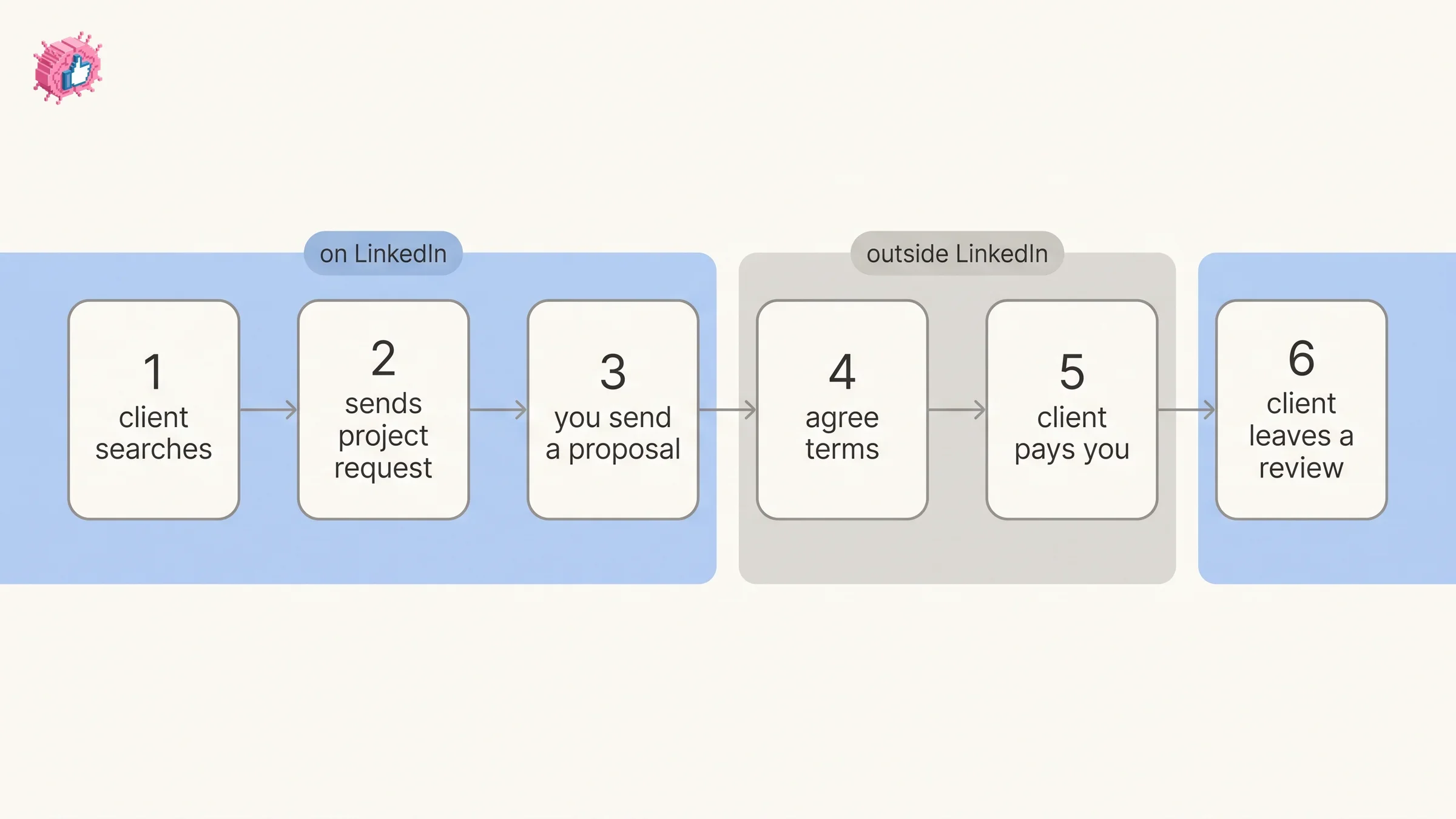
Step four and step five are the ones people get wrong. LinkedIn is a matching layer here, not a marketplace: it does not hold the contract, take a cut, or process payment. Your invoicing and your terms stay exactly where they are today.
Clients can also browse providers directly at linkedin.com/services, and LinkedIn notes that a Service Page "makes your services more discoverable from LinkedIn or using search sites, such as Google." The page is indexable, which is the quiet argument for filling it in properly even if you never expect a LinkedIn-sourced lead.
The two response metrics shown on your page
Reply fast and reply often, because both are published on your page once you clear LinkedIn's thresholds.
- Response time average from the past 180 days is displayed if you respond to inquiries within 24 hours
- Response rate average is displayed if you respond to at least 80% of inquiries
These are the only public performance numbers on a Service Page, and they are visible to buyers comparing you against other providers. A 180-day window is long enough that a slow month is hard to undo quickly.
What LinkedIn is retiring
Linking a Service Page to a Company Page is on the way out. The help article for that feature now opens with a notice: "the option to link your LinkedIn Service Page and Company Page is being discontinued."
Note the tense. LinkedIn says the option "is being discontinued," not that it has been, so the article still documents the process while it winds down. If you are planning a setup around that link, plan without it.
The requirement was restrictive anyway. To link the two, "you must be the only admin on all LinkedIn Pages where you have an admin role," and LinkedIn adds that if you recently removed admins, "it can take up to a week for LinkedIn to recognize this change."
This is worth separating from the Service Page itself, which is not being retired. Only the Company Page link is.
Is a Service Page worth turning on?
For most freelancers and consultants, yes, because the cost is ten minutes and the downside is one locked setting. It is a free, indexable page that lets strangers message you without a connection, on a platform where your buyers already are.
The honest limits are worth stating too. The free tier shows less than the Premium Services Showcase, in one of the two forms described above. Media needs a subscription, and LinkedIn hands you the introduction and nothing else. No contract, no escrow, no payment. If your pipeline already runs on referrals, this adds a channel rather than replacing one.
Set it up with the right owner selected, fill in the pricing field honestly, and answer inquiries inside 24 hours so the response metrics work for you rather than against you. If you are announcing the move itself, our going freelance post templates cover the launch posts.
FAQ
How much does a LinkedIn Service Page cost?
Nothing. LinkedIn states that any member can create a Service Page, market their brand and build an audience for free. A Premium Business, Sales Navigator or Recruiter Lite subscription adds extra features such as media, the Services Showcase display and a request button, but the page itself costs nothing.
Can I switch my Service Page from my profile to my Company Page?
No. LinkedIn says that after you set up your services, "you can't currently change whether your services are offered on your Company Page or on your profile." The word currently leaves the door open, but there is no published route to switch, so choose carefully at setup.
Who can create a LinkedIn Service Page?
Freelancers and small business owners who offer a service. There is no follower requirement and no approval process. Service Pages are available globally with one exception: LinkedIn says they are not available in China.
Do clients pay through LinkedIn?
No. LinkedIn states that clients and providers agree terms outside of LinkedIn and that payment happens through the provider's preferred process, also outside of LinkedIn. LinkedIn provides the introduction and the proposal exchange, not the transaction.
Can people message me about my services if we are not connected?
Yes. LinkedIn states that potential clients can contact providers for free regardless of connection degree, and the setup flow includes a checkbox to allow buyers to message you whatever your degree of connection.
Does a Service Page show up on Google?
LinkedIn says a Service Page "makes your services more discoverable from LinkedIn or using search sites, such as Google." It does not publish indexing guarantees or timings, so treat it as an additional discoverable page rather than a ranking strategy.
Can I still link my Service Page to my Company Page?
That option is being discontinued, according to LinkedIn's own help article on the feature. The article still documents the steps during the wind-down, and the requirement was that you be the only admin on every LinkedIn Page where you hold an admin role.
Sources: LinkedIn Service Pages FAQs, Get started as a service provider on LinkedIn, Offer services on LinkedIn with your personal profile, Link your LinkedIn Service Page and Company Page. LinkedIn help pages checked 10 September 2026.
Automate your LinkedIn for 30 days
ViralBrain plans, writes, and schedules your LinkedIn content, using official LinkedIn APIs so your account stays safe.
- Official LinkedIn APIs, no risk of ban
- You approve every post before it goes live
- Cancel anytime
Keep reading
How to Change Your Profile Picture on LinkedIn
How to add, change and remove your LinkedIn profile photo on desktop, in the app and in a mobile browser, plus who can see it and the file specs.
How to Hide Active Status on LinkedIn
How to hide your LinkedIn active status: the Manage active status setting, its three documented options on desktop and in the app, and what you give up.
How to Log Out of LinkedIn on Desktop and in the App
How to log out of LinkedIn on desktop, on iOS and on Android, how to sign out of other sessions or all devices, and what Keep me logged in changes.