

LinkedIn SEO: how to get found in LinkedIn search
What LinkedIn's own documentation says about how profile search works, what you can actually control, and how to measure whether it is working.
"LinkedIn SEO" gets used for two different jobs. This guide covers one of them: making your profile findable inside LinkedIn's own search, so the people who could hire you, buy from you or recruit you actually turn you up when they look. Getting your LinkedIn posts to rank on Google is a separate problem with separate levers, and there is a short note on it near the end rather than a pretence that the two are the same thing.
It is written for whoever owns the profile and wants it found. If you are looking for a LinkedIn SEO certification or course, that is a different question about acquiring a credential, and this page does not try to answer it.
Everything below about how LinkedIn behaves is either quoted from LinkedIn's own documentation with the date we checked it, or it is flagged as an observation. That distinction matters more here than in most topics, because this subject is full of confident advice with nothing behind it.
Automate your LinkedIn for 30 days
What LinkedIn actually says about how search works
LinkedIn does not publish its ranking factors, and says so directly. On its people-search relevance page, checked 2 September 2026, it states:
"Relevance is determined by a proprietary algorithm that LinkedIn continuously improves."
The same page lists what it may consider:
- The searcher's activity on LinkedIn
- The profiles that match the query
- Patterns from other members who ran similar searches
- The searcher's past search history
Read that list again. Three of the four are about the person searching, not about you. LinkedIn also says results "aren't shown in one fixed order for everyone", with an order unique to each member based on the query and the searcher's context.
That has an uncomfortable implication, and it is the honest starting point for this topic: there is no fixed position for you to climb to. Two recruiters typing the same words can see you in different places, and neither result is your rank.
So what can you actually control?
The useful split is between matching and ranking. You have real influence over the first and very little over the second.
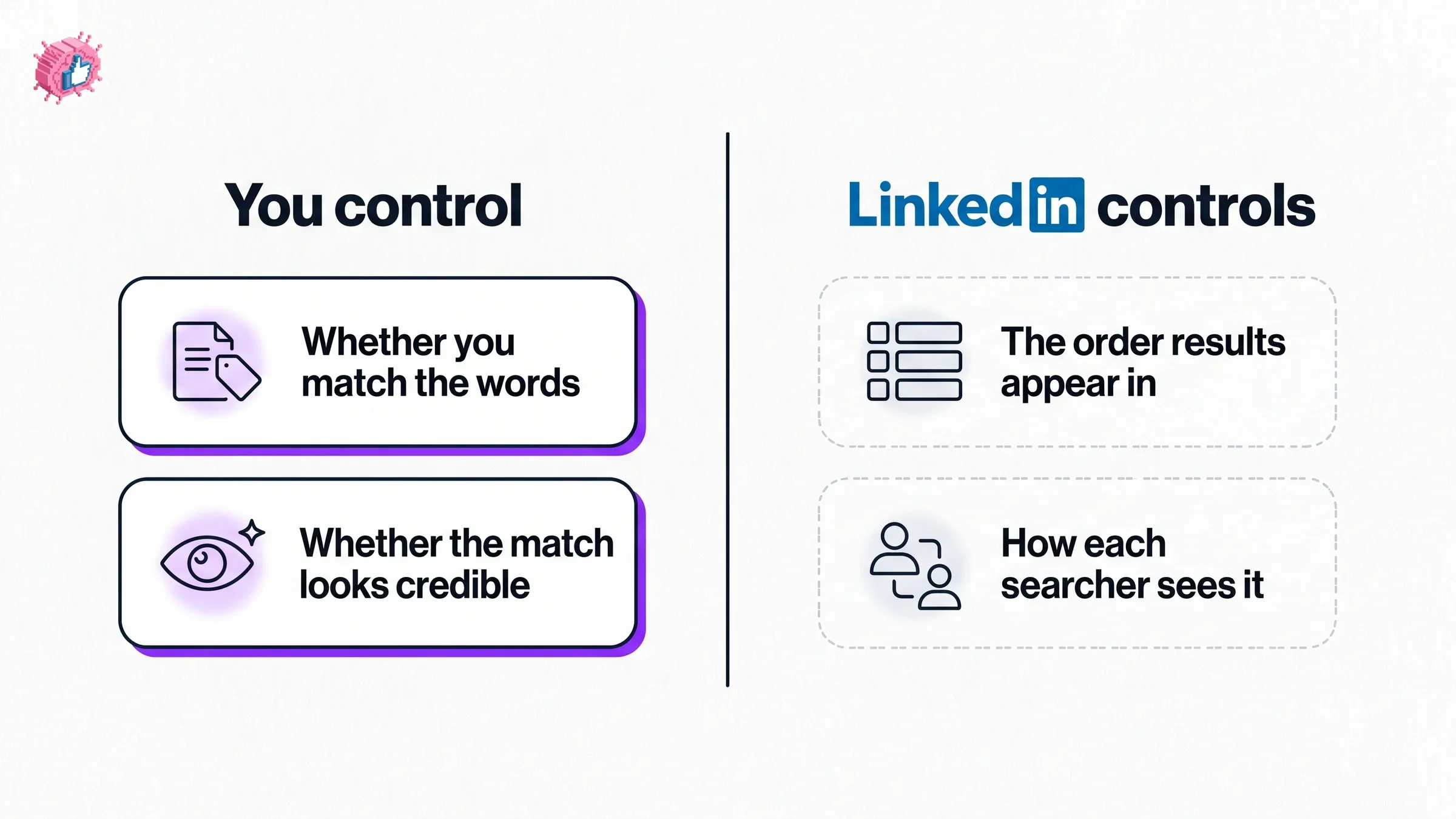
You control whether you are eligible to appear at all. If a searcher types a phrase and nothing on your profile expresses that phrase, no amount of activity puts you in the set. This is the whole of practical LinkedIn SEO: making sure the words your audience uses appear where LinkedIn can read them.
You control how credible the match looks. Once you appear, a human decides whether to click. A headline that reads like a keyword list gets skipped by exactly the people you wanted.
You do not control the order. Per LinkedIn's own wording above, that is personalised per searcher. Any guide promising you position one for a search term is describing something LinkedIn says does not exist in a fixed form.
Put the words your audience uses where they can be read
LinkedIn's search bar handles both keyword and natural-language input. Its documentation on searching states, checked 2 September 2026:
"You can search using keywords or natural, conversational language to discover relevant results."
So write for the phrases a real person would type or say, not a compressed keyword string. In practice that means the terms that describe what you do, at the level of specificity your buyer uses.
A worked example of the gap. A fractional CFO whose headline says "Finance Leader | Strategic Advisor | Growth" has expressed almost nothing searchable. "Fractional CFO for Series A SaaS" expresses a phrase people actually type. The second is shorter, plainer, and does more.
Two things worth being precise about, because they get overstated elsewhere. LinkedIn does not publish which profile fields carry more weight than others, so anyone telling you the headline counts for a specific multiple of the About section is guessing. And there is no published guidance on repeating a phrase a certain number of times. Write it where it is true and stop.
If you want help picking the phrases rather than guessing at them, our LinkedIn keyword checker works through the terms on your profile without an account.
Skills: what the documentation supports, and what it does not
Skills come up in every LinkedIn SEO article, usually with claims the documentation does not make. Here is the split.
Sourced. LinkedIn's Help page on skills, checked 2 September 2026, states: "You can add up to 100 skills to your profile." It also says: "Maintaining a relevant list of skills on your profile will help others understand your strengths and match you with the right opportunities."
Sourced, from LinkedIn's talent blog. "members who list at least one skill, receive up to 2x more profile views and connection requests and up to 4x more messages." Note what that compares: having at least one skill against having none. It is not a claim that more skills produce proportionally more views.
Not sourced. That same Help page does not say skills affect search rankings. The widely repeated line that skills are what get you into recruiter search results is not something LinkedIn states there. Skills are clearly useful and the matching language points that way, but the specific ranking claim is folklore, and this guide is not going to launder it.
The practical version: list the skills that are genuinely yours and that match how your work gets described. The 100 slots are not a target to fill.
Automate your LinkedIn for 30 days
Measure it, because guessing is optional here
LinkedIn gives you a metric for exactly this, and most people never open it. Per LinkedIn Help on Search Appearances, checked 2 September 2026:
"The Search Appearances profile feature displays statistics on how many people found you through a search on LinkedIn."
The same page says it also provides "member insights about those who searched for you, such as their companies and job titles". You reach it from your profile: click the Me icon, choose View profile, scroll to the Analytics section, then Search Appearances.
That companies-and-job-titles breakdown is the part worth using. It tells you whether the people finding you are the people you want. Appearing constantly to the wrong industry is a positioning problem, not a keyword problem, and no amount of profile editing fixes a mismatch between what you say and who you want.
Two honest limits. LinkedIn's Help page does not state how often that data refreshes, so treat the cadence as unknown rather than trusting a number you read elsewhere. And it does not say whether an appearance means anyone actually looked at you, only that they "found you through a search".
For a broader pass over the profile itself rather than the search metric, our LinkedIn profile checker reviews the sections a reader lands on after they find you.
A sensible order to work in
- Write down the three to five phrases you want to be found for, in the words your audience would actually use.
- Check whether those phrases appear anywhere on your profile. Most people find they do not.
- Put them where they are true: headline, About, and the experience entries they belong to.
- Review your skills against those phrases and remove ones that no longer describe you.
- Open Search Appearances and note the companies and titles you currently attract.
- Change one thing at a time, then check again. Changing everything at once tells you nothing.
Step six is the part people skip. Because you cannot see your rank, the only signal you get is whether the mix of people finding you shifts, and that only reads clearly if you changed one variable.
What nobody outside LinkedIn can tell you
Worth stating plainly, because these claims are everywhere and none of them is documented.
- Which profile fields rank strongest, or any weighting between them
- How often to repeat a phrase, or any keyword density figure
- Whether posting activity changes your position in people search
- Whether a specific profile completeness state changes ranking
- How Search Appearances is calculated, or how frequently it updates
- How long a profile change takes to affect anything
If you see a specific number attached to any of those, ask where it came from. LinkedIn describes the algorithm as proprietary and continuously changing, which is exactly the condition under which confident specifics should be distrusted.
The other meaning: ranking LinkedIn content on Google
Different question, and briefly, so as not to blur it. Public LinkedIn profiles and posts can be indexed by search engines, which is why your name often turns up a LinkedIn result. That is Google's ranking system rather than LinkedIn's, with different signals and different tactics, and it is governed partly by your own profile visibility settings.
It deserves its own guide rather than three misleading paragraphs here. If your goal is inbound from Google, treat it as a separate project from the profile-search work above.
FAQ
What is LinkedIn SEO?
LinkedIn SEO usually means optimising your profile so it appears when people search inside LinkedIn for the kind of work you do. It works differently from Google SEO: LinkedIn states that "Relevance is determined by a proprietary algorithm that LinkedIn continuously improves", and that results are not shown in one fixed order for everyone, so there is no single position to rank at. Checked 2 September 2026.
Does LinkedIn have a search algorithm I can optimise for?
LinkedIn confirms it uses one but does not publish how it works. Its people-search relevance page says relevance comes from a proprietary algorithm and lists four things it may consider, three of which describe the person searching rather than your profile. So you can influence whether you match a query, and you cannot control where you land in someone's results.
How do I find the right keywords for my LinkedIn profile?
Start from the phrases your audience would actually type, at the specificity they use, rather than job-title abstractions. LinkedIn's search accepts "keywords or natural, conversational language", so plain phrasing works. Write down three to five target phrases, check whether they appear on your profile at all, and use our LinkedIn keyword checker if you would rather not eyeball it.
How many skills should I add to my LinkedIn profile?
LinkedIn's Help documentation states you can add up to 100, checked 2 September 2026, but that is a ceiling rather than a goal. LinkedIn's talent blog reports that members listing at least one skill "receive up to 2x more profile views and connection requests and up to 4x more messages", which compares having a skill to having none rather than promising returns for filling every slot. List the ones that are genuinely yours.
Do skills affect LinkedIn search rankings?
LinkedIn's Help page on skills does not say so. It says maintaining a relevant list "will help others understand your strengths and match you with the right opportunities", which is matching language, not ranking language. Treat the common claim that skills drive recruiter search rankings as unverified, and add skills because they describe your work accurately.
How do I know whether my LinkedIn SEO is working?
Use Search Appearances, which LinkedIn describes as showing "statistics on how many people found you through a search on LinkedIn", along with insights about searchers' companies and job titles. The titles matter more than the count: attracting the wrong roles is a positioning problem rather than a keyword one. Change one element at a time so the shift is readable.
How long does it take for LinkedIn profile changes to show up in search?
LinkedIn does not publish this, so any specific figure you see is unsourced. The practical approach is to change one thing, then watch Search Appearances over several weeks rather than expecting a same-day effect.
Is LinkedIn SEO different from getting my LinkedIn profile to rank on Google?
Yes, and they are worth keeping separate. Appearing in LinkedIn's internal people search is governed by LinkedIn's own relevance system. Appearing in Google results for your name or expertise depends on Google's ranking and on your profile's public visibility settings. The tactics overlap only loosely, and this guide covers the first.
Automate your LinkedIn for 30 days
ViralBrain plans, writes, and schedules your LinkedIn content, using official LinkedIn APIs so your account stays safe.
- Official LinkedIn APIs, no risk of ban
- You approve every post before it goes live
- Cancel anytime
Keep reading
How to Change Your Profile Picture on LinkedIn
How to add, change and remove your LinkedIn profile photo on desktop, in the app and in a mobile browser, plus who can see it and the file specs.
How to Hide Active Status on LinkedIn
How to hide your LinkedIn active status: the Manage active status setting, its three documented options on desktop and in the app, and what you give up.
How to Log Out of LinkedIn on Desktop and in the App
How to log out of LinkedIn on desktop, on iOS and on Android, how to sign out of other sessions or all devices, and what Keep me logged in changes.