

7 best LinkedIn prospecting tools for sales teams (2026)
Compare the 7 best LinkedIn prospecting tools in 2026 to find, research, and enrich the right prospects, from Sales Navigator to Apollo, Clay, and more.
Prospecting is the part of LinkedIn selling that happens before any message goes out: finding the right people, confirming they fit your ideal customer profile, and pulling accurate contact data. Get that stage wrong and every downstream step, the connection request, the DM, the email, lands on the wrong person.
That is a different job from lead generation, which captures inbound interest, and from DM automation, which sends the outreach. This guide covers the best LinkedIn prospecting tools for the research and list-building stage in 2026. We compare what each tool finds, how accurate its data is, pricing, and which sales team it fits, so you spend your outreach effort on the right accounts instead of guessing.
Why outreach tools are not on this list. Outreach and sequencing platforms do a different job from data tools, so we have kept them apart. Every tool below earns its place at the find, research or enrich stage. Tools whose main job is sending connection requests and follow-up sequences are a separate category with separate risks, and comparing a database to a sequencer on one axis helps nobody.
How we picked. Four things decided the list: whether the tool works against LinkedIn data specifically rather than generic B2B records, how accurate and verifiable its contact data is, whether pricing is published rather than quote-only, and whether it earns its cost next to Sales Navigator instead of duplicating it. Every price below was checked on the vendor's own pricing page, and each entry links to the page we checked.
Automate your LinkedIn for 30 days
Best LinkedIn prospecting tools: a brief overview
- LinkedIn Sales Navigator: Best overall for finding prospects natively. LinkedIn's own premium search with 50+ filters, lead lists, and real-time alerts, straight from the source of truth.
- Apollo.io: Best all-in-one database. Pairs a large B2B contact database with a LinkedIn extension so you find prospects and get verified emails in one place.
- Clay: Best for building enriched lists at scale. Pulls from dozens of data providers and uses AI to research accounts before you ever reach out.
- Lusha: Best for fast contact data on a single profile. A Chrome extension that surfaces B2B emails and direct dials while you browse LinkedIn.
- Evaboot: Best for cleaning Sales Navigator exports. Turns messy Sales Nav search results into a clean spreadsheet with verified emails.
- Wiza: Best for verified email export. Pulls leads out of Sales Navigator with checked emails and phone numbers ready for your CRM.
- Cognism: Best for compliant enterprise prospecting. GDPR-focused data and phone-verified mobile numbers for regulated, high-volume teams.
| Tool | Key strength | Pricing | Best for |
|---|---|---|---|
| LinkedIn Sales Navigator | Native advanced search and lead lists | Free trial; Core $119.99/mo or $1,079.88/yr | Sellers who prospect directly inside LinkedIn |
| Apollo.io | Database plus LinkedIn extension in one | Free plan; Basic $49, Professional $99 | Teams wanting data and outreach together |
| Clay | Multi-source enrichment and AI research | Free plan; Launch $167/mo annual, from $185/mo | Ops and SDR teams building lists at scale |
| Lusha | One-click contact data on LinkedIn | Free plan, 40 credits; Starter $49.90/mo | Reps who need emails and dials fast |
| Evaboot | Clean, deduped Sales Nav exports | From $9/mo annually, plus a Sales Navigator subscription | Sales Navigator users exporting lists |
| Wiza | Verified email and phone export | Free tier; Starter $49, Email $83/mo annual | Reps exporting Sales Nav leads to a CRM |
| Cognism | GDPR-compliant data, verified mobiles | Custom pricing | Enterprise and regulated sales teams |
Every price in this table was checked against the vendor's own pricing page on 29 September 2026. Vendors change these often, so treat the figures as a starting point and confirm on the page we link in each section before you commit budget.
1. LinkedIn Sales Navigator, best overall for prospecting natively
LinkedIn Sales Navigator is the starting point for serious LinkedIn prospecting because it works inside the network where your prospects actually live. Where the free LinkedIn search caps filters and results, Sales Navigator advertises 50+ advanced search filters, saved searches, lead and account lists, and alerts when a prospect changes jobs or posts. It is the closest thing to a source of truth for who someone is on LinkedIn right now.
The trade-off is that Sales Navigator finds and organizes prospects but does not hand you verified emails or let you export lists cleanly. That is why most of the other tools on this list plug into it rather than replace it.
Key features:
- Advanced lead and account search with 50+ filters (seniority, function, headcount, geography, and more)
- Lead lists and account lists to organize your pipeline
- Real-time alerts on job changes, posts, and account news
- Saved searches that resurface new matches automatically
- Notes and tags synced to some CRMs
Best for:
- Sellers who prospect directly inside LinkedIn and want the freshest profile data
- Founders and account executives building a targeted account list by hand
- Teams that treat LinkedIn as the primary channel for finding buyers
Pricing:
- Free trial available
- Core: $119.99 per month per license, or $1,079.88 per year, which LinkedIn describes as a 25% saving and works out at $89.99 a month
- Advanced: $159.99 per month per license, or $1,799.88 per year
- Advanced Plus: customized to team size, CRM integration and onboarding needs, quoted on request
- LinkedIn notes these are estimates that may exclude VAT or GST and are subject to change
Verified on LinkedIn's compare plans page.
Pros:
- The most accurate, up-to-date view of who a prospect is, because it is LinkedIn's own data
- Job-change and post alerts create natural, timely reasons to reach out
- Deep filtering narrows a huge network down to a workable shortlist
Cons:
- No verified email or phone export on its own, so you need a companion tool
- The price is hard to justify if you only prospect occasionally
- Cleaning and exporting lists requires a third-party tool like Evaboot or Wiza
2. Apollo.io, best all-in-one prospecting database
Apollo.io combines a large B2B contact database with a LinkedIn Chrome extension, so you can identify a prospect and pull their verified email or phone in the same motion. For teams that want research, data, and outreach sequencing under one subscription rather than stitching several tools together, Apollo is the most complete single platform in this list.
The database is broad, and the LinkedIn extension surfaces contact data directly on profiles. The honest caveat is that data accuracy on any large database varies by region and role, so verify before you send at volume.
Key features:
- B2B contact database with hundreds of millions of contacts
- LinkedIn Chrome extension that reveals emails and phone numbers on profiles
- Built-in sequences for email and multichannel outreach
- Buying-intent signals and filters to prioritize accounts
- CRM sync with common systems
Best for:
- SDR and sales teams that want data plus outreach in one tool
- Founders running lean who cannot manage a separate data and sequencing stack
- Teams prospecting across email and LinkedIn together
Pricing:
- Free plan at $0
- Basic: $49
- Professional: $99
- Enterprise: contact for pricing
Verified on Apollo's pricing page. Apollo publishes the tier prices without stating the billing basis on the page itself, so check whether $49 is the monthly or annual-equivalent rate before you budget.
Pros:
- One subscription covers finding, enriching, and reaching out
- Generous free plan makes it easy to test data quality first
- Intent data helps you prioritize which prospects to work first
Cons:
- Data accuracy varies by geography and seniority; verify high-value contacts
- The all-in-one breadth can be more than a pure researcher needs
- Sequencing features overlap with tools you may already run
3. Clay, best for building enriched lists at scale
Clay is a data enrichment and orchestration tool that pulls from more than 50 data providers in one place. Instead of trusting a single database, Clay lets you run a prospect through waterfall enrichment, trying provider after provider until it finds a verified email or the data point you need. It also uses AI to research accounts, so your list arrives with context, not just names.
Clay is powerful, which is also its main cost: it has a steeper learning curve than a one-click extension, and it rewards teams that think in workflows.
Key features:
- Waterfall enrichment across 50+ data providers for higher match rates
- AI research agents that summarize accounts and find custom data points
- Table-based workflows to build and score prospect lists
- Integrations with Sales Navigator, CRMs, and outreach tools
- Templates for common prospecting plays
Best for:
- Revenue operations and SDR teams building lists programmatically
- Teams that want enriched, scored lists rather than raw exports
- Operators comfortable building repeatable workflows
Pricing:
- Free plan with 100 data credits and 500 actions a month, up to 200 rows per table, and unlimited seats and tables
- Launch: $167 a month on annual billing, or starting at $185 a month
- Launch's price scales with the volume of actions and data credits you choose, for example from 180,000 actions a year at $54 a month up to 2.4 million at $486 on annual billing. Growth, the next tier, starts at $446 a month on annual billing
- The free plan does not include phone number enrichment
Verified on Clay's pricing page.
Pros:
- Waterfall enrichment produces much higher data match rates than a single source
- AI research adds context that makes outreach more relevant
- One workspace replaces several point tools for list building
Cons:
- Steeper learning curve than a simple contact-lookup extension
- Credit-based pricing can climb quickly at high volume
- Overkill for a rep who just needs a few emails a day
4. Lusha, best for fast contact data on a single profile
Lusha is the quickest way to pull a B2B email or direct dial while you are already looking at a LinkedIn profile. The Chrome extension sits on the profile, and one click reveals the contact data it has on file. For reps who work prospect by prospect rather than in bulk, that speed is the whole value.
Lusha is less suited to building large lists in one pass, and like any provider its coverage is stronger in some regions than others. But for on-the-spot lookups during live prospecting, it is hard to beat on simplicity.
Key features:
- Chrome extension that reveals emails and direct dials on LinkedIn profiles
- Bulk enrichment for uploaded lists
- Data accuracy indicators on contacts
- CRM integrations to push contacts straight into your pipeline
- Team usage controls and credit management
Best for:
- Individual reps who prospect one profile at a time
- Sellers who want direct dials, not just email addresses
- Small teams that need contact data without a heavy setup
Pricing:
- Free plan with 40 credits
- Starter: $49.90 a month, or $449.10 a year, with 400 credits
- Professional: $69.90 a month with 600 credits, and credit top-ups above that
- Lusha lists five plans in total
Verified on Lusha's pricing page.
Pros:
- One of the fastest profile-to-contact-data experiences available
- Direct dials are useful for teams that still cold call
- Simple enough to onboard a rep in minutes
Cons:
- Better for one-off lookups than large-list building
- Coverage and accuracy vary by region and seniority
- Credits deplete quickly if you research heavily
Automate your LinkedIn for 30 days
5. Evaboot, best for cleaning Sales Navigator exports
Evaboot solves one specific, annoying problem: getting a clean, usable spreadsheet out of a Sales Navigator search. Sales Navigator does not let you export, and raw scrapes are full of junk, emojis in names, wrong casing, and unqualified rows. Evaboot exports your search, filters out the records that do not truly match your criteria, and finds and verifies emails.
It is a focused utility rather than a full platform, and it assumes you already run Sales Navigator. Within that lane, it does its one job cleanly.
Key features:
- One-click export of Sales Navigator lead and account searches
- Automatic filtering that removes rows that do not match your filters
- Email finding and verification on exported leads
- Clean formatting of names, titles, and companies
- CSV output ready for your CRM or outreach tool
Best for:
- Sales Navigator users who need lists as clean spreadsheets
- SDR teams that build searches in Sales Nav and work them in a CRM
- Anyone tired of manually cleaning scraped LinkedIn data
Pricing:
- Credit-based, from $9 a month for 100 credits a month, billed annually, which works out at $0.09 a credit
- One credit per lead or account exported, one more for an email Evaboot finds and verifies, so a lead with its email costs two
- Credits roll over, and you can cancel at any time
- Higher credit tiers exist but Evaboot's pricing page prices them through a slider rather than named plans, so check the vendor site for the tier you need
Verified on Evaboot's pricing page. Evaboot exports from Sales Navigator, so budget for that subscription alongside it.
Pros:
- Removes the manual cleanup that eats prospecting time
- Filtering catches the false matches Sales Nav search lets through
- Narrow focus means it is simple to use
Cons:
- Only useful if you already pay for Sales Navigator
- Not a research or database tool in its own right
- Credit model means costs scale with export volume
6. Wiza, best for verified email and phone export
Wiza sits in a similar lane to Evaboot: it turns Sales Navigator searches into exportable lists with verified contact data. The emphasis is on verification, so the emails and phone numbers you export are checked before they land in your CRM, which protects sender reputation and cuts bounce rates.
If your bottleneck is getting deliverable contact data out of Sales Navigator at volume, Wiza is built for exactly that. It is not where you research or decide who to target; that still happens in Sales Navigator.
Key features:
- Export of Sales Navigator leads with verified emails and phone numbers
- Real-time email verification to reduce bounces
- Bulk list export to CSV or CRM
- Chrome extension for individual profile lookups
- Integrations with common CRMs and outreach tools
Best for:
- Reps exporting Sales Nav leads into a CRM or sequencer
- Teams that care about deliverability and low bounce rates
- Sellers who need phone numbers alongside emails
Pricing:
- Free tier at $0 with 20 valid emails and 5 phone numbers
- Billed monthly: Starter at $49 a month per user for 100 valid emails and 100 phone numbers, with extras at $0.15 and $0.35 each; Email at $99 a month for 500 valid emails; Email plus Phone at $199 a month for 500 valid emails and 500 phone numbers
- Billed annually: Email at $83 a month per user, billed at $990 a year, with unlimited email reveals and 2,500 exports a month; Email plus Phone at $166 a month, billed at $1,990 a year, with unlimited email and phone reveals
- Team: custom pricing, billed annually, for three or more users
Verified on Wiza's pricing page.
Pros:
- Verification keeps bounce rates and spam risk down
- Exports both email and phone in one pass
- Free tier lets you test data quality before paying
Cons:
- Depends on Sales Navigator for the actual prospecting
- Credit-based costs rise with export volume
- Overlaps with Evaboot, so you rarely need both
7. Cognism, best for compliant enterprise prospecting
Cognism is a premium B2B sales intelligence platform aimed at enterprise and regulated teams. Its differentiators are compliance and phone accuracy: the data is built with GDPR and CCPA in mind, and its phone-verified mobile numbers are checked by a research team rather than guessed. For teams selling into strict regions or industries, that compliance posture matters as much as coverage.
Cognism is priced for larger teams and does not publish public pricing, so it is a fit when data quality and legal defensibility justify an enterprise contract.
Key features:
- GDPR and CCPA-focused B2B contact and company data
- Phone-verified mobile numbers for higher connect rates
- Intent data and sales-trigger events
- Chrome extension and CRM integrations
- International coverage across EMEA and North America
Best for:
- Enterprise sales teams with compliance requirements
- Teams selling into strict regulatory regions
- Organizations that need phone-verified mobiles at scale
Pricing:
- Custom pricing only, quoted per team
- No public free tier; demos available on request
- Sales Prospecting comes in Standard and Pro packages, with CRM Enrichment and Data-as-a-Service priced on subscription structure, usage and delivery requirements
Verified on Cognism's pricing page, which publishes no prices and routes to a personalized quote.
Pros:
- Compliance-first data reduces legal risk in regulated markets
- Phone-verified mobiles improve cold-call connect rates
- Strong international, especially EMEA, coverage
Cons:
- Enterprise pricing puts it out of reach for solo sellers and small teams
- No transparent pricing to evaluate quickly
- More platform than a small team needs
How to choose the best LinkedIn prospecting tool for your needs
The seven tools above solve different parts of prospecting. Work through these questions to land on the right one, or the right small stack.
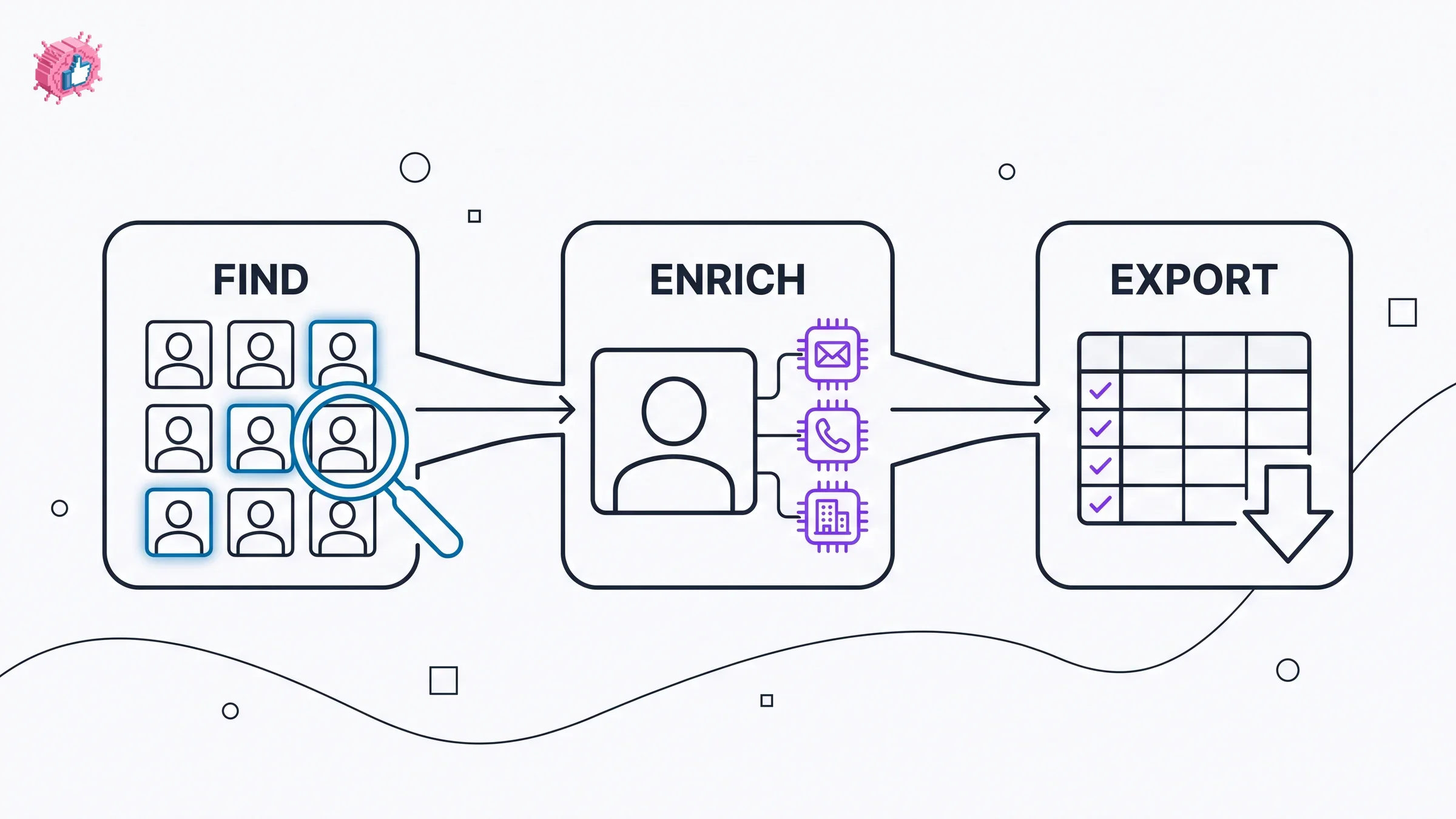
Most confusion about which tool to buy comes from not knowing which of these three stages you are actually weak at.
1) Do you need to find prospects, or enrich a list you already have?
This is the first split. Sales Navigator is where you find and decide who to target. Everything else largely enriches or exports what you find there.
- If you need to find and prioritize prospects: start with LinkedIn Sales Navigator
- If you already have a target list and need contact data: Apollo, Lusha, or Clay
- If you need clean exports from Sales Navigator: Evaboot or Wiza
2) Do you work one prospect at a time or in bulk?
Your workflow decides whether you want an extension or a list engine.
- One profile at a time: Lusha for fast single lookups
- Bulk list building with enrichment: Clay for scale, Apollo for an all-in-one
- Bulk export from Sales Nav: Evaboot or Wiza
3) How important is compliance and phone accuracy?
For regulated industries or heavy cold calling, data provenance matters.
- Regulated regions or enterprise procurement: Cognism
- Direct dials for a calling team: Lusha or Cognism
- Email-led outreach: Apollo, Wiza, or Clay
4) What is your budget and team size?
Match the spend to your motion, not the sticker price.
- Solo or small team on a budget: Apollo free plan or Lusha, plus Sales Navigator
- Growing SDR team: Sales Navigator plus Clay or Apollo
- Enterprise: Cognism for compliant data at scale
Run a short trial with your actual target accounts before committing. A tool that looks great on a demo list can have thin coverage in your specific niche or region, and the only way to know is to test it on the accounts you sell to.
If your outbound prospecting fills the top of the funnel, the fastest way to lift reply rates is to be someone your prospects already recognize before you ever hit send. That is where consistent LinkedIn content comes in. ViralBrain analyzes the top creators in your niche, learns your voice, and helps you publish posts that keep you visible to the exact buyers you are prospecting, so your outreach lands warm instead of cold. Pair your prospecting stack with a real LinkedIn content strategy, learn what actually earns reach in the how to go viral on LinkedIn guide, and try the free LinkedIn post generator to make posting sustainable. A €1 trial covers the full platform when you are ready.
FAQ
What are LinkedIn prospecting tools?
LinkedIn prospecting tools help you find, research, and gather contact data for the right buyers before you reach out. They cover the research stage of sales: identifying prospects who fit your ideal customer profile, confirming details, and pulling verified emails or phone numbers. This is distinct from tools that automate connection requests or DMs.
What is the best LinkedIn prospecting tool in 2026?
For most teams, LinkedIn Sales Navigator is the best starting point because it uses LinkedIn's own data to find and organize prospects. Then you pair it with an enrichment or export tool like Apollo, Clay, Evaboot, or Wiza to get verified contact data. The right pick depends on whether you prospect one profile at a time or build lists in bulk.
What is the difference between prospecting and lead generation on LinkedIn?
Prospecting is the outbound research stage: you actively find and qualify the specific people you want to sell to. Lead generation is broader and often inbound: it captures interest from people who find you, through content, ads, or forms. Prospecting tools help you build target lists, while lead generation focuses on capturing and converting demand.
Do I need Sales Navigator to use these tools?
Several tools, including Evaboot and Wiza, are built specifically to export and clean Sales Navigator lists, so they assume you have it. Others, like Apollo, Clay, and Lusha, have their own databases and can work without Sales Navigator, though many teams use them alongside it for the freshest LinkedIn data.
Is there a free LinkedIn prospecting tool?
Yes. Apollo, Lusha, Clay, and Wiza all offer free tiers with limited monthly credits, which is enough to test data quality on your target accounts. LinkedIn Sales Navigator offers a free trial rather than a permanent free tier. Cognism is enterprise-only with custom pricing and no public free plan.
How accurate is the contact data from these tools?
Data accuracy varies by provider, region, and seniority, and no single database is complete. Tools like Clay improve match rates by checking multiple providers, and Wiza and Cognism emphasize verification to cut bounce rates. Always verify high-value contacts before sending at volume.
Can prospecting tools get my LinkedIn account restricted?
Research and enrichment tools that read public data are generally lower risk than aggressive automation tools that send mass connection requests or messages. To stay safe, prospect through official channels like Sales Navigator, respect LinkedIn's limits, and avoid tools that automate large volumes of outreach from your account.
How does content fit into a LinkedIn prospecting strategy?
Prospecting fills your pipeline, but consistent LinkedIn content warms it. When a prospect already recognizes you from their feed, your outreach gets far higher reply rates. Publishing regularly, building a clear LinkedIn personal brand, turns cold prospecting into warm conversations. Understanding how the LinkedIn algorithm distributes your posts helps you stay visible to the exact buyers you are prospecting, and the free LinkedIn engagement benchmarks tool shows whether that content is landing. Content is a natural complement to any tool on this list.
Automate your LinkedIn for 30 days
ViralBrain plans, writes, and schedules your LinkedIn content, using official LinkedIn APIs so your account stays safe.
- Official LinkedIn APIs, no risk of ban
- You approve every post before it goes live
- Cancel anytime
Keep reading

10 Best LinkedIn Lead Generation Tools in 2026
Compare the 10 best LinkedIn lead generation tools and software in 2026: Waalaxy, Expandi, Dripify, Apollo, Clay and Sales Navigator on price and fit.

6 best LinkedIn comment generators in 2026
Six LinkedIn comment generators compared, with pricing checked on each vendor's own page on 3 September 2026 and the ones that publish nothing named as such.

LinkedIn Carousel Size: 1080x1080px (Exact Specs for 2026)
The recommended LinkedIn carousel size is 1080x1080px (square) or 1080x1350px (portrait). Get the exact specs, safe zone, and PDF export limits for 2026.