

10 Best LinkedIn Lead Generation Tools in 2026
Compare the 10 best LinkedIn lead generation tools and software in 2026: Waalaxy, Expandi, Dripify, Apollo, Clay and Sales Navigator on price and fit.
LinkedIn is where most B2B buyers actually are, but turning that audience into a steady pipeline takes more than a personal profile and good intentions. The best LinkedIn lead generation tools handle the heavy lifting: finding the right prospects, enriching their contact data, running outreach sequences, and feeding everything back into your CRM so nothing slips. If your focus is the research stage of finding and qualifying the right people, see the dedicated best LinkedIn prospecting tools.
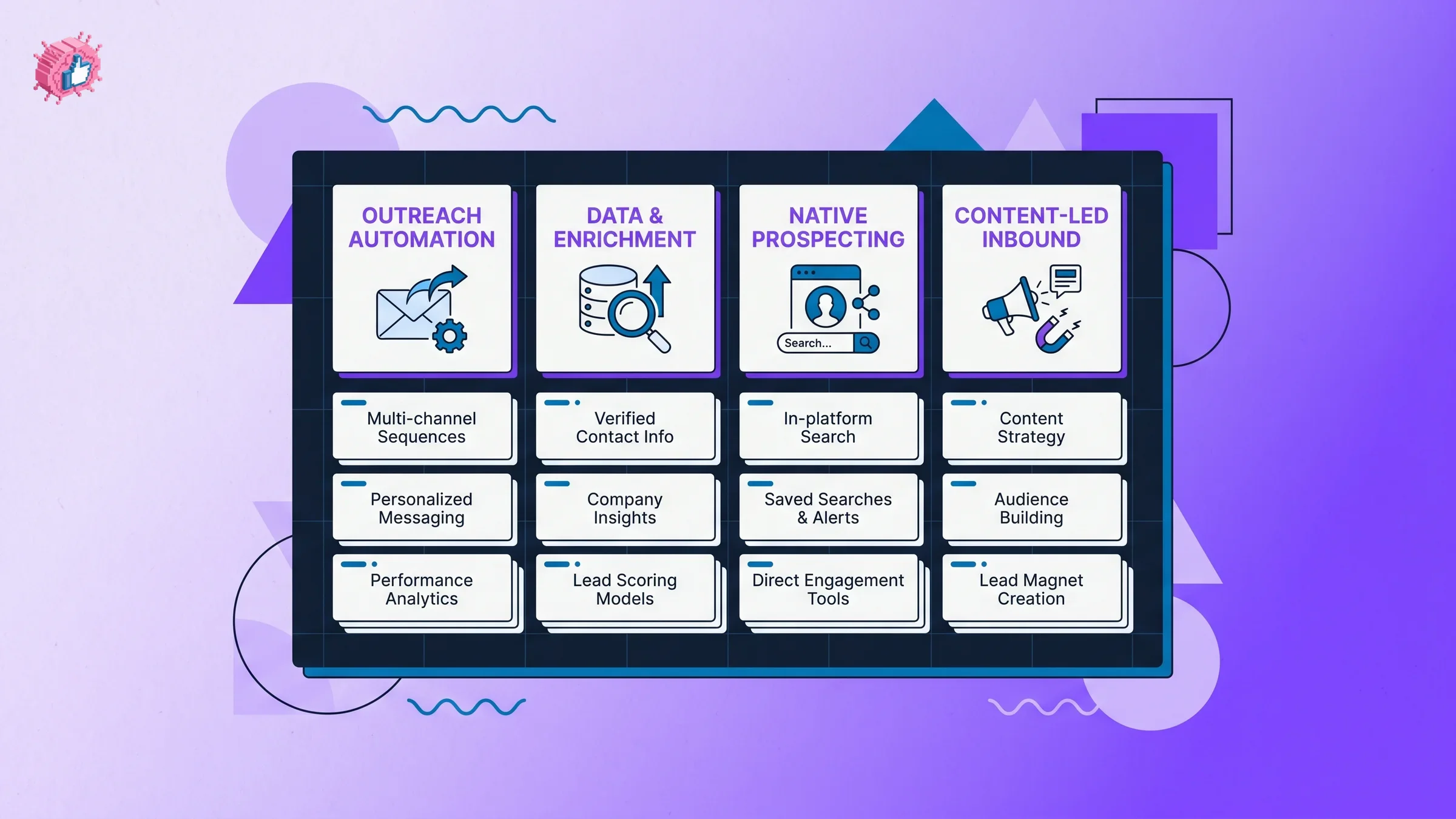
The catch is that these tools fall into very different categories, and picking the wrong one wastes budget. Some automate connection requests and DMs. Some pull verified emails and phone numbers off profiles. Some build and enrich lead lists at scale. And one growing category skips outreach entirely by generating content that pulls leads to you.
In this guide, we compare the 10 best LinkedIn lead generation tools in 2026, covering pricing, features, honest trade-offs, and a decision framework so you can match a tool to how your team actually works.
Automate your LinkedIn for 30 days
Best LinkedIn lead generation tools: a brief overview
- Waalaxy: Best LinkedIn lead generation tool for solo founders and small teams who want simple, template-driven outreach without technical setup.
- Expandi: Best cloud-based LinkedIn automation for agencies and teams that need account safety, dedicated IPs, and conditional sequences.
- Dripify: Best beginner-friendly LinkedIn drip-campaign tool that runs in the cloud with your device off.
- Apollo.io: Best all-in-one B2B sales intelligence and CRM with a 210M+ contact database for prospecting and enrichment.
- Clay: Best LinkedIn lead enrichment and GTM automation tool for technical teams building lists at scale.
- LinkedIn Sales Navigator: Best native LinkedIn prospecting tool with advanced search and InMail on first-party data.
- Lemlist: Best multichannel outreach tool for chaining LinkedIn and email in a single campaign.
- Phantombuster: Best LinkedIn scraping and automation toolkit for data extraction across LinkedIn and Sales Navigator.
- Dux-Soup: Best budget LinkedIn automation extension for individuals testing outreach for the first time.
- Wiza and LeadIQ: Best contact-extraction tools for pulling verified emails and phone numbers off LinkedIn and Sales Navigator.
| Tool name | Key strength | Pricing | Best for |
|---|---|---|---|
| Waalaxy | Template-driven LinkedIn outreach via Chrome extension | Free tier; paid from EUR 19/user/mo | Solo founders and small teams |
| Expandi | Cloud automation with dedicated IPs and smart sequences | From $79/seat/mo (annual) | Agencies and safety-conscious teams |
| Dripify | Cloud LinkedIn drip campaigns with A/B testing | From $39/user/mo (annual) | Beginners running first campaigns |
| Apollo.io | 210M+ contact database with sequencing and CRM | Free tier; paid from $49/user/mo | Sales teams wanting an all-in-one stack |
| Clay | Waterfall enrichment across 150+ data sources | Free tier; paid from ~$185/mo | Technical GTM teams building lists |
| Sales Navigator | Advanced search and InMail on LinkedIn's own data | From $119.99/mo | Prospectors living inside LinkedIn |
| Lemlist | Multichannel sequences mixing LinkedIn and email | LinkedIn from $87/mo (annual) | Teams running email plus LinkedIn |
| Phantombuster | Pre-built scraping and automation Phantoms | From ~$69/mo | Data-focused growth and ops teams |
| Dux-Soup | Cheapest LinkedIn automation browser extension | From $11.25/mo (annual) | Individuals testing outreach cheaply |
| Wiza / LeadIQ | Verified email and phone extraction with CRM sync | Wiza from $49/mo; LeadIQ from $200/mo | SDRs exporting contacts at scale |
1. Waalaxy, best for solo founders and small teams
Waalaxy is a Chrome-extension LinkedIn outreach tool built for people who want results without a technical setup. You install it, pick from a library of pre-built campaign sequences, and it automates connection requests, profile visits, messages, and follow-ups on your behalf. It is one of the most approachable LinkedIn lead generation tools on the market, which is why solo founders and lean teams reach for it first.
The higher Business tier adds an email finder and cold email, so you can layer multichannel touches on top of LinkedIn outreach. It is EUR-priced and leans toward simplicity over deep configurability, which is exactly the trade most small operators want.
Key features:
- Automated connection requests, profile visits, and message sequences
- Library of 99+ campaign templates to copy and launch
- Email-finder credits and cold email on the Business tier
- CRM sync and a free Inbox add-on for managing replies
- Runs as a Chrome extension on your own LinkedIn session
Best for:
- Solo founders sending their first cold LinkedIn campaigns
- Small teams who want pre-built sequences over manual config
- Operators who prefer a low monthly entry price in EUR
Pricing:
- Free tier with around 80 invites per month
- Paid from EUR 19/user/month (Pro), then Advanced EUR 49 and Business EUR 69
- Annual billing cuts the cost roughly in half
Pros:
- Easiest setup of any outreach tool in this list
- Generous free tier to test before paying
- Template library removes the blank-campaign problem
Cons:
- Browser-extension automation runs on your own account, which carries ban risk under LinkedIn's terms
- Less configurable than cloud tools like Expandi for complex sequences
2. Expandi, best cloud-based LinkedIn automation for agencies
Expandi is a fully cloud-based LinkedIn automation platform built around account safety and conditional logic. Each seat gets a dedicated country IP with warm-up, which is why agencies and teams managing client accounts trust it more than browser extensions that run on a shared session. Its "smart sequences" let you branch outreach based on whether someone accepts a request, replies, or opens an email.
For teams running outreach as a serious channel, Expandi's white-label features, unlimited campaigns, and webhook integrations make it the operational workhorse of the category. It costs more than entry-level tools, but the safety architecture is the point.
Key features:
- Conditional smart sequences across LinkedIn and email
- Dedicated country IP with account warm-up per seat
- Unlimited campaigns with scheduling, blacklists, and webhooks
- White-label setup for agencies managing client outreach
- Fully cloud-based, so campaigns run without your device on
Best for:
- Agencies running LinkedIn outreach for multiple clients
- Teams that prioritize account safety and dedicated IPs
- Operators building branched, multi-condition sequences
Pricing:
- $99/seat/month (Business) billed monthly
- $79/seat/month on annual billing
- Agency pricing is custom; no free plan, 7-day trial available
Pros:
- Strongest account-safety architecture in this list
- Smart sequences handle complex branching logic
- White-label and webhooks suit agency workflows
Cons:
- No free plan and a higher entry price than Waalaxy or Dux-Soup
- Native image and GIF personalization requires a third-party add-on
3. Dripify, best beginner-friendly LinkedIn drip-campaign tool
Dripify is a cloud-based LinkedIn automation tool designed to make drip campaigns approachable. You build a sequence of visits, connection requests, messages, and follow-ups, and Dripify runs it from the cloud even when your device is off. It sits between Waalaxy's simplicity and Expandi's depth, with A/B testing and step-level analytics that help beginners learn what is actually working.
The platform includes safety features, a dedicated inbox for managing conversations, and team management for small sales teams. For someone running their first structured LinkedIn lead generation campaign, Dripify's guided flow shortens the learning curve.
Key features:
- Drip sequences of visits, connects, messages, and follow-ups
- A/B testing on messaging and sequence steps
- Advanced and step-level campaign analytics
- Dedicated inbox and team management features
- Cloud-based execution that runs with your device off
Best for:
- Beginners launching their first LinkedIn outreach sequence
- Small sales teams wanting analytics without complexity
- Operators who want A/B testing built in from the start
Pricing:
- $59/user/month (Basic) billed monthly, $39/user/month annual
- Pro $79 and Advanced $99 monthly, with annual discounts
- 7-day trial, no permanent free plan; Enterprise is custom
Pros:
- Gentle learning curve with a guided campaign builder
- Built-in A/B testing helps optimize early
- Cloud execution keeps campaigns running around the clock
Cons:
- No permanent free plan to test long term
- Automation runs against LinkedIn's terms, so account-ban risk applies
4. Apollo.io, best all-in-one B2B sales intelligence and CRM
Apollo.io is a sales intelligence platform that combines a 210M+ contact database with prospecting, enrichment, email sequencing, and a lightweight CRM. Where the outreach tools above act on people you already find, Apollo helps you find them in the first place, then reveals verified emails and phone numbers through its Chrome extension as you browse LinkedIn or Sales Navigator.
For sales teams that want their prospecting, enrichment, and outreach in one place rather than stitching together five subscriptions, Apollo is the most complete single platform in this roundup. Its credit-based reveal model means real spend depends on usage, so model your volume before committing.
Key features:
- 210M+ contact database with 65+ search filters
- Chrome extension that pulls verified emails and phones off LinkedIn
- Credit-based contact reveals tied to your plan
- Email sequencing and a built-in dialer
- Lightweight CRM to manage pipeline without a separate tool
Best for:
- Sales teams wanting prospecting, data, and outreach in one stack
- SDRs working lists directly from LinkedIn and Sales Navigator
- Founders who want a CRM without buying a separate platform
Pricing:
- Free tier with 100 credits per month
- Paid from $49/user/month (Basic, annual) or $59 monthly
- Professional $79 and Organization $119 (3-seat minimum)
Pros:
- Massive contact database reduces the need for separate data tools
- All-in-one stack lowers total tool spend for many teams
- Generous free tier for early testing
Cons:
- Credit-driven pricing means real cost scales with usage, often above list price
- LinkedIn removed Apollo's company page in 2025, a reminder that data reliance carries platform risk
5. Clay, best LinkedIn lead enrichment and GTM automation
Clay is a spreadsheet-style GTM automation tool that runs "waterfall" enrichment across 150+ data providers. You import or scrape a list of LinkedIn prospects, then Clay cascades through multiple sources to find the best available email, phone, and firmographic data, filling gaps that any single provider would miss. Technical growth and revenue teams use it to build and enrich large lead lists at scale.
Clay's Claygent AI columns can research prospects, detect job changes, and surface intent signals, then push enriched leads into your CRM and outreach tools. It is powerful but has a real learning curve, and its pricing was overhauled in March 2026 to a dual data-credits and actions model, so model your spend carefully.
Key features:
- Waterfall enrichment across 150+ data sources
- LinkedIn list import and scraping into a spreadsheet view
- Claygent AI columns for research, job-change, and intent signals
- Integrations with major CRMs and outreach platforms
- Programmatic, scalable list-building for technical teams
Best for:
- Technical GTM and revenue-operations teams
- Companies building large enriched lead lists programmatically
- Teams that want maximum data coverage via waterfalls
Pricing:
- Free tier with around 500 actions per month
- Paid from roughly $185/month (Launch, annual)
- Growth around $446/month; Enterprise is custom
Pros:
- Best data coverage in this list thanks to waterfall enrichment
- AI columns automate prospect research at scale
- Flexible enough to power almost any GTM workflow
Cons:
- Steep learning curve compared with point tools
- Pricing changed in March 2026, and real spend varies heavily with usage
6. LinkedIn Sales Navigator, best native LinkedIn prospecting tool
LinkedIn Sales Navigator is LinkedIn's own premium prospecting product, built on first-party data that no third-party scraper can match for accuracy. It gives you 50+ lead and account filters, saved searches with alerts, and InMail to reach people outside your network. For teams that want to prospect inside LinkedIn without touching automation that risks their account, Sales Navigator is the safest foundation.
It is also the backbone many other tools depend on: Wiza, Apollo, and Phantombuster all read from Sales Navigator searches. Treat it as the data layer your prospecting sits on rather than an outreach engine in itself.
Key features:
- 50+ advanced lead and account search filters
- 50 InMail messages per month to reach beyond your network
- Saved searches with new-lead alerts
- Account IQ and Relationship Explorer for account mapping
- CRM sync on the Advanced Plus tier
Best for:
- Prospectors who want first-party data accuracy
- Teams avoiding automation-related account risk
- Sales orgs that pair it with extraction or outreach tools
Pricing:
- $119.99/month (Core) or roughly $1,080/year
- Advanced $159.99/month
- Advanced Plus is custom, around $1,600/seat/year
Pros:
- Most accurate, first-party LinkedIn data available
- No ToS risk since it is LinkedIn's own product
- Foundation that most extraction tools build on
Cons:
- No automation or sequencing, so outreach stays manual
- Expensive per seat, with the best CRM features locked to the top tier
Automate your LinkedIn for 30 days
7. Lemlist, best multichannel outreach tool
Lemlist is a multichannel cold outreach platform that lets you chain email, LinkedIn, and even calls or SMS into a single campaign. Instead of treating LinkedIn as a standalone channel, Lemlist sequences a LinkedIn visit, a connection request, and a message alongside email steps, so a prospect gets coordinated touches across channels. It is a strong fit for teams that already run cold email and want to add LinkedIn without a second tool.
It includes a built-in lead database and supports multiple senders, which helps teams scale outreach while keeping per-sender volume safe. The catch is that LinkedIn steps require its Multichannel tier, not the cheapest email-only plan.
Key features:
- Multichannel sequences mixing LinkedIn, email, and calls
- LinkedIn visits, follows, invites, messages, and voice notes
- Built-in lead database for sourcing prospects
- Multiple sender support for safer scaling
- Personalization across every step of a campaign
Best for:
- Teams already running cold email who want to add LinkedIn
- Operators who want coordinated multichannel touches
- Sales teams managing several sending identities
Pricing:
- Email-only plan from $69/month ($55 annual)
- LinkedIn requires the Multichannel tier at $109/month ($87 annual)
- Enterprise is custom
Pros:
- True multichannel coordination in one campaign
- Built-in lead database reduces sourcing friction
- Multiple senders support safer volume scaling
Cons:
- LinkedIn features sit behind the pricier Multichannel tier
- Most value comes when email is your primary channel, not LinkedIn
8. Phantombuster, best LinkedIn scraping and automation toolkit
Phantombuster is a cloud library of pre-built "Phantoms" that scrape data and automate actions across LinkedIn, Sales Navigator, and other networks. You connect your account, pick a Phantom (such as Sales Navigator search export or auto-connect), and schedule it to run in the cloud. For data-focused growth and operations teams that want building blocks rather than a packaged campaign tool, it is the most flexible LinkedIn prospecting toolkit here.
Phantombuster also offers email-enrichment credits and chaining, so you can extract profiles, enrich them, and feed the output into your stack. It rewards a more technical, workflow-minded user and assumes you understand the automation risks involved.
Key features:
- Pre-built Phantoms for profile and Sales Navigator scraping
- Auto-connect and auto-message automation Phantoms
- Scheduled cloud runs without your device on
- Email-enrichment credits and Phantom chaining
- Data extraction across LinkedIn and other networks
Best for:
- Growth and ops teams building custom data workflows
- Technical users who want modular automation pieces
- Teams extracting and enriching LinkedIn data at scale
Pricing:
- Starter around $69/month with 20 execution hours and 5 slots
- Pro around $159/month, Team around $439/month
- Pricing corroborated across sources but not page-verified
Pros:
- Most flexible toolkit for custom automation workflows
- Cloud scheduling runs Phantoms reliably
- Strong for extraction plus enrichment pipelines
Cons:
- Requires a more technical, hands-on setup than packaged tools
- Scraping and automation carry meaningful account-ban risk
9. Dux-Soup, best budget LinkedIn automation extension
Dux-Soup is a LinkedIn-only automation browser extension that handles profile visits, connection requests, and messaging from your own browser. Its claim to fame is price: at $11.25/month on annual billing, it is the cheapest entry in this entire list, which makes it a natural first step for individuals testing whether automated outreach works for them before committing to a pricier cloud tool.
Higher tiers add drip campaigns, CRM features, a central inbox, and a cloud always-on option. It does one thing, LinkedIn automation, and keeps the barrier to entry low, though running on your own session means the usual ToS exposure applies.
Key features:
- Personalized invites and auto-messaging to first-degree connections
- Automated profile visits and prospect tagging
- CSV export of profile data
- Drip campaigns, CRM, and central inbox on higher tiers
- Cloud always-on option on the top tier
Best for:
- Individuals testing LinkedIn automation on a tight budget
- Solo operators who only need LinkedIn outreach
- Users who want a cheap entry before scaling up
Pricing:
- $14.99/month (Pro Dux) monthly, $11.25/month annual
- Turbo Dux $55/month, Cloud Dux $99/month
- Cheapest starting price in this comparison
Pros:
- Lowest entry price of any tool here
- Simple, LinkedIn-focused feature set
- Easy to start for first-time automation users
Cons:
- Runs on your own session, so account-ban risk is real
- Lower tiers lack the cloud and CRM depth of dedicated platforms
10. Wiza and LeadIQ, best contact-extraction tools
Wiza and LeadIQ both specialize in pulling verified emails and phone numbers off LinkedIn and Sales Navigator, then syncing those contacts into your CRM. Wiza is built for bulk export: it can pull around 2,500 contacts from a single Sales Navigator list, verify emails in real time, and reveal phone numbers, with a Chrome overlay for on-the-fly capture. The hidden cost is that meaningful bulk export effectively requires a separate Sales Navigator subscription.
LeadIQ leans toward outbound enablement, capturing contacts from LinkedIn, tracking job changes and buying signals, and writing AI outreach messages with its Scribe feature. Note that LeadIQ retired its cheap per-seat plan, so the realistic entry point is now a pooled-credit plan at $200/month.
Key features:
- Bulk Sales Navigator list export (Wiza, around 2,500 per list)
- Real-time email verification and phone reveals
- Chrome capture overlay on LinkedIn and Sales Navigator
- One-click CRM sync and API access on higher tiers
- Job-change tracking, buying signals, and AI messaging (LeadIQ Scribe)
Best for:
- SDRs exporting verified contacts at volume
- Teams that already pay for Sales Navigator
- Outbound teams wanting capture plus CRM sync
Pricing:
- Wiza: free tier (20 emails/month), paid from $49/user/month
- LeadIQ: free tier (50 emails/month), paid from $200/month (pooled credits)
- Wiza Email $99 and Email+Phone $199 tiers above Starter
Pros:
- Fast, verified contact extraction from LinkedIn data
- Clean CRM sync keeps your pipeline current
- LeadIQ adds signals and AI messaging on top of capture
Cons:
- Wiza's bulk export effectively needs a separate Sales Navigator plan
- LeadIQ dropped its cheap per-seat tier, raising the real entry cost
How to choose the best LinkedIn lead generation tool for your needs
These tools solve different problems, so the right pick depends less on features and more on what stage of the pipeline you are trying to fix. Work through these four questions before you pay for anything.
1) Do you need outreach automation, contact data, or both?
This is the biggest dividing line in the category.
- If you have a clear target list and just need to reach people: outreach tools like Waalaxy, Expandi, or Dripify run the connect-and-message motion for you.
- If you need to find prospects and their verified contact info: Apollo, Clay, Wiza, or LeadIQ are built for sourcing and enrichment, not messaging.
- If you want both in one platform: Apollo covers prospecting, data, and sequencing, while Lemlist coordinates email plus LinkedIn outreach.
2) Are you a solo operator, a team, or an agency?
Scale and account safety change the recommendation completely.
- Solo operators on a budget: Dux-Soup ($11.25/mo) or Waalaxy's free tier let you test cheaply.
- Growing teams: Dripify, Apollo, or Lemlist balance features and per-seat cost.
- Agencies running client accounts: Expandi's dedicated IPs and white-label features, or Clay for programmatic list-building, are the safer operational choices.
3) How comfortable are you with LinkedIn's automation risk?
Automation that runs on your own session violates LinkedIn's terms, and 2025 to 2026 saw real enforcement, including the permanent shutdown of the scraper Proxycurl and the removal of Apollo's and Seamless.AI's company pages.
- Lowest risk: Sales Navigator (LinkedIn's own product) and user-consented capture flows.
- Moderate risk: browser-extension and cloud automation that sends connects and DMs at volume.
- Highest risk: mass scraping with fake accounts, the pattern that triggers lawsuits and forced shutdowns.
Run any automation slowly, on a warmed account, and never on a profile you cannot afford to lose. Read the LinkedIn algorithm guide for context on how distribution actually works before you scale anything.
4) Are you buying leads, or building an audience that brings them to you?
Outbound automation chases prospects; inbound content makes prospects come to you. The two are not mutually exclusive, and the best B2B operators run both.
- For pure outbound: pick from the automation and data tools above based on questions 1 to 3.
- For inbound: a consistent stream of strong LinkedIn content builds the audience that fills your DMs without a single cold message. See our LinkedIn content strategy guide for how to structure that motion.
- For agencies blending both: pair outreach tooling with a content engine, and read LinkedIn for agencies for how that combination scales across clients.
Whatever you shortlist, run a 7-day trial on your real target accounts before committing. Marketing copy looks similar across these tools; daily use does not.
ViralBrain: the inbound lead generation play
Every tool above is built to push outreach or pull data. None of them help you with the other half of LinkedIn lead generation: creating content so good that buyers come to you. That is where ViralBrain fits. It analyzes the top LinkedIn creators in your niche, learns the formats and hooks that drive engagement, and generates posts in your own voice so you stay visible to the exact people your outreach tools are trying to reach.
Strong content lowers the cost of every cold message, because prospects who already see your posts reply faster. Start with the free LinkedIn post generator, check drafts with the viral score checker, and see plans on the ViralBrain pricing page. A 7-day trial for €1 is available when you want the full content engine.
FAQ
What are LinkedIn lead generation tools?
LinkedIn lead generation tools help B2B teams find prospects, collect their contact data, run outreach, and convert connections into pipeline. They fall into a few categories: outreach automation (Waalaxy, Expandi, Dripify), data and enrichment (Apollo, Clay, Wiza, LeadIQ), native prospecting (Sales Navigator), and content-led inbound (ViralBrain). Most teams combine two or three rather than relying on one.
Should I use a LinkedIn lead generation tool or a lead generation service?
A tool gives you the software and you run the campaigns yourself: you build the lists, write the messages and handle the replies. A LinkedIn lead generation service is an agency that runs that whole process for you, usually on a monthly retainer, and hands over qualified replies or booked meetings. Tools cost less and keep targeting and messaging in your hands. A service costs more but saves the hours, which suits teams with budget and nobody free to run outbound. Agencies often run the same kind of tools listed above, which is why Expandi sells white-label features to them, so knowing how the tools work also helps you judge an agency's pitch.
What is the best LinkedIn lead generation tool in 2026?
There is no single best tool because they solve different problems. For all-in-one prospecting plus outreach, Apollo is the most complete. For safe agency automation, Expandi leads. For data enrichment at scale, Clay is strongest. For inbound lead generation through content, ViralBrain fills the gap none of the outreach tools cover.
Is there a free LinkedIn lead generation tool?
Yes. Waalaxy, Apollo, Clay, Wiza, and LeadIQ all offer free tiers, though they cap volume tightly. For inbound, ViralBrain offers free LinkedIn tools including a hook generator and viral post templates that require no account. Free tiers are enough to test a workflow before you commit budget.
Is LinkedIn automation against the rules?
Automation that acts on your behalf, sending connection requests or messages, violates LinkedIn's user agreement and can get accounts restricted. In 2025 LinkedIn shut down the scraper Proxycurl and removed Apollo's company page. The lower-risk paths are Sales Navigator (LinkedIn's own tool) and building inbound demand through content rather than automating outbound at volume.
What is the difference between a LinkedIn CRM and a LinkedIn automation tool?
A LinkedIn CRM (like the lightweight one inside Apollo) tracks contacts, conversations, and pipeline stages so nothing falls through. A LinkedIn automation tool (like Dripify or Expandi) performs actions such as connecting and messaging. Many platforms blend both, but if you only need to organize relationships, a CRM layer matters more than automation.
Which LinkedIn prospecting tool gives the most accurate data?
LinkedIn Sales Navigator has the most accurate data because it reads directly from LinkedIn's first-party records. Third-party tools like Apollo, Clay, Wiza, and LeadIQ enrich from outside databases, so verification quality varies. Many teams use Sales Navigator as the source and an extraction tool like Wiza to export verified contacts from it.
Can content generate B2B leads on LinkedIn without cold outreach?
Yes, and for many founders it outperforms outbound. Consistent, high-quality posts build an audience of the exact buyers you want, who then reach out or reply warm. This inbound motion pairs well with outreach: prospects who already follow you convert faster. Tools like ViralBrain and our repurpose content for LinkedIn workflow help you sustain that posting cadence.
Which LinkedIn lead generation tool is best for solopreneurs?
For solo operators on a budget, Dux-Soup ($11.25/month annual) is the cheapest automation entry, and Waalaxy's free tier is a low-risk way to start. If your strategy is inbound rather than outbound, ViralBrain's free LinkedIn post generator helps you build an audience without paying for outreach seats at all.
Does AI-generated LinkedIn content hurt lead generation?
Generic AI content can hurt you because it reads like noise and gets ignored. The fix is voice-matched generation built on real engagement data, not blank prompts. ViralBrain learns from top creators in your niche so posts sound like you and follow patterns that actually perform. See how to write a LinkedIn post for the structure behind posts that convert.
Automate your LinkedIn for 30 days
ViralBrain plans, writes, and schedules your LinkedIn content, using official LinkedIn APIs so your account stays safe.
- Official LinkedIn APIs, no risk of ban
- You approve every post before it goes live
- Cancel anytime
Keep reading
7 best LinkedIn prospecting tools for sales teams (2026)
Compare the 7 best LinkedIn prospecting tools in 2026 to find, research, and enrich the right prospects, from Sales Navigator to Apollo, Clay, and more.

6 best LinkedIn comment generators in 2026
Six LinkedIn comment generators compared, with pricing checked on each vendor's own page on 3 September 2026 and the ones that publish nothing named as such.

LinkedIn Carousel Size: 1080x1080px (Exact Specs for 2026)
The recommended LinkedIn carousel size is 1080x1080px (square) or 1080x1350px (portrait). Get the exact specs, safe zone, and PDF export limits for 2026.