Products
Discover HeroesFind top LinkedIn creators in your niche.Post CreatorAI-powered composer with your tone and style.Trending PostsSee what's going viral on LinkedIn right now.
Use Cases
Repurpose ContentTurn YouTube, blogs, and articles into LinkedIn posts.Carousel GeneratorCreate swipeable LinkedIn carousels with AI.30-Day Auto CalendarPlan and auto-publish a month of posts.LinkedIn MCP ServerPost to LinkedIn from Claude, Codex and OpenClaw.For AgenciesRun your clients' LinkedIn content in one place.
Tools
Text FormatterBold, italic, and Unicode styles for posts.Hashtag GeneratorFind the best hashtags for your content.Engagement CalculatorMeasure your post performance instantly.Hook GeneratorAI hooks that stop the scroll.Post PreviewSee exactly how your post will look.Content CalendarPlan and schedule your LinkedIn content.Browse all 90+ free tools
Resources
Free Tools90+ LinkedIn tools, no signup required.Templates100 ready-to-use LinkedIn post templates.GuidesStep-by-step LinkedIn growth playbooks.CollectionsCurated tool sets by role and goal.CompareViralBrain vs. other LinkedIn tools.BlogLinkedIn growth tips and strategies.
Pricing
LoginStart 7 Days Trial
Back to Discover Heroes
Agnius Bartninkas

Agnius Bartninkas

LinkedIn Content Strategy & Writing Style

Operational Excellence and Automation Consultant | Power Platform Solution Architect | Microsoft Biz Apps MVP | Speaker | Author of PADFramework

Lithuania
61 Viral ScoreView on LinkedIn

1 person tracking this creator on ViralBrain

Warm Analysis

Agnius Bartninkas positions himself as a high-level technical architect and operational excellence strategist within the Microsoft ecosystem, specifically bridging the gap between Power Platform development and enterprise-grade governance. His content strategy centers on providing deep-dive technical "field reports," where he deconstructs recent release notes, identifies undocumented limitations in Power Automate Desktop (PAD), and offers pragmatic workarounds for licensing hurdles. He is particularly notable for his unfiltered transparency regarding platform bugs and "quality of life" regressions, often testing features in early release environments to warn his audience of potential breaking changes before they hit general availability. By intersecting rigorous solution architecture with a user-centric focus on ergonomics and professional well-being, Bartninkas builds a brand rooted in both technical mastery and the lived reality of a high-output consultant.

Performance Overview

Followers

11.7K

Connections

5.3K

Avg. Engagement

49

Engagement Rate

Posts/Week

3.5

Viral Score

61

Posts Analyzed

1

Top Posts by Engagement

As someone who spends quite a bit of time at his desk, I've been struggling with back pain my entire adult life. And while enough physical activity is obviously the first thing to do to avoid/fix it,…
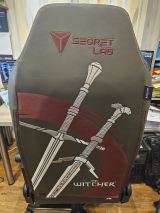
LinkedIn post image: As someone who spends quite a bit of time at his desk, I've been struggling with back pain my entire adult life.
5057024 viral
Workplace Ergonomics9 months ago

View on LinkedIn

I have somehow completely missed this. The Power Platform Environment Settings app has now become the default experience for managing all environment settings from the maker portals. And I didn't eve…
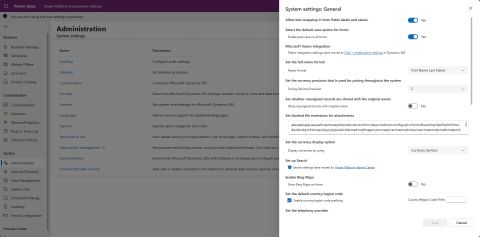
LinkedIn post image: I have somehow completely missed this.
7213011 viral
Low-Code Development9 months ago
View on LinkedIn

Apparently, Azure Document Intelligence is not as perfect of a solution to switching away from AI Builder for document processing in Power automate as I initially assumed. During a conversation aroun…
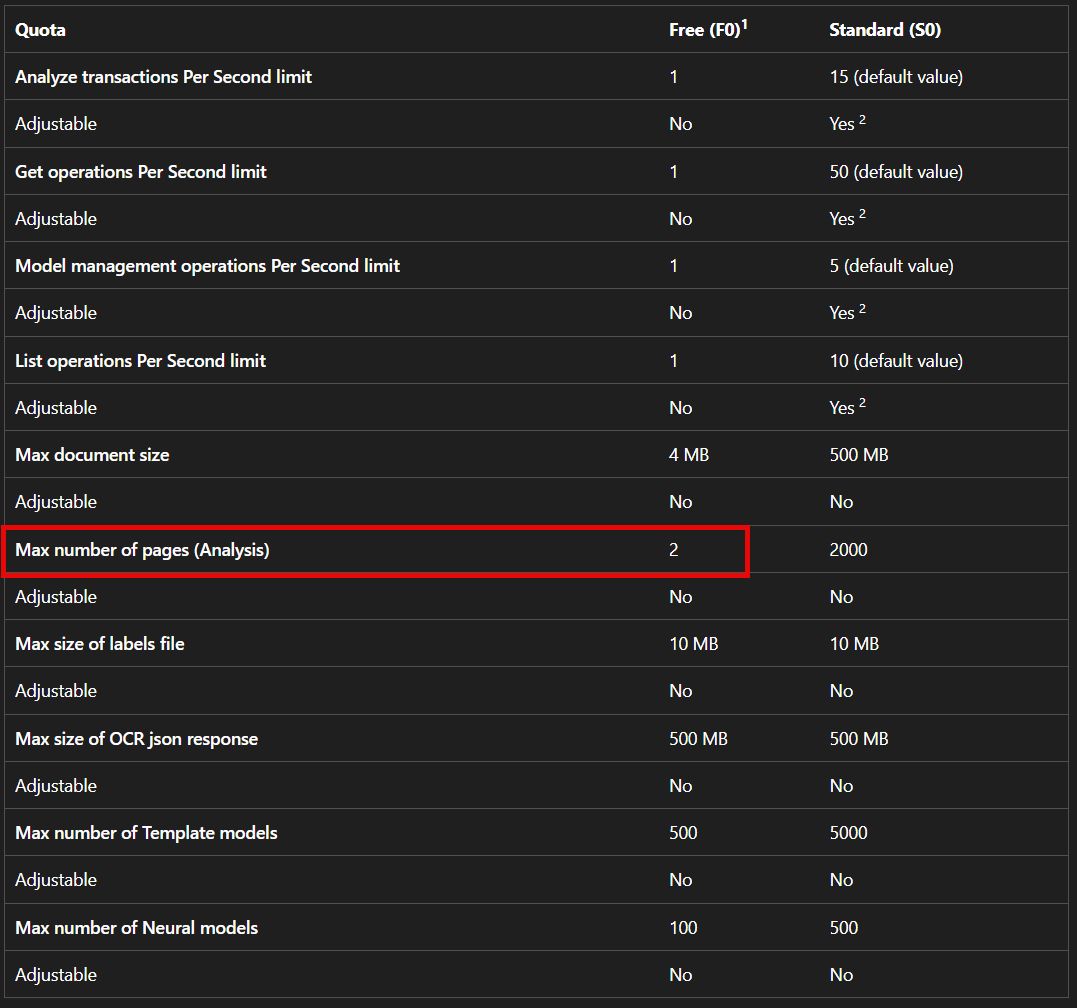
LinkedIn post image: Apparently, Azure Document Intelligence is not as perfect of a solution to switching away from AI Builder for document p
4715210 viral
Automation9 months ago
View on LinkedIn

It's been almost a month since my last event for 2025 - the ESPC in Dublin. The times were busy, and I was also waiting for some more of the official photos from the event to pop up. Now that they d…
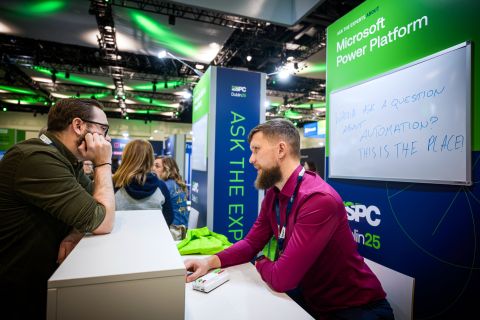
LinkedIn post image: It's been almost a month since my last event for 2025 - the ESPC in Dublin.
52707 viral
Power Platform9 months ago
View on LinkedIn

Microsoft has added some preconfigured alerts to the Power Platform Admin Center Monitor menu last month and pushed them to public preview globally. I guess this is a reasonable next step after intro…
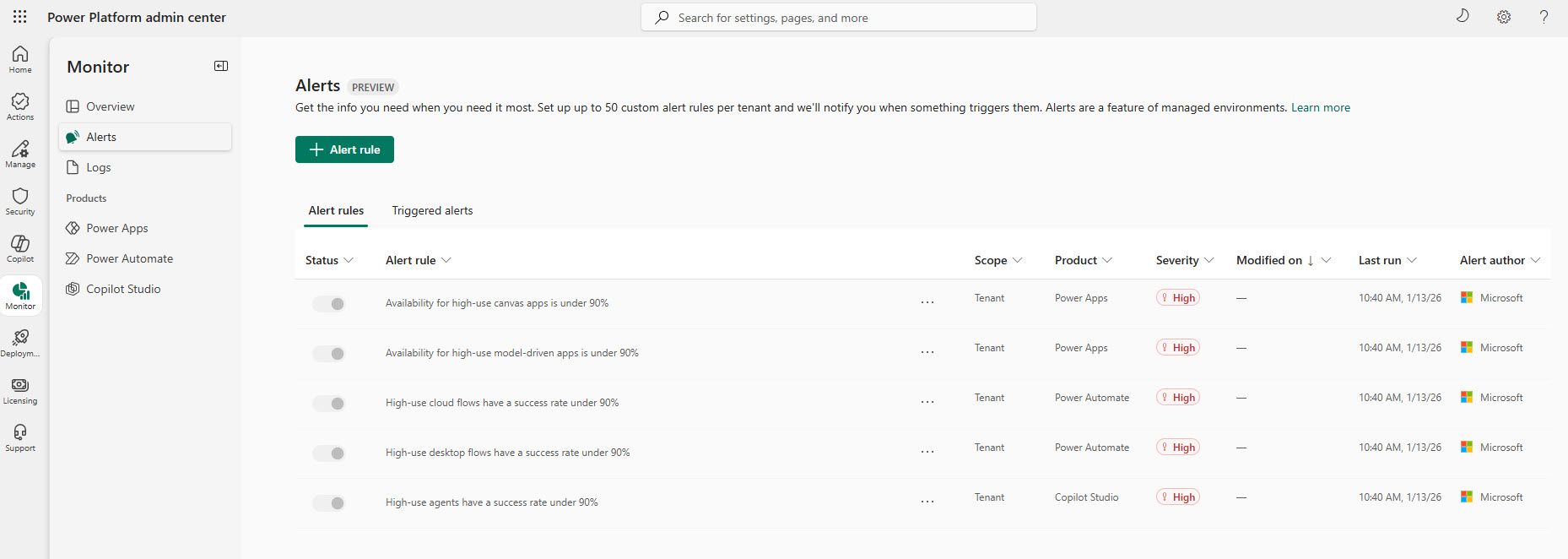
LinkedIn post image: Microsoft has added some preconfigured alerts to the Power Platform Admin Center Monitor menu last month and pushed them
40347 viral
Microsoft Power Platform9 months ago
View on LinkedIn

The first release of 2026 for Power Automate Desktop (version 2.64) has landed in some early release environments late last week. I had a quick look and didn't find much. But there was one thing that…
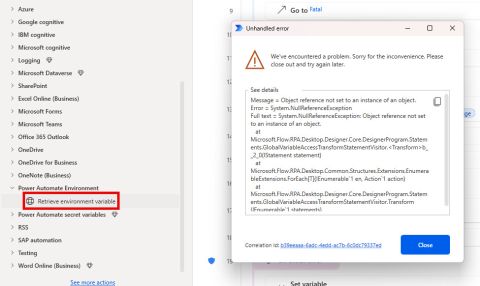
LinkedIn post image: The first release of 2026 for Power Automate Desktop (version 2.64) has landed in some early release environments late l
341006 viral
Automation9 months ago
View on LinkedIn

Posting Patterns & Frequency

3.5 posts/week

Posts / Week

2.2 days

Days Between Posts

1

Total Posts Analyzed

HIGH

Posting Frequency

Timezone: Europe/Vilnius

Best Performing Days

MondayTuesdayThursday

Best Performing Times To Post

08:00–09:00 (morning, workday start)Late morning (around midday) as a secondary slot

Topics & Content Focus

Primary Topics

Enterprise-grade Power Automate Desktop engineering (error handling, environment variables, cross-service behavior)Power Platform governance, monitoring, and reliability at tenant/admin levelLicensing and capability gaps between free/M365 and Premium Power Automate usageRelease-note deconstruction and early-access feature analysis for Power Automate & Power Platform

Secondary Themes

Differences between cloud flows and desktop flows in real-world automationFile handling and data integrity patterns with SharePoint and Excel OnlineError handling design (custom errors, on-error blocks, retries, edge-case management)Monitoring and alerting hygiene (preconfigured alerts, thresholds, high-use definitions)Environment strategy (Default vs managed environments, SMEs vs enterprise)Schema validation, caching behavior, and its impact on solution robustness

Industry Focus

Microsoft Power Platform and Power Automate-focused enterprise automationB2B IT operations, automation engineering, and platform administrationLow-code/RPA solutions in Microsoft 365-centric organizations (SMEs and enterprises)

Content Categories

Deep technical how-tos and pattern breakdownsRelease analysis and roadmap interpretationGovernance and best-practice recommendationsLicensing and platform limitation navigationEdge-case diagnostics and reliability engineering

Performance Insights

49.1%

Avg Engagement Rate

STABLE

Performance Trend

Best Performing Topics

Monitoring and alerting improvements in the Power Platform Admin CenterEarly, partially broken, or not-yet-documented features (e.g., environment variables in PAD)Deep dives into subtle behaviors that prevent failures (e.g., Excel schema caching, file overwrite behavior)

Virality Signals

Shares spike when content addresses tenant-wide hygiene, monitoring, or admin concerns rather than single-flow tipsComments increase when posts critique or question Microsoft’s defaults (e.g., thresholds, licensing, missing icons)Audience is especially responsive to early access or ‘this isn’t in the docs yet’ type insightsTechnical nuance that saves people from rare but catastrophic edge cases generates strong appreciation and discussion

Structure & Quality

400

Avg Length (Words)

HIGH

Depth Level

ADVANCED

Expertise Level

9/10

Uniqueness Score

Common Hooks

Concrete product update or behavior statement (e.g., a specific feature has changed or been released)Contrastive hook highlighting a discrepancy (e.g., desktop vs cloud flows)Timely platform news framed with immediate practical impactReal-world scenario setup (e.g., working with Excel Online or SharePoint in an automation)

Common Endings

Balanced takeaway summarizing pros, cons, and trade-offsForward-looking note about upcoming fixes or roadmap expectationsImplicit design recommendation rather than explicit call-to-actionReassurance that quirks are manageable with the right pattern

Value Delivery Methods

Exposes undocumented or poorly documented platform behaviors and limitationsTranslates release notes into concrete, real-world implications for builders and adminsProvides design patterns and guardrails to avoid brittle or unreliable automationsSurfaces governance and licensing nuances that affect how organizations should architect solutions

Formatting Style

Long-form paragraphs interspersed with bullet points for key takeawaysUse of 📌 bullets to foreground important points or caveatsQuoted action names and features (e.g., "Create file", "Throw custom error") as quasi-code referencesNumbered step lists for more complex workarounds or procedures

Audience & Tone

YES

Question Usage

0.5%

Response Rate

Detected Tone

Technically authoritative yet accessibleCalm, detail-obsessed problem-solverSkeptical but constructive towards platform defaultsSystems-thinking architect focused on reliability and governancesemi-formalfirst-person

Interaction Style

Educator-expert explaining complex behavior in a calm, precise wayPractitioner speaking from hands-on experimentation across multiple tenantsConstructive critic of product decisions, inviting implicit peer validation and discussion

Community Building Signals

References to previous posts to create continuity of learning (e.g., earlier environment variable post)Pointing readers to official Microsoft Learn documentation while adding critical contextPositioning as an early tester/observer of new features, creating a trusted source role for updatesSharing nuanced workarounds and caveats that invite other experts to compare notes

Writing Style Patterns

Content Strategy

Hook: Concrete product update or behavior statement (e.g., a speciTone: semi-formalCTA: Implicit CTAs to experiment or implement patterns

Writing style breakdown

Core characteristics

Overall tone is professional, expert, and informative, but also quite conversational and personal.

The voice is that of a highly experienced practitioner talking to peers, not a marketer talking to leads.

It is analytical and nuanced rather than hype-driven, even when enthusiastic about a feature.

Style is methodical and structured, not free-flowing; thoughts are clearly segmented into logical blocks.

Formality

Medium formality: uses contractions and colloquial phrases, but maintains precise technical vocabulary.

Not academic; closer to a blog / LinkedIn thought-leadership style for professionals.

Grammar is mostly correct, but not obsessively polished; slight imperfections are allowed to keep a human feel.

Emotional tone and energy

Generally calm, balanced, and reflective.

- Energy rises when describing something exciting or strongly opinionated

Uses words like 'huge', 'really big things', 'truly excited', 'no-brainer', 'absolutely worth'.

But this enthusiasm is always followed by detailed reasoning and caveats.

Rare spikes of strong emotion are usually positive (excitement, gratitude, appreciation) or mild annoyance (e.g. unnecessary pop-ups, limitations).

- Frequent use of

Personal opinion markers: 'I personally find...', 'I honestly think...', 'I guess...', 'I would argue...', 'if you ask me.'

Soft hedging: 'seems to', 'most likely', 'probably', 'in most cases', 'might', 'could', 'likely'.

Clarifying parentheticals in brackets: '(as shown in the screenshot)', '(see link in the comments)', '(most likely because...)'.

Mild rhetorical questions to highlight ambiguity or design issues.

- Strong emphasis on

Explaining the practical impact of features.

Calling out caveats, edge cases, or inconsistencies.

Distinguishing theory from what has actually been tested in real environments.

Addressing the reader

Primarily first-person singular ('I') plus occasional inclusive 'we'.

- Second-person 'you' is used, but sparingly, usually

When giving recommendations: 'if you're on the lookout for a sturdy chair...'

When describing what users might experience: 'you would need to create some additional logic...'

Tone towards the reader is respectful, assuming technical competence and shared context.

- Suggestions tend to be softer

'It would make sense to...', 'It might be worth...', 'we would need to...', 'I can absolutely see SMEs... benefiting...'

Imperatives exist but are framed as reasonable steps: 'make sure to check out the solution version...'.

- Prefers suggestive/conditional formulations to hard commands

'It makes a lot of sense to consider...', 'could probably be...', 'we can finally use them properly...'

- When direct, it's for clear procedural advice

'So, if you have updated but don't see it, make sure to check out the solution version in your environment.'

2. STRUCTURAL FLOW & LOGICAL PROGRESSION
3. SPACING, LINE BREAKS & VISUAL FLOW
4. SENTENCE CONSTRUCTION & PACING

Sign in to unlock the full writing analysis

Apply Agnius Bartninkas's patterns to your posts

Free tools to help you write, score, and benchmark in the same style.

LinkedIn Hook Generator

Generate scroll-stopping hooks in the same style top creators use.

Open tool

LinkedIn Post Scorer

Score your draft against viral post patterns before you publish.

Open tool

LinkedIn Engagement Calculator

Benchmark your engagement rate against creators in your niche.

Open tool

More LinkedIn creators to learn from

Discover all

Other creators worth studying alongside Agnius Bartninkas.

Ethan Mollick

Ethan Mollick

Associate Professor at The Wharton School. Author of Co-Intelligence

27 Viral Score

Shivani Virdi

Shivani Virdi

AI Engineering | Founder @ NeoSage | ex-Microsoft • AWS • Adobe | Teaching 70K+ How to Build Production-Grade GenAI Systems

33 Viral Score

Angel Serrano Ceballos

Angel Serrano Ceballos

Co-Fundador & CEO zityhub | Top Voice. Future of Work | zityhub, la tecnología que facilita a las empresas la gestión de la flexibilidad y la experiencia del profesional. Activista de la Revolución Flexible. Maratoniano.

120 Viral Score

Sascha Muckenhaupt

Sascha Muckenhaupt

Service Product Development and Management | Workplace Experience | Sustainability | Diversity, Inclusion & Mobility

92 Viral Score

Guillaume De Sá

Guillaume De Sá

Growth Engineer & Founder | Bootstrapped All the Way

80 Viral Score

Maria Inês Amaro

Maria Inês Amaro

Editor in Chief @TheSocialGrowthEngineers

207 Viral Score

€1 trial · 7 days

Automate your LinkedIn for 30 days

ViralBrain plans, writes, and schedules your LinkedIn content, using official LinkedIn APIs so your account stays safe.

  • Official LinkedIn APIs, no risk of ban
  • You approve every post before it goes live
  • Cancel anytime
Start €1 trial€39 Pro or €69 Premium · cancel anytime

30-day plan

On track
1
2
3
4
5
6
7
8
9
10
11
12
13
14
15
16
17
18
19
20
21
22
23
24
25
26
27
28
13 posts queued · auto-publishing
€1 · 7-day trial

Write like Agnius Bartninkas and auto-post for 30 days.

ViralBrain learns their voice and publishes for you.

Try it free

Write like Agnius Bartninkas.

Try it free

Discover more LinkedIn creators · ViralBrain

Other LinkedIn creators

  • Abhishek T.
  • Michael T.
  • Liam Ottley
  • Nate Herkelman
  • Eduardo Ordax
  • Ashish Pratap Singh
  • Antonio Gulli
  • Patrick Lencioni
  • Raul Junco
  • Michael Yan
  • Roger Dunn
  • Marie Robin