

What Is LinkedIn InMail? (And When It's Worth Using)
LinkedIn InMail lets you message anyone directly, even without a connection. Here's how credits work, what gets refunded, and when it beats a connection request.
ViralBrain Team · Published: August 17, 2026 · Updated: August 17, 2026
Automate your LinkedIn for 30 days
What is LinkedIn InMail?
LinkedIn InMail is a paid direct message that reaches anyone on LinkedIn, even if you're not connected to them and don't share a mutual connection. It's the workaround for LinkedIn's normal rule that free messaging is limited to 1st-degree connections. InMail comes with a paid plan (Premium, Sales Navigator, or Recruiter), each allotting a set number of credits per billing cycle, and it isn't unlimited on any plan.
How InMail credits work
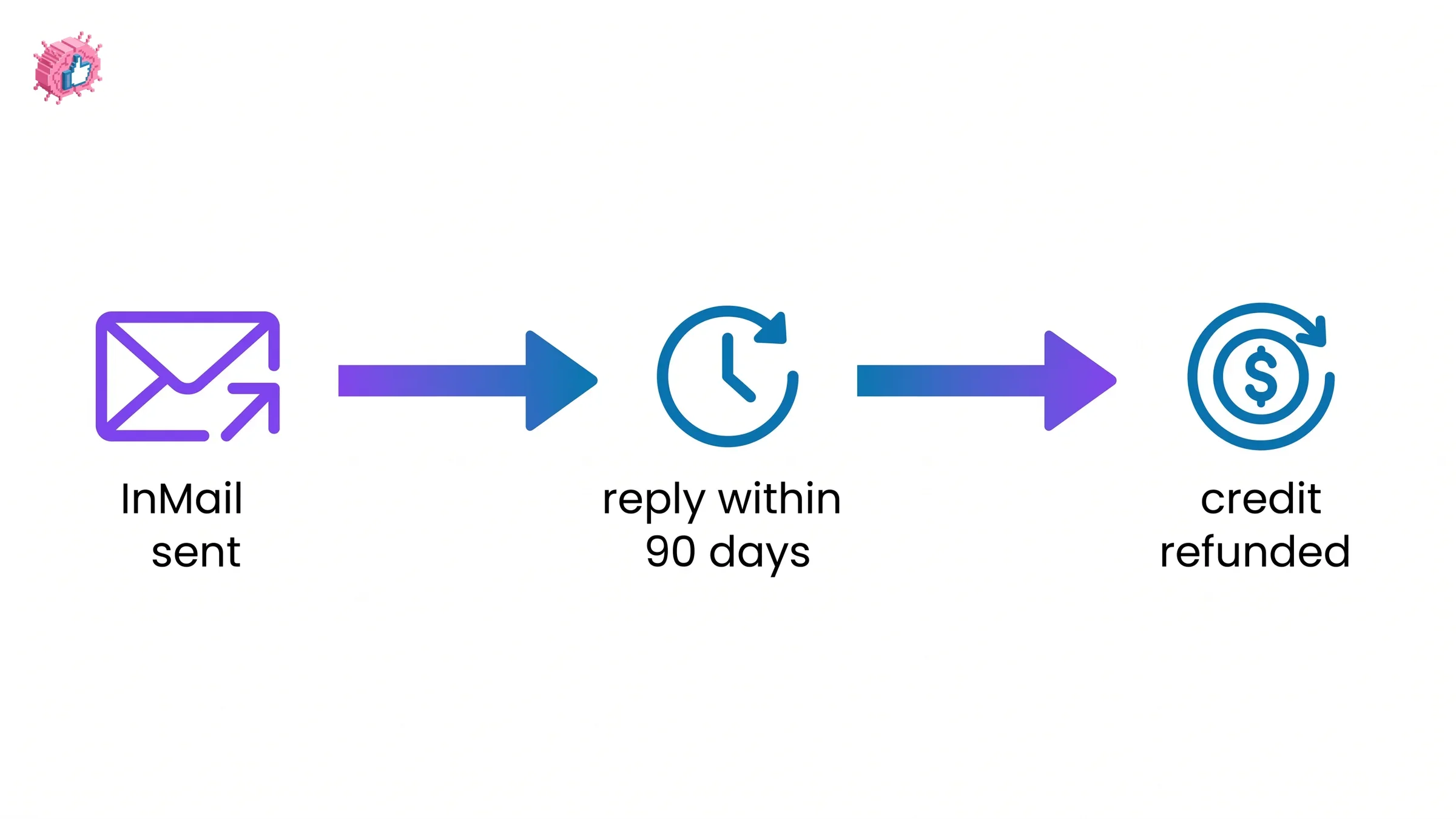
You get a set number of InMail credits at the start of each billing cycle, based on which paid plan you're on. Credits accumulate if unused, up to a plan-specific cap, and they don't expire on their own. The part most people don't expect: you get a credit back automatically if the recipient responds within 90 days of you sending it. A well-targeted InMail that gets a reply effectively costs you nothing.
Premium InMail credits, Sales Navigator InMail credits, and Recruiter InMail credits are separate pools; a credit from one plan can't be used to send a message through another.
InMail vs a connection request: what's the difference?
| InMail | Connection request | |
|---|---|---|
| Cost | Uses a paid credit | Free |
| Reaches | Anyone, any degree | Sent to 2nd or 3rd-degree; becomes a message only after acceptance |
| Delivers immediately | Yes, lands in their inbox right away | No, sits as a pending request until accepted or ignored |
| Best for | A specific, time-sensitive ask to someone outside your network | Building an ongoing connection before you need anything |
Automate your LinkedIn for 30 days
When InMail is worth using
InMail earns its cost when a connection request would be too slow or too easy to ignore: reaching a hiring manager before a role closes, following up with a prospect who hasn't accepted your connection request, or contacting someone whose 2nd or 3rd-degree distance makes a request unlikely to get noticed. It's a weaker choice when you have time on your side, since a well-written connection request costs nothing and often converts just as well for anyone not in a hurry.
Where InMail shows up in practice
- A recruiter reaching a candidate who isn't a connection, before a role fills
- A sales rep following up on a stalled connection request with a direct pitch
- A founder reaching a specific investor or advisor outside their existing network
- Any outreach where a fast response matters more than building the relationship first
What this means for you
Treat InMail credits as a scarce resource, not a first move. Try a connection request or a warm introduction first when you have time; save InMail for the specific people worth the credit, and write it to actually earn a reply, since a reply within 90 days gets your credit refunded and a non-reply doesn't. If your outreach strategy leans more on content than cold messaging, what makes LinkedIn posts go viral covers the alternative path: getting the right people to come to you instead of messaging them first.
FAQ
How many InMail credits do I get per month?
The number depends on your specific paid plan (Premium, Sales Navigator, or Recruiter) and tier within that plan. Check your account's My Premium or Sales Navigator settings page for your current allotment, since it varies by plan and can change.
Do InMail credits roll over if I don't use them?
Yes, unused InMail credits accumulate month to month up to a plan-specific limit, and they don't expire on their own the way some other subscription perks do.
Do I get my InMail credit back if someone doesn't respond?
No, only if they do respond, within 90 days of you sending the message. A message that goes unanswered past that window keeps the credit spent.
Can I send InMail for free without a paid plan?
Generally no. InMail is a paid-plan feature. The free alternative is a connection request or a message to an existing 1st-degree connection, which doesn't require a credit.
Is InMail better than a regular connection request?
Neither is universally better; it depends on urgency. InMail delivers immediately and reaches anyone regardless of connection degree, which matters when speed counts. A connection request is free and often converts just as well when you're not in a hurry.
Sources: LinkedIn Help: InMail message credits and renewal process.
Automate your LinkedIn for 30 days
ViralBrain plans, writes, and schedules your LinkedIn content, using official LinkedIn APIs so your account stays safe.
- Official LinkedIn APIs, no risk of ban
- You approve every post before it goes live
- Cancel anytime
Keep reading
How to Add Organizations on LinkedIn: Full Steps
How to add organizations on LinkedIn, where the section sits, desktop and app steps, editing entries, and why a LinkedIn Page is a different thing.
How to Add Education on LinkedIn: Fields and Steps
How to add education on LinkedIn, the eight fields LinkedIn documents, multiple entries, the expected end date, reordering, and the 24 hour notify window.
How to Add Honors and Awards on LinkedIn
How to add the Honors and awards section on LinkedIn on desktop and in the app, the exact steps LinkedIn publishes, and how to edit or delete an entry.