

LinkedIn Boolean Search: What It Is and How to Use It (2026)
LinkedIn Boolean search uses AND, OR, NOT, and quotation marks to narrow search results. Here's how the operators work and what LinkedIn doesn't support.
ViralBrain Team · Published: August 17, 2026 · Updated: August 17, 2026
Automate your LinkedIn for 30 days
What is LinkedIn Boolean search?
LinkedIn Boolean search lets you combine keywords with operators like AND, OR, NOT, and quotation marks directly in the search bar to narrow results to exactly who or what you're looking for. Instead of one broad keyword, a Boolean string filters LinkedIn's entire index of profiles and posts against a specific combination of terms in one search.
The operators, and how each one works
AND
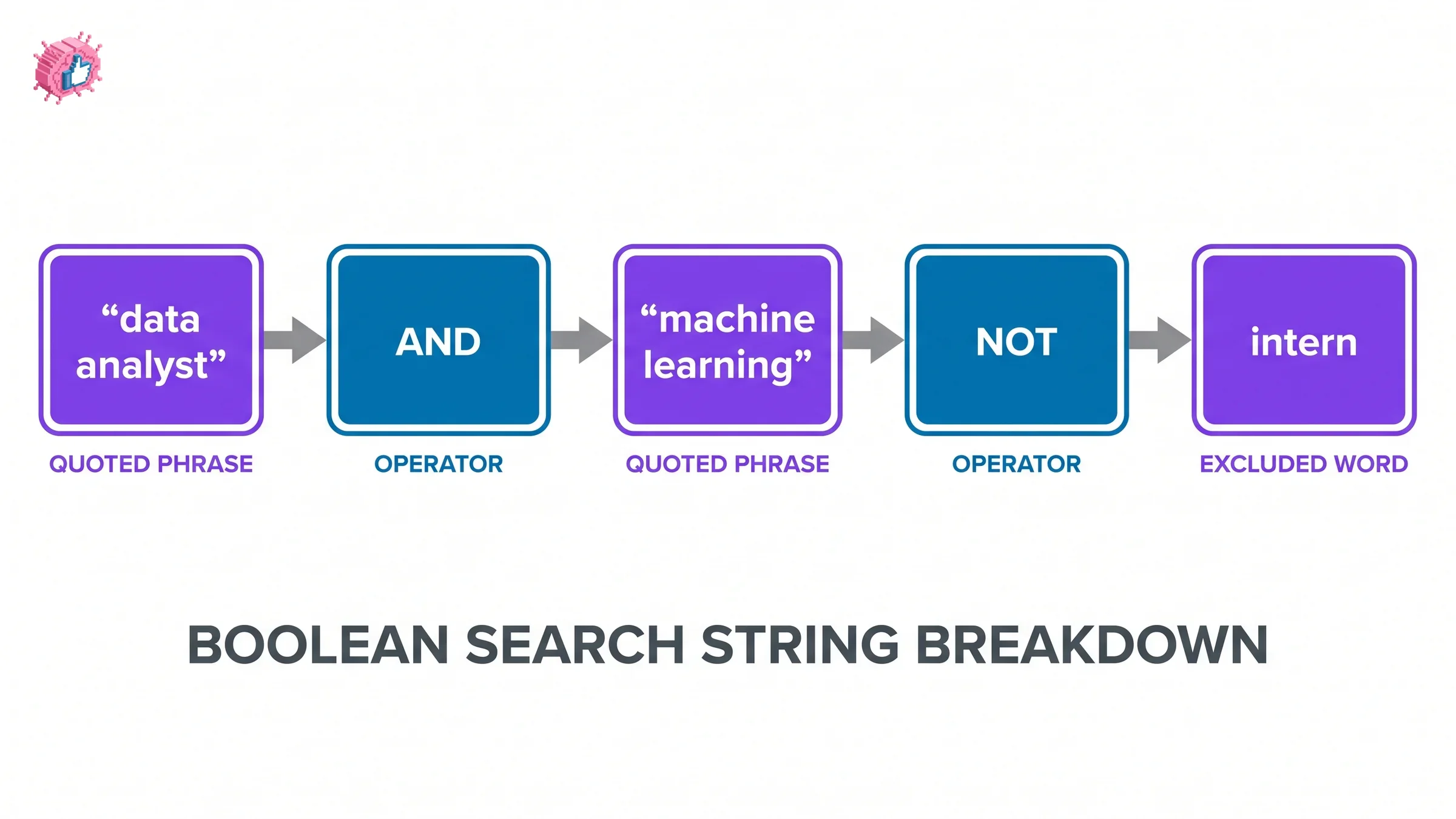
Narrows results to profiles or posts containing every term. "content strategist" AND "B2B SaaS" only returns results with both phrases present, not either one alone.
OR
Broadens results to match any of the terms. "growth marketer" OR "demand gen" returns anyone matching either phrase, useful when a role has more than one common title.
NOT
Excludes a term from results. "marketing manager" NOT "intern" filters out results that include the excluded word, even if everything else matches.
Quotation marks
Searches for an exact phrase instead of the individual words separately. "content marketing" only matches that exact two-word phrase, not profiles that happen to contain "content" and "marketing" in unrelated places.
Parentheses
Groups terms so operators apply in the right order. ("growth marketer" OR "demand gen") AND SaaS finds either job title, but only when SaaS also appears.
Operators must be typed in capital letters to work as logical operators. Lowercase "and" or "or" gets treated as a plain keyword, not an operator.
What LinkedIn Boolean search doesn't support
LinkedIn doesn't support braces, brackets, angle brackets, or wildcard characters like asterisks in search strings. The + and - symbols sometimes appear to work as informal stand-ins for AND and NOT, but they're not officially supported operators, so a string built around quotation marks and the four real operators above is the reliable version.
Automate your LinkedIn for 30 days
Regular search vs LinkedIn Recruiter
| Regular LinkedIn search | LinkedIn Recruiter | |
|---|---|---|
| Where you type it | Main search bar | Keyword field |
| What it scans | Headline, summary, current and past roles, skills | Full profile plus Recruiter-specific fields |
| Operator support | AND, OR, NOT, quotes, parentheses | Boolean plus "Can have" (OR) and "Doesn't have" (NOT) shortcuts |
| Who has access | Any LinkedIn account | Recruiter or Recruiter Lite subscription |
Where Boolean search shows up in practice
- Narrowing a search for people in a specific role across multiple possible job titles
- Excluding a common but irrelevant result, like filtering out "intern" from a manager-level search
- Combining a skill and an industry into one search instead of scrolling through unrelated results
- Building repeatable search strings for lead research or hiring, saved and reused across searches
What this means for you
Start with quotation marks around any multi-word title or phrase; LinkedIn treats unquoted multi-word searches as separate keywords, not a phrase, which is the most common reason a Boolean string returns unexpected results. Then layer in AND to narrow, OR to broaden across synonyms, and NOT to cut noise. If the goal behind your search is finding creators to study or learn from rather than recruiting, ViralBrain's hero discovery finds top LinkedIn creators in your niche without needing a Boolean string at all.
FAQ
Does LinkedIn still support Boolean search in 2026?
Yes. Boolean operators (AND, OR, NOT), quotation marks for exact phrases, and parentheses for grouping all still work in LinkedIn's main search bar as of 2026.
Why isn't my LinkedIn Boolean search working?
The most common cause is lowercase operators; AND, OR, and NOT must be capitalized to function as operators rather than plain keywords. Unsupported characters like brackets or wildcards, and multi-word phrases without quotation marks, are the other frequent causes.
What's the difference between LinkedIn search and LinkedIn Recruiter Boolean search?
Regular LinkedIn search scans standard profile fields like headline, summary, and job history using the four core operators. LinkedIn Recruiter adds "Can have" and "Doesn't have" shortcuts on top of standard Boolean logic and searches additional Recruiter-specific fields, but it requires a paid Recruiter subscription.
Can I use Boolean search without a paid LinkedIn account?
Yes, the core Boolean operators (AND, OR, NOT, quotation marks) work in LinkedIn's free main search bar. Advanced filtering and the Recruiter-specific shortcuts require a paid plan.
Automate your LinkedIn for 30 days
ViralBrain plans, writes, and schedules your LinkedIn content, using official LinkedIn APIs so your account stays safe.
- Official LinkedIn APIs, no risk of ban
- You approve every post before it goes live
- Cancel anytime
Keep reading
How to Edit a Post on LinkedIn: What You Can Change
Editing a LinkedIn post takes five steps, and on a post you shared only the text can change. LinkedIn's rules on media, previews, Pages and polls.
How to Delete a Post on LinkedIn (Feed, Page, Group)
The four documented steps to delete a LinkedIn post on desktop and mobile, plus Page, group, scheduled and comment deletes, and what happens to engagement
How to Add Skills on LinkedIn: Steps and Limits
How to add skills on LinkedIn on desktop and in the app, the 100 skill cap and its exemption, plus reordering, editing and removing a skill.