

What Is Creator Mode on LinkedIn? (It Was Retired in 2024)
LinkedIn Creator Mode was a profile toggle for creators, retired in March 2024. Here's what it did and how to get the same features today.
ViralBrain Team · Published: August 17, 2026 · Updated: August 17, 2026
Automate your LinkedIn for 30 days
What is Creator Mode on LinkedIn?
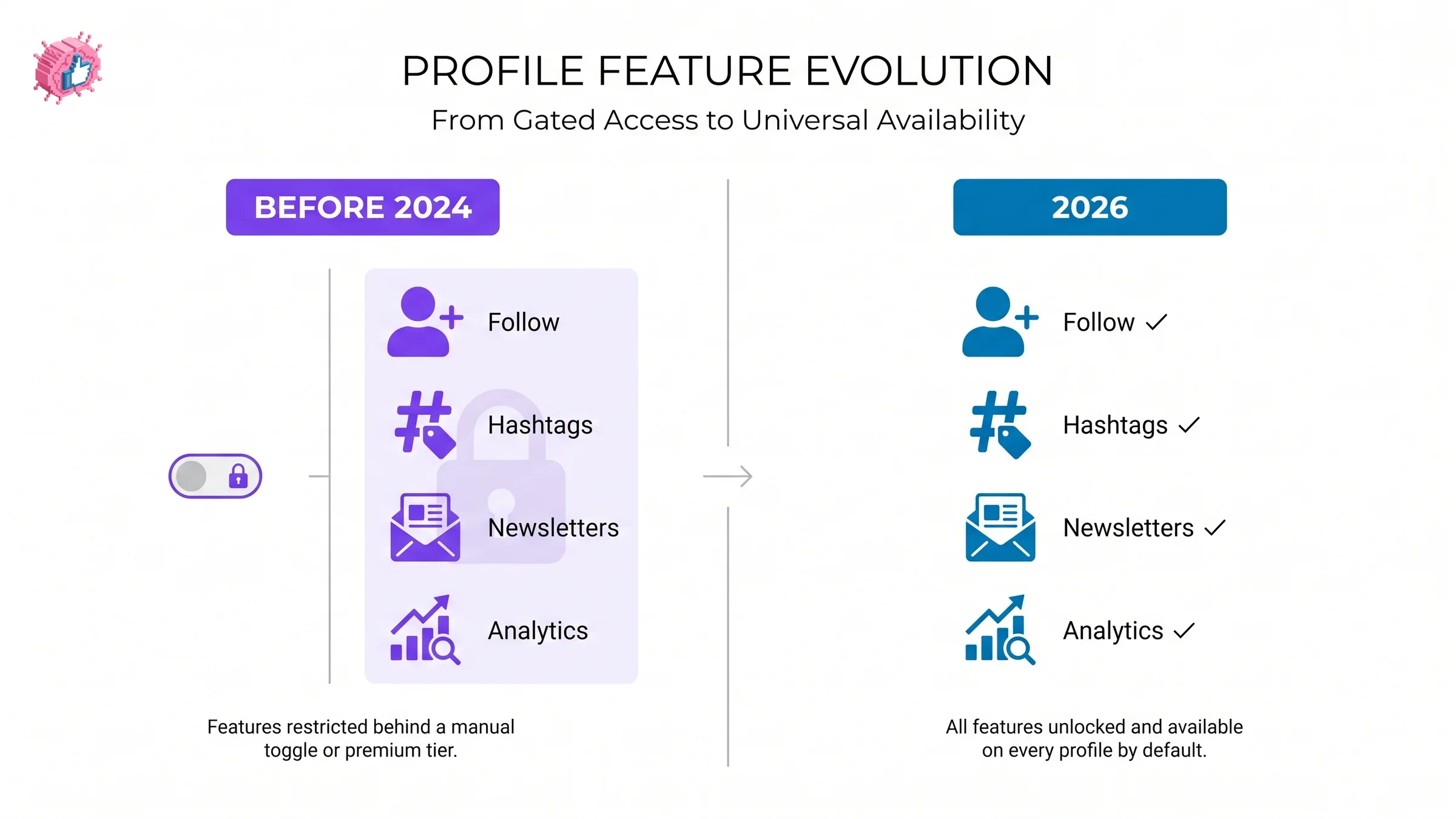
Creator Mode was a LinkedIn profile toggle that swapped your "Connect" button for "Follow" and turned on creator tools like newsletters, a deeper analytics view, and topic hashtags on your profile. It's worth stating plainly since a lot of what's written about it is outdated: LinkedIn retired the on/off toggle in February and March 2024. The tools it turned on didn't disappear, they got built into every profile by default, so there's nothing left to switch on.
What Creator Mode used to do
Before it was retired, switching Creator Mode on changed three things on a profile:
- The primary button became "Follow" instead of "Connect", better suited to an audience that wanted your content without needing mutual approval to see it
- A set of up to five topic hashtags appeared under your name, signaling what you post about
- Newsletters, LinkedIn Live, and audio events became available, along with a more detailed analytics view than standard profiles had
Why LinkedIn retired it
LinkedIn's own reasoning, per its Help Center update, was that Creator Mode's features had proven popular enough to roll into every profile by default instead of leaving them behind an extra toggle most people never found or understood. Removing the decision meant more accounts got access to the same sharing and analytics tools without an activation step standing in the way.
Automate your LinkedIn for 30 days
Where Creator Mode's features live now
| Old Creator Mode feature | Where it lives today |
|---|---|
| Follow as the primary button | Settings & Privacy → Visibility → Followers → "Make follow primary" |
| Topic hashtags under your name | Removed platform-wide, not just for former Creator Mode profiles |
| Newsletters | Available to eligible profiles directly, no toggle required |
| Deeper post analytics | Available under the standard Analytics section of every profile |
What this means for you
If you're looking for a "Creator Mode" switch in your settings in 2026, you won't find one, and that's expected, not a bug. The one setting worth checking is "Make follow primary" under Visibility, since that's the direct successor to Creator Mode's most visible change: it puts Follow ahead of Connect on your profile, which matters if you're building an audience rather than a private network. Everything else Creator Mode used to gate, newsletters, analytics, LinkedIn Live, is already available without a switch. If you're using those tools to publish consistently, ViralBrain's content calendar plans and auto-publishes the posts that actually put those default creator tools to use.
FAQ
Does LinkedIn Creator Mode still exist in 2026?
No, not as an on/off toggle. LinkedIn retired the Creator Mode switch in February and March 2024. Most of what it used to gate, like the Follow-primary button and the deeper analytics view, is now available to every profile by default.
How do I turn on Creator Mode on LinkedIn now?
You can't, since the toggle was removed. To get the closest equivalent, go to Settings & Privacy, then Visibility, then Followers, and turn on "Make follow primary." That replicates Creator Mode's main visible change: showing Follow instead of Connect as your profile's primary button.
What happened to Creator Mode hashtags?
The topic hashtags that used to appear under a Creator Mode profile's name were removed platform-wide in February 2024, along with the rest of the toggle, and were not replaced with an equivalent feature.
Do I still get analytics without Creator Mode?
Yes. The deeper post analytics that Creator Mode used to gate is now part of the standard Analytics section available to every profile, not something behind a separate toggle.
Is Creator Mode the same as being a LinkedIn Top Voice?
No. Creator Mode was a profile setting anyone could turn on themselves before 2024. Top Voice is a LinkedIn-awarded badge given to specific creators based on their contributions in a topic community, unrelated to the retired toggle.
Sources: LinkedIn Help: Updates to Creator Mode.
Automate your LinkedIn for 30 days
ViralBrain plans, writes, and schedules your LinkedIn content, using official LinkedIn APIs so your account stays safe.
- Official LinkedIn APIs, no risk of ban
- You approve every post before it goes live
- Cancel anytime
Keep reading
LinkedIn Service Page: setup, pricing, and the one-way choice
LinkedIn Service Pages are free for freelancers and consultants, but choosing profile or Company Page is locked once set. Setup steps and Premium limits.
How to become a LinkedIn Top Voice: what LinkedIn actually says
LinkedIn Top Voice is invite-only and the gold Community badge was retired in October 2024. The five selection factors, and the nomination form.
LinkedIn collaborative posts: how they work and who can use them
LinkedIn announced collaborative posts globally in July 2026, but help still limits creation to early access. How to add collaborators, and the limits.