

Best LinkedIn banners: 7 examples by role (with free templates)
The best LinkedIn banners for 2026, with free templates. See great LinkedIn cover photo examples by role for founders, job seekers, consultants, and more.
Your LinkedIn banner is 1584x396 pixels of prime real estate that most people leave blank or fill with a stock skyline. That is a mistake. The banner sits directly behind your photo and headline, so it is one of the first things a recruiter, prospect, or potential follower sees, and a clear one tells them what you do and who you help before they read a word. For the exact dimensions across profile and company pages, see the LinkedIn banner size guide, and to build one fast, try the free LinkedIn banner generator.
The best LinkedIn banners are not the flashiest. They are the ones that make your positioning obvious in two seconds and give a reason to stay on your profile. In this guide, we walk through the best LinkedIn banners and cover photos by role, break down exactly why each one works, and point you to free templates so you can ship your own in minutes. If you want the exact specs first, our LinkedIn banner size guide covers dimensions and safe zones.
Automate your LinkedIn for 30 days
Best LinkedIn banners: a brief overview
Each banner below is built around a role and a job to be done. Match your goal to the closest style, then grab the matching free template.
- The founder authority banner: Best for building trust fast. States what your company does and the outcome you deliver in one line.
- The job seeker value banner: Best for standing out to recruiters. Turns your headline into a clear "here is the role I want and the value I bring" statement.
- The consultant offer banner: Best for selling a service. Names your niche, your offer, and a soft call to action.
- The B2B sales banner: Best for warming up prospects. Reinforces your product's core promise so profile visits convert to replies.
- The recruiter pipeline banner: Best for attracting candidates. Shows the roles you hire for and why people want to work there.
- The creator brand banner: Best for growing a following. Reinforces your content niche and posting cadence so profile visitors hit follow.
- The designer portfolio banner: Best for showing, not telling. Uses the banner itself as a work sample.
| Banner style | What makes it work | Best for | Free template |
|---|---|---|---|
| Founder authority | Company outcome stated in one clear line | Founders and B2B execs building trust | Cover Photo Maker |
| Job seeker value | Target role plus proof of value | Candidates standing out to recruiters | LinkedIn Banner Generator |
| Consultant offer | Niche, offer, and soft CTA | Consultants and coaches selling services | Cover Photo Maker |
| B2B sales | Product promise that pre-sells the reply | Sales reps warming inbound profile views | Image Branding tool |
| Recruiter pipeline | Roles hiring for plus employer appeal | Recruiters and talent teams | LinkedIn Banner Generator |
| Creator brand | Niche plus posting cadence and hook | Creators growing a following | Cover Photo Maker |
| Designer portfolio | The banner is the work sample | Designers, illustrators, and studios | Any design tool |
1. The founder authority banner, best for building trust fast
Founders get the most profile visits from people deciding whether to trust the company behind the person. The strongest founder banners skip the abstract mission statement and state the concrete outcome the business delivers, usually in one line, with the company logo and a clean brand color. Think "We help B2B teams cut onboarding time by 40 percent," not "Reimagining the future of work."
The reason it works is context. Your headline sells you as a person, the banner sells the company, and together they answer the visitor's real question: is this someone worth talking to. Keep the layout minimal, left-aligned so your profile photo does not cover the message, and use a color that contrasts with LinkedIn's white background.
Key elements:
- One-line outcome statement, not a mission slogan
- Company logo and a single brand accent color
- Left or center-weighted text that clears the profile photo circle
- Optional proof point (a metric, client logo strip, or "backed by")
Best for:
- Founders and co-founders building authority for a young company
- B2B executives whose profile doubles as a sales asset
Get this look: Start from a business template in the free LinkedIn cover photo maker, drop in your logo, and swap the headline for your outcome line. Pair it with a sharp profile headline using the LinkedIn headline generator so the two lines reinforce each other.
2. The job seeker value banner, best for standing out to recruiters
Most job seekers waste the banner on a motivational quote. The best ones use it as a second headline. A strong job seeker banner names the role you are targeting and the value you bring, so a recruiter skimming 40 profiles instantly knows you are a fit. For example: "Senior Product Designer, 8 years shipping B2B SaaS, open to remote roles."
This works because recruiters decide in seconds. The banner removes ambiguity about what you want and what you offer, which is exactly the friction that gets profiles skipped. Add a subtle "Open to work" cue in the banner rather than relying only on the green photo frame, which many recruiters find noisy.
Key elements:
- Target role stated plainly, not a vague aspiration
- One line of proof: years, domain, or a signature result
- Availability cue (remote, relocating, open to X roles)
- Clean, readable font with high contrast
Best for:
- Active job seekers who want recruiters to self-qualify fast
- Career changers signaling a new direction clearly
Get this look: The free LinkedIn banner generator has role-based templates sized to 1584x396, so you can type your target role and export a PNG in under a minute.
3. The consultant offer banner, best for selling a service
Consultants and coaches use the banner as a storefront. The best consultant banners name a specific niche, the offer, and a soft call to action, turning a passive profile into a lead source. Something like: "I help SaaS founders build outbound systems. DM me 'outbound' to start." Specificity is the whole game here.
It works because a niche offer filters for the right buyer and repels the wrong one, which is what you want. The banner does the qualifying so your DMs fill with people who already understand what you sell. Keep the CTA low-friction, a DM keyword or a "book a call" line, and make sure the offer language matches your headline and featured section.
Key elements:
- A named niche, not "I help businesses grow"
- The specific offer or transformation you deliver
- A soft CTA (DM keyword, book a call, free resource)
- Consistent wording with your headline and featured links
Best for:
- Consultants, coaches, and fractional operators selling a service
- Solopreneurs who get most leads from inbound profile visits
Get this look: Build it from a template, then keep your feed consistent with the offer using a strong LinkedIn content strategy guide so the banner promise matches your posts.
4. The B2B sales banner, best for warming up prospects
Sales reps get profile-checked constantly. A prospect who receives your outreach almost always clicks your profile before replying, so your banner is part of the pitch. The best B2B sales banners reinforce the product's core promise and add credibility, not a photo of the rep on a stage. For example: "Helping RevOps teams cut CRM admin by half," plus a couple of recognizable customer logos.
This works because it pre-sells the reply. When your banner echoes the value your message promised, the prospect trusts the outreach more and responds. Keep it product-focused and on-brand with your company colors so it feels like an extension of the business, not a personal collage.
Key elements:
- Product promise aimed at the buyer's pain
- Social proof: customer logos, a metric, or an award
- Company brand colors for a cohesive, trustworthy feel
- No clutter, so the single message lands
Best for:
- AEs, SDRs, and founders doing outbound where profile checks are common
- Anyone whose personal profile supports a product pitch
Get this look: The image branding tool lets you build a clean, on-brand banner with your logo and colors, and preview how it sits above your profile card before you export.
Automate your LinkedIn for 30 days
5. The recruiter pipeline banner, best for attracting candidates
Recruiters and talent teams should treat the banner as a job ad. The best recruiter banners list the kinds of roles you hire for and give one reason candidates want in, turning your profile into a passive sourcing tool. For example: "Hiring engineers and designers at a remote-first fintech. We ship weekly and pay top of band."
It works because candidates browsing recruiter profiles are often passive and need a reason to reach out. A banner that names the roles and the appeal converts those quiet visits into inbound interest. Include your careers link in the featured section so the banner and the click path line up.
Key elements:
- The role families you are actively hiring for
- One genuine reason to work there (remote, growth, pay, mission)
- Employer brand colors and logo for recognition
- A nudge toward your careers page or "message me"
Best for:
- In-house recruiters and talent teams building inbound pipelines
- Agency recruiters positioning around a niche
Get this look: Use a recruiter template and confirm your text sits inside the safe zone with the LinkedIn image sizes reference.
6. The creator brand banner, best for growing a following
For creators, the banner reinforces the reason to hit follow. The best creator banners state the content niche and often the cadence, so a first-time visitor knows exactly what they will get in their feed. Something like: "3 posts a week on LinkedIn ghostwriting for founders." It sets an expectation and a promise.
This works because following is a low-stakes decision that still needs a nudge. When the banner, headline, and recent posts all point at one clear theme, visitors follow because they can predict the value. Keep the design on-brand with your usual post visuals so your profile and feed feel like one coherent brand.
Key elements:
- A single, specific content niche
- Posting cadence or a signature format
- Visual style that matches your post graphics
- A light hook or tagline, not a wall of text
Best for:
- Creators and personal brands growing a LinkedIn audience
- Ghostwriters and solopreneurs building topical authority
Get this look: Design it from a role-based template, then keep the promise by publishing consistently. See our LinkedIn personal branding guide for how banner, headline, and content stack into one brand.
7. The designer portfolio banner, best for showing not telling
Designers, illustrators, and studios have an unfair advantage: the banner itself can be a work sample. The best designer banners use original artwork, a signature style, or a tight grid of recent projects to prove skill instantly. There is no need to describe your craft when the banner demonstrates it.
It works because visitors judge design ability visually, and a strong banner is immediate evidence. Keep it intentional rather than busy, one cohesive visual idea beats a cluttered collage, and make sure the important elements survive the crop on mobile, where LinkedIn shows less of the banner.
Key elements:
- Original artwork or a curated project grid
- A single cohesive visual concept, not a scrapbook
- Mobile-safe composition so nothing critical gets cropped
- Optional small tagline naming your specialty
Best for:
- Designers, illustrators, motion artists, and creative studios
- Anyone whose work is the strongest possible proof
Get this look: Export your artwork at 1584x396 from any design tool, then confirm the crop and safe zones before uploading so nothing critical gets cut off on mobile.
Free LinkedIn banner templates and how to make one
You do not need Photoshop to ship a strong banner. Two free ViralBrain tools cover every style above:
- The LinkedIn cover photo maker has role-based templates at the correct 1584x396 size. Pick a template, edit the text, drop in your logo or photo, and export.
- The LinkedIn banner generator creates a clean, text-first banner as a free PNG, ideal for founders, job seekers, and recruiters who want a fast, no-design result.
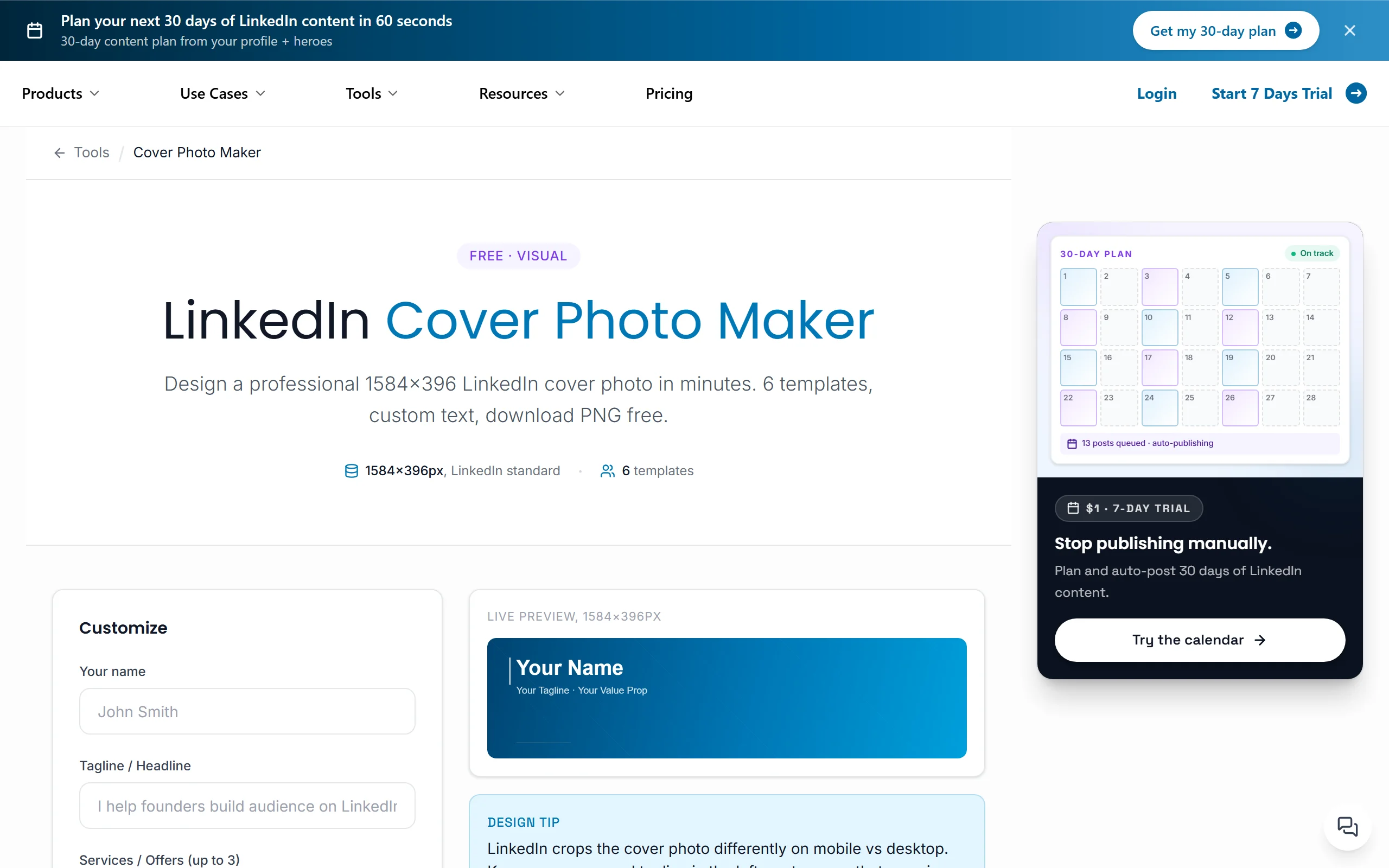
Whichever you use, follow the same checklist:
- Design at exactly 1584x396 pixels so the image stays sharp.
- Keep key text out of the bottom-left, where your profile photo overlaps.
- Check the mobile crop, since LinkedIn shows a shorter strip on phones.
- Use one message and high contrast so it reads in two seconds.
If you also work with headshots and post images, the image size checker and LinkedIn image sizes reference keep every visual on your profile correctly sized. For a full tool comparison, see our roundup of the best LinkedIn banner makers.
How to choose the best LinkedIn banner for your role
The right banner depends on what you want a profile visitor to do next. Use these three questions to pick a direction.
1) What is the job of your profile?
Your banner should serve your single most important goal.
- If you want to sell or get hired: use the consultant offer, B2B sales, or job seeker value styles, which state an outcome and a next step.
- If you want to grow an audience: use the creator brand style, which sets a clear content promise.
2) Should the banner show or tell?
Some roles win by stating value in words, others by demonstrating it.
- Tell: founders, consultants, recruiters, and job seekers benefit from a clear one-line message in text.
- Show: designers and visual creators are better off letting the banner itself be the proof.
3) How much design time do you have?
Match the tool to your appetite for fiddling.
- Fast and no-design: a text-first banner generator gives you a clean result in a minute.
- More control: a template-based cover photo maker lets you customize colors and logos. Either way, verify the result against your banner size and safe zones before you upload.
Whatever you choose, run it live for a week and check whether profile visits turn into the action you care about, then refine the message.
A great banner earns the click, but your feed is what keeps people around. If you want that to be effortless, ViralBrain turns a topic into voice-matched LinkedIn posts and lets you plan them ahead so your profile always has fresh, on-brand content behind the banner. Generate your next post with the AI post creator, then line up a month of content with the LinkedIn post scheduler. Try ViralBrain on a 7-day trial for €1 and keep your profile working after the banner does its job.
FAQ
What size should a LinkedIn banner be?
The recommended LinkedIn banner size is 1584x396 pixels, a roughly 4:1 ratio. Design at that exact size so the image stays sharp, and keep important text out of the lower-left corner where your profile photo overlaps. Our LinkedIn banner size guide covers the safe zones and the mobile crop in detail.
What is the difference between a LinkedIn banner and a cover photo?
They are the same thing. LinkedIn calls the image behind your photo a "background photo," while most people call it a banner or cover photo. Whatever you call it, the specs are identical: 1584x396 pixels, and the best LinkedIn cover photos state who you help and what you do in one clear line.
Are there free LinkedIn banner templates?
Yes. The LinkedIn cover photo maker has free, role-based templates already sized to 1584x396, and the LinkedIn banner generator exports a clean text banner as a free PNG. Neither requires an account, so you can test a few styles before committing to one.
What should a founder put on their LinkedIn banner?
A founder banner should state the concrete outcome the company delivers in one line, add the logo and a single brand color, and optionally include one proof point like a metric or "backed by" note. Avoid abstract mission slogans. The goal is for a visitor to understand the business in two seconds.
What makes a good LinkedIn banner for job seekers?
A strong job seeker banner works like a second headline: it names the role you want and one line of proof (years, domain, or a signature result), plus an availability cue such as "open to remote roles." That specificity helps recruiters self-qualify you quickly instead of skipping an ambiguous profile.
Do LinkedIn banners actually matter for reach?
Banners do not directly affect feed reach, but they affect conversion. When a post earns a profile visit, the banner helps decide whether that visitor follows, connects, or replies. To grow the reach that drives those visits, pair a clear banner with consistent posting using a LinkedIn content strategy guide and tools like the viral post generator.
How do I keep my whole profile visually consistent?
Use the same colors, fonts, and message across your banner, headshot, and post graphics so your profile reads as one brand. The image branding tool helps you match your banner to your visual identity, and checking every asset with the image size checker keeps them crisp across devices.
Can I schedule content to match my new banner?
Yes. Once your banner sets the positioning, keep the momentum by planning posts around the same theme. ViralBrain's LinkedIn post scheduler lets you auto-publish weeks of content, and the AI post creator drafts it in your voice so the feed behind your banner never goes stale.
Automate your LinkedIn for 30 days
ViralBrain plans, writes, and schedules your LinkedIn content, using official LinkedIn APIs so your account stays safe.
- Official LinkedIn APIs, no risk of ban
- You approve every post before it goes live
- Cancel anytime
Keep reading
How to Log Out of LinkedIn on Desktop and in the App
How to log out of LinkedIn on desktop, on iOS and on Android, how to sign out of other sessions or all devices, and what Keep me logged in changes.
LinkedIn Two Step Verification: How to Turn It On and Off
LinkedIn documents it as two-factor authentication. How to turn it on and off on desktop and in the app, the two methods, and what to do if locked out.
How to Change Your LinkedIn Password
How to change your LinkedIn password on desktop, iOS, Android and a mobile browser, how to reset a forgotten one, and what the sign out control does.