

The Ideal LinkedIn Post Length in 2026 (Data-Backed)
The ideal LinkedIn post length in 2026 is 1,200-2,000 characters (200-330 words). See the data, length-by-format ranges, and the engagement curve.
Every credible study run in the last year points to the same window: longer posts win, but only up to a point. Across AuthoredUp's analysis of 372,126 posts, a 1.19 million-post dataset from MagicPost, and Richard van der Blom's Algorithm Insights report on 1.8 million posts, the ideal LinkedIn post length lands in a narrow, repeatable band. Most creators write far below it.
This matters because length is not a vanity metric. It is the single easiest variable to control on a LinkedIn post, and in 2026 it correlates directly with dwell time, the signal the algorithm now weights most heavily. Get the length right and you give the post a structural advantage before anyone reads a word.
This article gives you the direct answer first, then the data behind it, the ideal length broken down by format, and the difference between what fits versus what performs. We will keep the strategic engagement question separate from the hard character-limit facts, which live in our character limits reference.
Automate your LinkedIn for 30 days
The short answer
The ideal LinkedIn post length in 2026 is 1,200 to 2,000 characters, or roughly 200 to 330 words. That is a 60 to 90 second read: long enough to carry a full hook, context, insight, and call to action, short enough to hold attention to the end.
Three independent datasets converge on this range:
- AuthoredUp (372,126 posts, Sept 2025 to Feb 2026): posts in the 1,301 to 2,500 character range earned roughly 27% higher engagement than posts under 400 characters
- Buffer: the optimal band is 1,300 to 1,900 characters
- MagicPost (1.19M posts): 200 to 400 words is the sweet spot, and engagement climbs at every step up the length ladder
If you only remember one number, aim for 1,500 characters. It sits in the middle of every study's range, forces the "see more" cutoff to appear (which signals the algorithm that readers are clicking to expand), and leaves room for white space between short paragraphs.
This is the strategic, engagement-driven answer. It is different from the hard limit. LinkedIn caps a post at 3,000 characters, but the cap is not the target. For every character ceiling across posts, headlines, comments, and the About section, use our LinkedIn character limits tool. To check whether your current draft sits inside the ideal band, paste it into the LinkedIn post length analyzer.
Post length vs engagement: what the data actually shows
The most useful finding in the 2026 data is that the engagement curve has no early plateau. Performance improves monotonically with length up to about 2,000 characters, then flattens and eventually declines past 2,500.
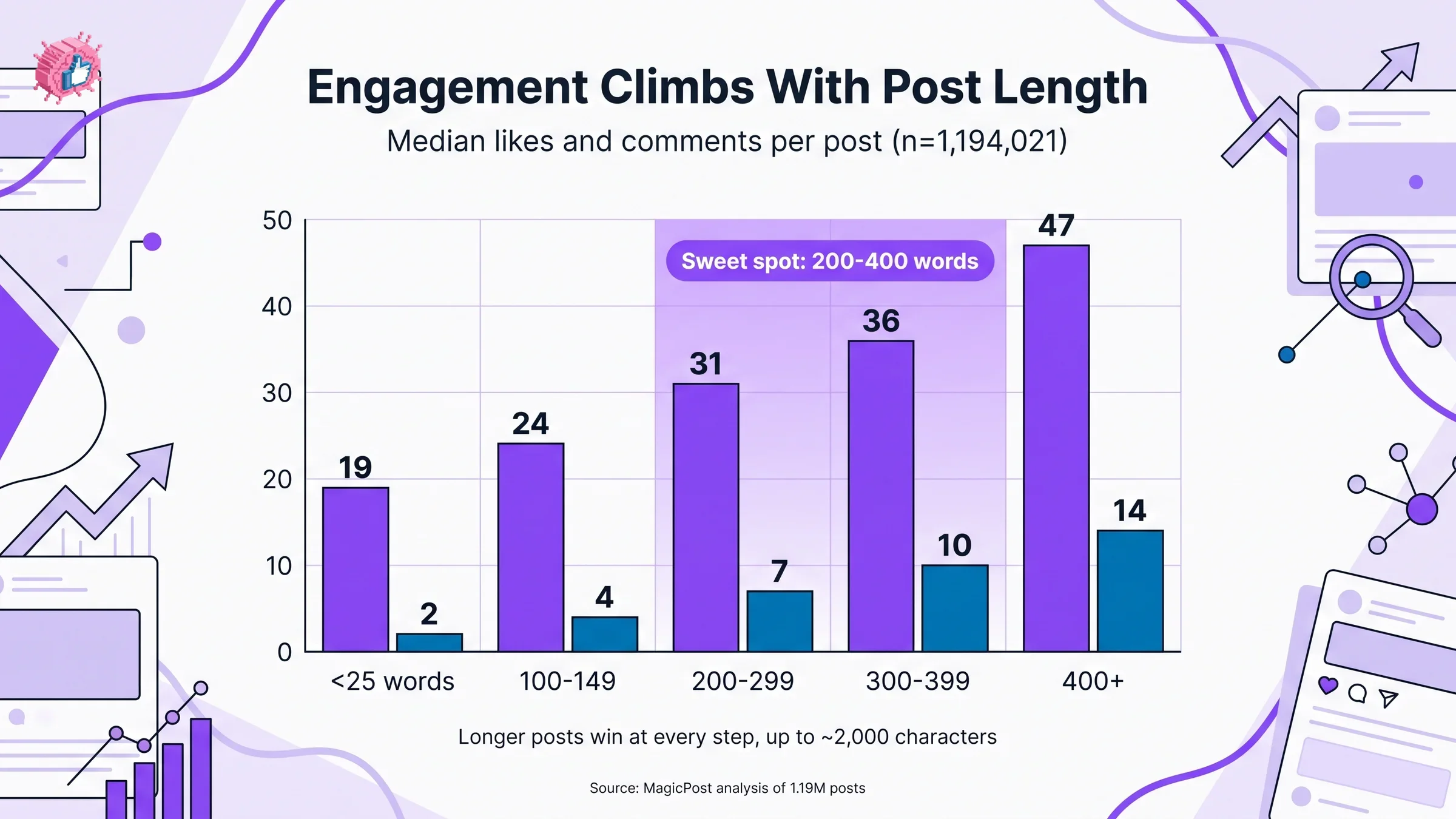
Here is the MagicPost breakdown across 1.19 million posts, measured by median likes and comments per post:
| Post length | Median likes | Median comments | Read pattern |
|---|---|---|---|
| Under 25 words | 19 | 2 | Skimmed, rarely expanded |
| 100 to 149 words | 24 | 4 | Quick read, partial value |
| 200 to 299 words | 31 | 7 | Full narrative, strong recall |
| 300 to 399 words | 36 | 10 | Deep value, high comment rate |
| 400+ words | 47 | 14 | Longest dwell, highest engagement |
Source: MagicPost analysis of 1,194,021 LinkedIn posts.
Two things stand out. First, comments more than triple between short and long posts (2 to 14 median comments), and comments are the strongest algorithmic signal LinkedIn tracks. Second, longer posts do not just get more passive impressions: likes more than double while reach roughly doubles, meaning readers of longer posts engage more actively, not just scroll past.
The mechanism is dwell time. Van der Blom's research found posts with 61+ seconds of dwell time hit a 15.6% engagement rate, versus 1.2% for posts read in 0 to 3 seconds, a 13x gap. A 1,500 character post takes about 75 seconds to read in full. A 300 character post takes 8. Length buys dwell, and dwell buys reach. For the full picture of how the 2026 ranking model weights these signals, see our LinkedIn algorithm guide.
Where the ceiling kicks in
Longer is better until it is not. Posts over 2,500 characters show an engagement drop as readers abandon mid-scroll, and anything pushing the 3,000 character limit needs an exceptional hook to justify the ask. The 1,200 to 2,000 band is the zone where added length still pays for itself in dwell without losing readers.
Our own analysis of 30,360 posts found the highest viral rate clustered in the 900 to 1,300 character band (3.07% of posts hitting the viral threshold, versus a 2.18% baseline). That sits just below the broad industry sweet spot, which tells you the floor for strong performance starts around 900 characters, and the ceiling for safe length runs to about 2,000.
Ideal LinkedIn post length by format
The 1,200 to 2,000 character answer applies to text-led posts. Once you attach a carousel, video, or poll, the caption plays a different role and the ideal length shifts. The asset carries the content; the caption sets context and earns the click.
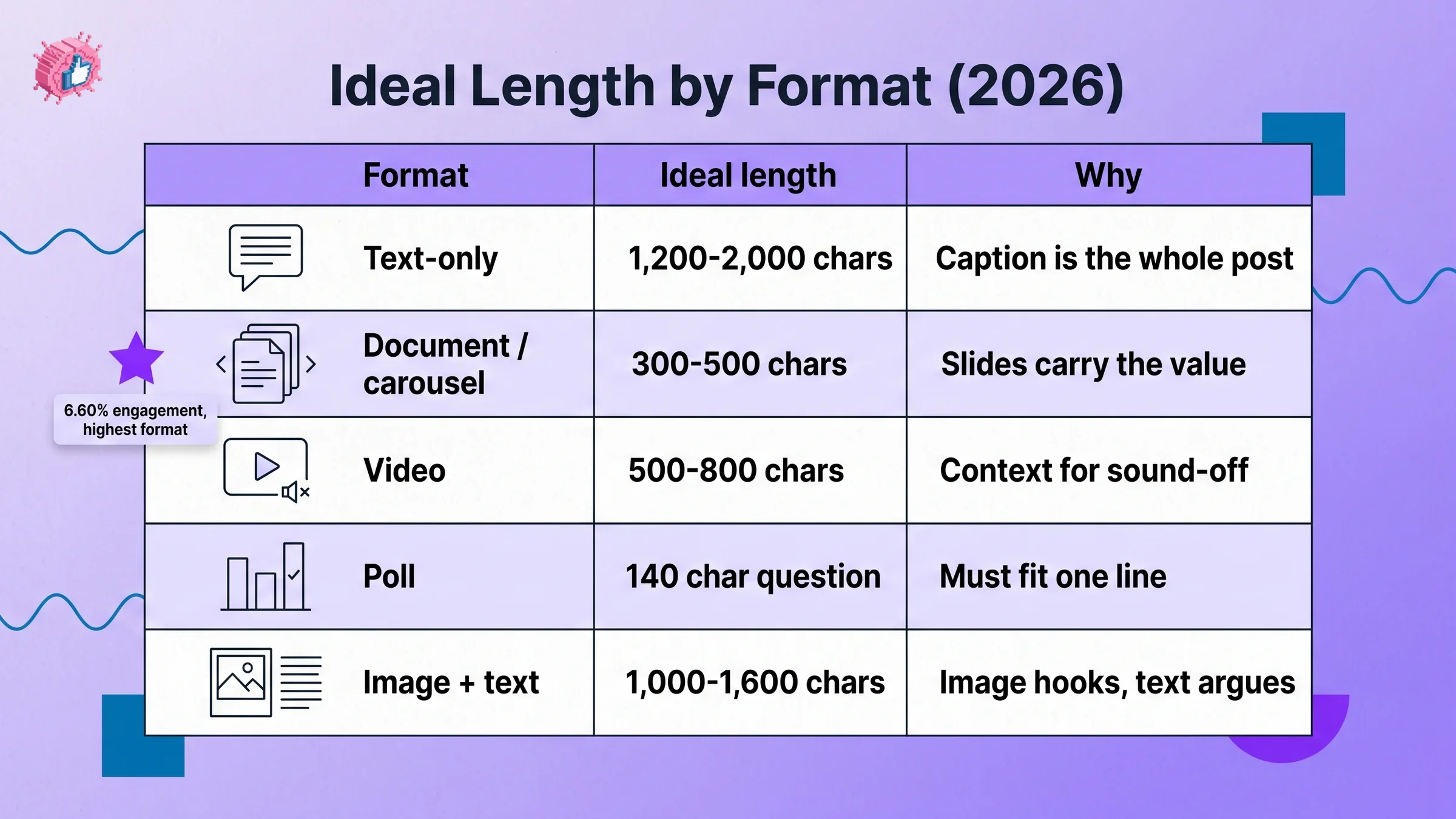
| Format | Ideal caption length | Why | Notes |
|---|---|---|---|
| Text-only | 1,200 to 2,000 chars (200 to 330 words) | Caption is the whole post | The core sweet spot |
| Document / carousel | 300 to 500 chars | Slides carry the value | 5 to 15 slides, highest engagement format at 6.60% |
| Video | 500 to 800 chars | Context for sound-off viewers | Caption explains what the video delivers |
| Poll | 140 char question + 300 to 500 char setup | Question must fit one line | Setup frames why the vote matters |
| Image + text | 1,000 to 1,600 chars | Image hooks, text carries argument | Slightly shorter than text-only |
Sources: AuthoredUp, Buffer, and SocialInsider 2026 format benchmarks.
A few format rules worth internalizing:
- Documents and carousels are the highest-engagement format on LinkedIn at roughly 6.60%, but only if the caption is short and the slides do the work. A 1,500 character caption on a carousel competes with your own slides
- Polls live or die on the question. It has to read in a single line, so keep it under 140 characters, then use the body to explain the stakes
- Video captions are not optional. A large share of LinkedIn video plays with sound off, so the caption is where you deliver the takeaway for non-listeners
If you are deciding which format to write before you worry about length, our viral post templates give you proven structures for each one.
Automate your LinkedIn for 30 days
The first 210 characters decide everything
Length only matters if the reader clicks "see more." On desktop, LinkedIn shows roughly the first 210 characters before the cutoff; on mobile it is closer to 140. Everything after that is invisible until someone chooses to expand.
This is why the ideal-length conversation always loops back to the hook. A 1,500 character post with a flat opening line performs worse than a 600 character post with a hook that stops the scroll. The length sets the ceiling; the first two lines decide whether anyone reaches it.
Practical implications:
- Front-load the tension. Put the most surprising claim, stat, or stakes in the first sentence, not the third
- Never waste line one on a greeting. "Happy Monday everyone" burns your only visible real estate
- Write the hook last, if you have to. Draft the full post, then go back and engineer the opening 210 characters to earn the click. A LinkedIn hook generator can give you variations to test
- Preview the cutoff. See exactly where "see more" lands on your draft with our LinkedIn post preview
For the full anatomy of a high-performing post from hook to CTA, read our guide on how to write a LinkedIn post.
Why most creators write too short
If longer wins, why do most posts run under 600 characters? Three reasons.
First, the fear of losing readers. Creators assume a long post will get skipped, so they cut. The data says the opposite: depth holds attention, and shallow posts get a glance and a scroll.
Second, effort. A 1,500 character post that earns its length needs a real story, a real argument, or real proof. That takes longer to write than a one-liner. This is exactly where an AI tool that drafts in your voice saves the time without flattening the substance: try the LinkedIn post generator.
Third, bad benchmarking. Creators copy the format of the viral one-liners they see, not realizing those work because of the author's existing reach, not the length. Measure your own posts against real data instead, using LinkedIn engagement benchmarks.
What this means for you
- Target 1,200 to 2,000 characters for text posts. Aim for 1,500 as your default. It is the middle of every 2026 study's ideal range and forces the value-signaling "see more" cutoff
- Match length to format. Keep carousel and video captions short (300 to 800 characters) and let the asset carry the content. Reserve the full 1,500+ for text-led posts
- Win the first 210 characters. Length sets the ceiling, the hook decides whether anyone reaches it. Engineer your opening line separately
- Stop cutting for fear of length. The engagement curve climbs with word count up to about 400 words. Depth is rewarded, padding is not
- Test, do not guess. Run any draft through a length analyzer and predict its reach with the viral score checker before you publish
The ideal length is a starting line, not a finish line. Hit the band, then let your hook and substance do the rest. Start drafting in your voice with ViralBrain, and see ViralBrain pricing when you are ready to scale.
Sources: AuthoredUp LinkedIn Character Limit Analysis, MagicPost: How Long Should a LinkedIn Post Be, Taplio Post Length Data, Richard van der Blom Algorithm Insights Report 2026, SocialInsider 2026 Format Benchmarks.
FAQ
How long should a LinkedIn post be in 2026?
A LinkedIn post should be 1,200 to 2,000 characters, or about 200 to 330 words, for maximum engagement. This is a 60 to 90 second read that carries a full hook, context, insight, and call to action. Aim for 1,500 characters as a reliable default.
What is the ideal LinkedIn post length for engagement?
The ideal length for engagement is 1,300 to 1,900 characters, based on Buffer and AuthoredUp data. Posts in this range earn roughly 27% more engagement than posts under 400 characters, mainly because longer posts generate more dwell time and comments, the two signals the algorithm weights most.
Does post length affect reach on LinkedIn?
Yes, indirectly. Length drives dwell time, and dwell time is a primary ranking signal in the 2026 algorithm. Posts with 61+ seconds of dwell hit a 15.6% engagement rate versus 1.2% for posts read in under 3 seconds. Longer, substantive posts hold readers longer, which expands reach.
What is the LinkedIn post character limit?
The hard limit is 3,000 characters per post, including spaces, emojis, and line breaks. Only about 210 characters show on desktop before the "see more" cutoff. The 3,000 ceiling is the maximum, not the target. See every field limit in our LinkedIn character limits reference.
Can a LinkedIn post be too long?
Yes. Engagement climbs with length up to roughly 2,000 characters, then flattens and declines past 2,500 as readers abandon mid-scroll. Posts near the 3,000 character limit need an exceptional hook to justify the time ask. Stay inside 1,200 to 2,000 for most posts.
How long should a LinkedIn carousel or document caption be?
Keep carousel and document captions short, around 300 to 500 characters. The slides carry the content, so a long caption competes with your own document. Aim for 5 to 15 slides. Document posts are the highest-engagement format on LinkedIn at roughly 6.60%.
Are shorter LinkedIn posts ever better?
Occasionally, for established creators with large audiences whose one-liners ride existing reach. For most people building an audience, short posts underperform: they get a glance and a scroll instead of the dwell time that triggers algorithmic distribution. Default to the 1,200 to 2,000 character range.
How do I check if my LinkedIn post is the right length?
Paste your draft into a LinkedIn post length analyzer to see the character count, word count, and where the "see more" cutoff lands. Then predict its engagement with a viral score checker before publishing.
Automate your LinkedIn for 30 days
ViralBrain plans, writes, and schedules your LinkedIn content, using official LinkedIn APIs so your account stays safe.
- Official LinkedIn APIs, no risk of ban
- You approve every post before it goes live
- Cancel anytime
Keep reading
What Is the Featured Section on LinkedIn?
The Featured section lets you pin your best posts, articles, links, and media to the top of your LinkedIn profile. Here's what to put in it and how.
What Is LinkedIn InMail? (And When It's Worth Using)
LinkedIn InMail lets you message anyone directly, even without a connection. Here's how credits work, what gets refunded, and when it beats a connection request.
LinkedIn Boolean Search: What It Is and How to Use It (2026)
LinkedIn Boolean search uses AND, OR, NOT, and quotation marks to narrow search results. Here's how the operators work and what LinkedIn doesn't support.