

What to post on LinkedIn: 15 ideas that get reach (2026)
What to post on LinkedIn when you run dry: 15 proven post ideas, a filter for picking today's topic, the formats that get reach, and how to never run out.
Most LinkedIn accounts do not stall because the person cannot write. They stall on a smaller, more frustrating problem: opening the composer, staring at the blank box, and having no idea what to post on LinkedIn today. The streak breaks, the momentum dies, and three weeks later the account is quiet again.
The fix is not more motivation. It is a menu. Once you know the handful of post types that reliably earn reach, and you have a simple way to pick one each day, the blank page stops being a decision and becomes a checklist.
This guide gives you 15 LinkedIn post ideas that consistently perform in 2026, a three-question filter for choosing today's topic, the formats that actually get distribution, and a system for never running out again. Every idea is something you can post this week.
Automate your LinkedIn for 30 days
What to post on LinkedIn: the short answer
The posts that perform on LinkedIn almost always do one of three jobs: they teach something useful, they take a clear point of view, or they tell a story the reader recognizes. Everything below is a variation on those three.
If you want the fastest possible answer, rotate through these five categories and you will rarely miss:
- A lesson or framework you have earned the hard way
- A contrarian take on something your industry treats as settled
- A short story about a failure, a turning point, or a specific result
- A timely reaction to news or a trend in your niche, with your angle on it
- A practical how-to that helps the reader do one specific thing
The reason these work is that they give the reader a reason to stop scrolling today. A generic "5 tips for productivity" post competes with a million others. "The productivity advice I ignored for two years, and what it cost me" does not.
15 LinkedIn post ideas that reliably get reach
Here are 15 concrete LinkedIn post ideas, grouped by the job they do. Pick one, add your specifics, and you have a post.
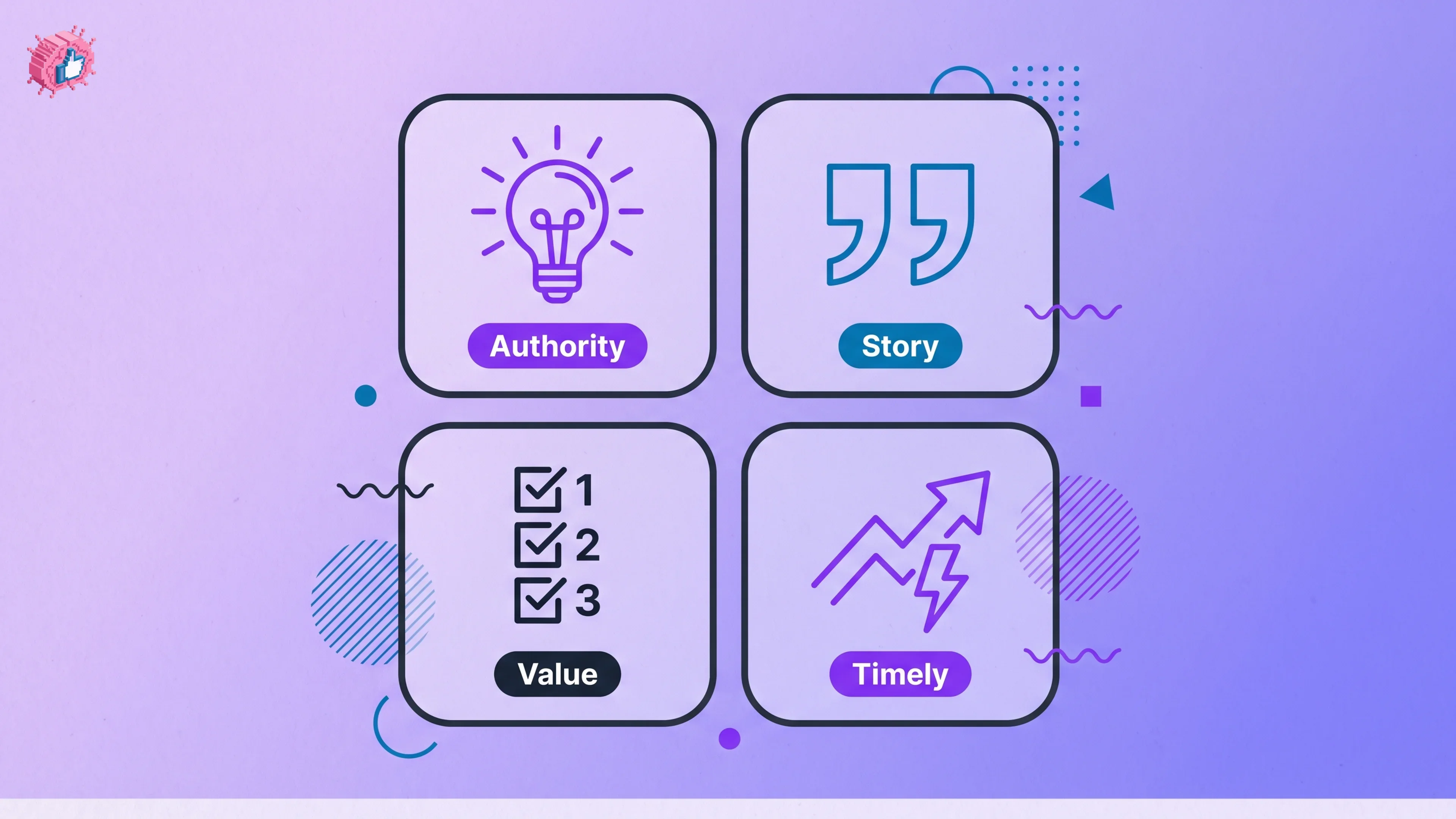
Authority posts (show you know your space)
- The framework you use. Name your repeatable process for a problem your audience has. Frameworks get saved and shared because they are reusable.
- A contrarian take. State a common belief in your field, then argue the opposite with evidence. Respectful disagreement drives comments, and comments drive reach.
- The mistake you see constantly. Call out one thing people in your niche get wrong, and what to do instead.
- A myth you used to believe. Show your own change of mind. It is credible and it invites others to share theirs.
Story posts (make you memorable)
- The origin story. Why you do what you do, told through one specific moment, not a resume.
- A public failure. What broke, what it cost, what you learned. Vulnerability with a lesson attached outperforms polished wins.
- Behind-the-scenes. Show the messy middle of a project most people only see the finished version of.
- A turning-point decision. The choice that changed your trajectory, and the reasoning behind it.
Value posts (help the reader act)
- A step-by-step how-to. Teach one narrow task start to finish. Specific beats broad every time.
- A curated list. The tools, books, or accounts you actually use, with a line on why each earns its spot.
- A teardown. Break down something that worked (a post, a campaign, a launch) and extract the transferable principle.
- A resource you built. A checklist, template, or cheat sheet the reader can use immediately.
Timely posts (ride attention that already exists)
- News plus your take. React to a development in your industry within a day or two, and add the angle only you would have.
- A trend, translated. Explain what a rising trend actually means for your specific audience.
- A seasonal or moment-based post. Tie a genuine insight to something happening now, so it feels current rather than evergreen filler.
For the structural side of turning any of these into a scroll-stopping draft, the how to write a LinkedIn post guide covers hooks, spacing, and the first-line rule.
How to decide what to post today
Having 15 ideas is only useful if you can pick one in 30 seconds. Run any topic through three questions. If it fails two of them, skip it.
- Is it timely or specific? A post tied to a recent event, or built from a concrete detail, beats a generic evergreen tip.
- Does it show a point of view? If a competitor could post the exact same thing, it is too safe. Add the opinion only you hold.
- Does it help the reader act or feel understood? Every strong post either teaches something they can do or names something they are living.
A topic that clears all three is worth writing. One that clears none is why your last post got 40 impressions.
The format matters as much as the topic
The right idea in the wrong format still underperforms. In 2026, format is a distribution multiplier, and the gap is large.
| Format | Approx. engagement rate | Best for |
|---|---|---|
| Document post (PDF carousel) | ~7% | Frameworks, step-by-step guides, list posts |
| Image + text | ~4-6% | Stories, single strong visual, data points |
| Text-only | ~0.9% | Hot takes, quick observations, high-variance swings |
| Video | ~1.4% | Demonstrations, face-to-camera authority |
(Format engagement rates: SocialInsider 2026 benchmarks.)
The takeaway: if you have a how-to or a list, put it in a document post rather than plain text. If you have a sharp opinion, text-only is fine because it is a high-variance format that can spike. Match the idea to the format, do not default everything to text.
Two things sharpen any format further. First, the opening line does most of the work, so test a few with a LinkedIn hook generator before you commit. Second, proven structures shortcut the blank page, and the viral post templates give you frameworks to drop your idea into.
Automate your LinkedIn for 30 days
How to never run out of what to post on LinkedIn
The 15 ideas above solve today. The harder problem is the 200 posts you need over the next year. Three systems keep the well full.
- Keep a running swipe file. Every time a question, objection, or insight comes up in your work, drop it in a note. Most of your best posts are answers to things people already ask you.
- Repurpose what you already have. One webinar, article, or podcast is five to ten posts. Turning long content into feed posts is the fastest way to produce without inventing, and AI content repurposing does the heavy lifting.
- Let fresh, on-niche topics come to you. The reason most people run dry is that finding timely topics is manual work. ViralBrain's LinkedIn post ideas engine surfaces fresh developments in your niche every couple of days and drafts each one in your voice, so "what do I post today" is answered before you ask.
When you have a topic in hand, drafting it fast matters more than drafting it perfectly. A LinkedIn post generator turns the idea into a full post in your voice in under a minute, and you edit from there. Consistency beats polish, and consistency is a supply problem before it is a willpower problem.
What not to post on LinkedIn
A few categories reliably underperform or actively hurt reach. Avoid them.
- Pure promotion. Constant "buy my thing" posts train the algorithm and your audience to scroll past.
- Engagement bait. "Comment YES if you agree" gets throttled, and the reach it buys is hollow.
- Vague inspiration. "Work hard and believe in yourself" says nothing only you could say.
- Reposts with no take. Sharing an article without your angle adds nothing and rarely travels.
The pattern is the same across all four: they give the reader no specific reason to care. Fix that and almost any topic works.
What this means for you
- Build a menu, not a mood. Keep the 15 ideas above somewhere visible and rotate through them so posting is a choice between options, not a fight with a blank page.
- Run every topic through the three-question filter (timely, opinionated, useful) before you write. It kills the posts that would have flopped.
- Match format to idea. Put how-tos and lists in document posts, save text-only for sharp opinions. Format is a reach multiplier in 2026.
- Solve supply, not willpower. Use a swipe file, repurpose long content, and let a LinkedIn post ideas engine feed you fresh, on-niche topics so you never start from zero.
- Draft fast and post consistently. See ViralBrain pricing if you want the idea, the draft, and the calendar in one place.
Knowing what to post on LinkedIn is not a talent, it is a system. Set the menu, run the filter, pick the format, and keep the supply full. Do that and the blank page stops being the thing that ends your streak.
Sources: SocialInsider LinkedIn Benchmarks 2026, LinkedIn Official Blog, format engagement data (2026).
FAQ
What should I post on LinkedIn?
Post content that teaches something useful, takes a clear point of view, or tells a story your audience recognizes. In practice that means frameworks, contrarian takes, short personal stories, timely reactions to news in your niche, and specific how-tos. Rotate through those categories and you will rarely run out.
What kind of LinkedIn posts get the most engagement?
Document posts (PDF carousels) lead at roughly 7% engagement in 2026, followed by image posts, then video, with text-only lowest on average at around 0.9% (SocialInsider 2026). That said, text-only is high-variance and a strong opinion can still spike. Match the format to the idea rather than defaulting to one.
How often should I post on LinkedIn?
Consistency matters more than frequency. Three to five quality posts a week is a strong target for most creators, and a steady two-to-three is better than seven posts one week and none the next. The algorithm and your audience both reward reliability, so pick a cadence you can sustain.
How do I come up with LinkedIn content ideas when I run out?
Keep a swipe file of questions people ask you, repurpose long content like webinars and articles into multiple posts, and use a tool that surfaces fresh topics in your niche automatically. ViralBrain's post-ideas engine finds timely, on-niche topics and drafts each in your voice, which removes the manual work of finding something to say.
What should a beginner post on LinkedIn?
Start with your origin story, one lesson you have learned, and one how-to in your area of expertise. These are the easiest to write because they come from your own experience, and they establish who you are and what you know. From there, add contrarian takes and timely reactions as you get comfortable.
Is it better to post text or carousels on LinkedIn?
It depends on the idea. Put step-by-step guides, frameworks, and list posts into document carousels, which get the highest engagement in 2026. Use text-only for sharp opinions and quick observations, where the format's high variance can work in your favor. The best accounts mix both.
Can AI tell me what to post on LinkedIn?
Yes, and the better tools go further than a generic topic list. Instead of vague prompts, ViralBrain analyzes your niche and your best-performing posts, then delivers timely topics already drafted in your voice. You can generate a full draft in seconds with the LinkedIn post generator and edit from there.
Automate your LinkedIn for 30 days
ViralBrain plans, writes, and schedules your LinkedIn content, using official LinkedIn APIs so your account stays safe.
- Official LinkedIn APIs, no risk of ban
- You approve every post before it goes live
- Cancel anytime
Keep reading
How to Log Out of LinkedIn on Desktop and in the App
How to log out of LinkedIn on desktop, on iOS and on Android, how to sign out of other sessions or all devices, and what Keep me logged in changes.
LinkedIn Two Step Verification: How to Turn It On and Off
LinkedIn documents it as two-factor authentication. How to turn it on and off on desktop and in the app, the two methods, and what to do if locked out.
How to Change Your LinkedIn Password
How to change your LinkedIn password on desktop, iOS, Android and a mobile browser, how to reset a forgotten one, and what the sign out control does.