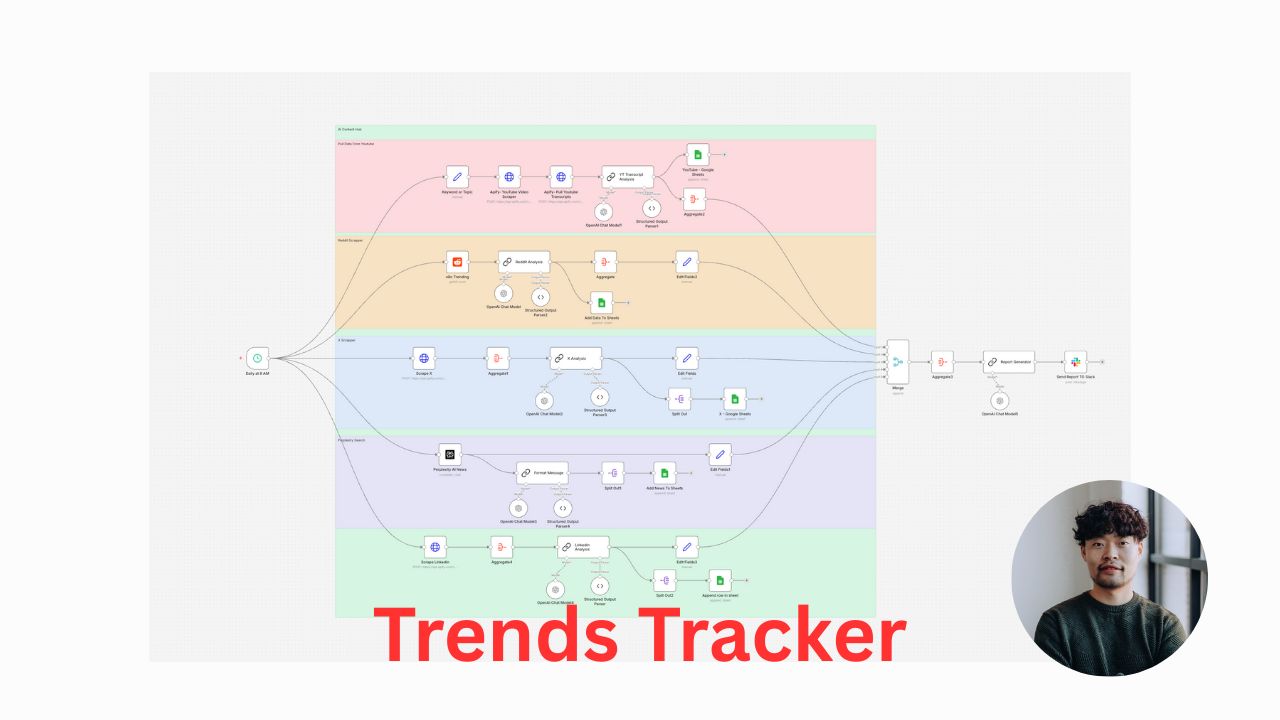
Joonhyeok Ahn's AI Workflow for Content Research
Explore how Joonhyeok Ahn automates content research with an AI-driven n8n workflow and how you can adapt the same system.
Joonhyeok Ahn, an AI consultant for AI first company | I automate 80% of marketing & sales ops with AI systems | Founder, Threadsight, recently posted something that made me stop scrolling: "I stopped spending 3 hours daily on content research. Now an AI system does it while I sleep. Here's the exact n8n workflow."
In just a couple of sentences, he captured a problem most creators know too well: content research is a time sink. You open YouTube, Reddit, X, and LinkedIn to "look for ideas," and an hour later you’re buried in tabs with nothing ready to publish.
Ahn went on to explain what his system replaces:
"Most creators waste their mornings scrolling YouTube, Reddit, X, and LinkedIn hunting for trends.
By the time they find something worth posting about, their competitors already shipped it."
That tension — between the need to stay on top of trends and the reality of limited time — is exactly why his post resonated and went viral. So let’s unpack the idea and turn it into a repeatable playbook.
The Problem: Manual Content Research Doesn’t Scale
If you’re serious about content, your biggest asset isn’t clever hooks or design tricks — it’s consistently knowing what your audience cares about right now.
The traditional way to do that is manual:
- Open multiple platforms
- Search for your niche or keywords
- Sort by recency or engagement
- Skim what’s performing
- Try to reverse-engineer why
That’s doable when you’re posting once in a while. But if you’re aiming to publish daily (or across multiple platforms), spending 2–3 hours every morning on research quickly becomes unsustainable. You start making tradeoffs:
- Less time to actually write, record, or design
- Less time to refine offers or talk to customers
- More context-switching and fatigue
Ahn’s core point is simple: research is a perfect candidate for automation.
The Shift: Treat Research as a System, Not a Task
Instead of treating research as something you manually "do," Ahn treats it as a system that runs in the background.
Every night at 8 a.m. (his words), his n8n workflow:
- Scrapes trending AI content from five platforms simultaneously
- Runs everything through GPT for analysis and categorization
- Organizes it in Google Sheets by source
- Drops a complete markdown report into Slack
So when he wakes up, he doesn’t open social platforms at random. He opens Slack and sees: "Here are 47 trending topics in your niche with engagement metrics."
That’s not a cute productivity hack. It’s a structural change in how you think about content operations:
- Inputs (raw posts across platforms) are gathered automatically.
- Processing (filtering, clustering, labeling) is handled by AI.
- Outputs (clear, prioritized ideas) are delivered where you already work.
Inside Joonhyeok Ahn’s n8n Workflow
We don’t need his exact JSON file to understand the power of this system. Conceptually, it breaks down into four stages.
1. Multi-platform trend scraping
First, the workflow pulls in data from several platforms at once — in his case, five sources focused on AI content.
Why this matters:
- You avoid being trapped in one algorithm’s bubble.
- You see patterns that emerge across platforms, not just inside one feed.
- You reduce the risk of copying a single creator; you instead spot themes.
This can be done via APIs, RSS feeds, search URLs, or no-code scrapers, depending on what each platform allows.
2. GPT-powered analysis and categorization
Once the raw posts are collected, Ahn pipes them through GPT.
Here’s where the leverage really kicks in:
- GPT can cluster similar ideas into themes (e.g., "AI agents for marketing," "prompt engineering myths," "automation case studies").
- It can summarize each piece into a one-line idea you could build on.
- It can score or label content based on engagement metrics you feed it (likes, comments, reposts).
Instead of you reading 100 posts to find 5 good ideas, GPT can pre-filter and organize them into a shortlist.
3. Organized storage in Google Sheets
Ahn then stores everything in Google Sheets by source.
This isn’t just convenience; it turns your research into a living database:
- You can sort by engagement, date, platform, or topic.
- You can track which themes keep coming back.
- You can see which ideas you’ve already used or adapted.
Over time, this sheet becomes more valuable than any single platform’s feed. It’s your owned dataset of market attention.
4. Daily markdown report in Slack
Finally, the workflow generates a markdown summary and sends it to Slack.
This is clever for a few reasons:
- Markdown is easy to paste into docs, CMSs, or scripts.
- Slack is where many teams already spend their time.
- A daily message creates a rhythm: you wake up to ideas ready to go.
The result? By the time Ahn starts his day, he’s not asking "What should I post?" He’s choosing from a curated menu of battle-tested topics.
He notes that the initial setup takes about 20 minutes. After that, the time saved compounds daily as the workflow keeps running on autopilot.
In his post, Ahn even offers the complete JSON file for free. That generosity highlights an important point: the real asset isn’t the exact template, it’s the mindset of turning messy, manual work into a repeatable system.
Why This Matters for Creators and Teams
The real win here isn’t just saving "3 hours daily on content research." It’s what that reclaimed time and energy unlock:
- More creative depth: You can spend your best hours writing, filming, or designing — not scrolling.
- Faster iteration: With a constant stream of validated ideas, you can test more angles and formats.
- Stronger positioning: Because you’re seeing patterns across platforms, you can frame ideas in a way that stands out instead of copying what’s already viral.
For teams — agencies, startups, internal marketing squads — this is even bigger. One automated research workflow can feed an entire content team, each person pulling different angles from the same trend report.
How to Build a Similar System (Even If You Don’t Use n8n)
You don’t have to be an automation expert to borrow Ahn’s approach. Here’s a simplified version you can adapt:
-
Define your niche clearly.
"Trending content" is vague. "AI tools for B2B marketing teams" is specific enough for targeted research. -
Pick 3–5 primary sources.
Think YouTube channels, subreddits, X searches, LinkedIn hashtags, Product Hunt, or niche forums in your industry. -
Set a daily or weekly trigger.
Whether you use n8n, Zapier, Make, or a custom script, the key is consistency: the system runs on a schedule, not when you remember. -
Use GPT or another LLM as your research assistant.
Prompt it to:- Summarize each piece of content
- Tag it by topic, audience, and format
- Highlight engagement signals (views, saves, comments)
-
Send the output where you already work.
Ahn chose Google Sheets + Slack. You might prefer Notion, Airtable, or even a simple email digest.
The tools are flexible. The non-negotiable part is the workflow: collect → analyze → organize → deliver.
The Mindset Shift: Build Systems, Not Just Content
Ahn ends his post with a line that’s easy to gloss over but worth sitting with:
"The best content creators don’t work harder. They build better systems."
That’s the throughline of his entire workflow. The goal isn’t to become superhumanly disciplined or to wake up earlier to "grind" on research. The goal is to design a system that makes the highest-leverage activities — creating, publishing, iterating — almost impossible to avoid.
If you feel stuck in the endless scroll of idea hunting, take a page from Joonhyeok Ahn’s playbook. Automate the research. Systematize the inputs. Free your brain for the parts only you can do: telling the story, sharing the insight, and serving the audience.
This blog post expands on a viral LinkedIn post by Joonhyeok Ahn, AI consultant for AI first company | I automate 80% of marketing & sales ops with AI systems | Founder, Threadsight. View the original LinkedIn post →